54 free SEO tools on a hand-coded WordPress theme, fully public and inspectable
| Metric | Before | After | How measured |
|---|---|---|---|
| Tools built | 0 | 54 | Counted on the live site, grouped by category |
| Schema generators | 0 | 19 | Largest single category |
| Homepage HTTP requests | n/a | 8 | Measured in-browser: 2 scripts, 1 stylesheet, 3 images, favicon |
| Homepage DOM nodes | n/a | 574 | Measured in-browser on the live page |
| Page builder used | n/a | None | Hand-coded theme, wp-content/themes/toolsinstant |
| Tool processing | n/a | Client side | Pasted content is processed in the browser, not uploaded |
| Third-party tool plugins | n/a | 0 | Every tool is custom code |
| Schema nodes on homepage | n/a | 6 | One @graph: Organization, WebSite, ImageObject, WebPage + FAQPage, Person, ItemList |
ToolsInstant is a free SEO tool platform I designed, built and maintain myself. It runs 54 tools across schema markup, AI search, technical SEO, on-page SEO and analytics, on a hand-coded WordPress theme with no page builder and no third-party tool plugins. It is the only project on this site you can inspect line by line, because it is mine and there is no client to protect.

Every other case study here describes work done under an NDA. The results are real and the measurement method is always stated, but the company is anonymised and you cannot click through to the site. That is a legitimate frustration for anyone deciding whether to hire me.
ToolsInstant is the answer to it. It is live, it is public, and nothing about it is hidden. If you want to know whether I can build something substantial, open it and look. Open the source while you are there.
Fifty-four tools, grouped into five categories. Most of them run entirely in your browser, which means pasted content is never uploaded anywhere. The exceptions are the tools that have to fetch a live URL, and those requests pass through the server without being stored.
| Category | Tools | Examples |
|---|---|---|
| Schema | 19 | LocalBusiness, Organization, Person, Product, Article, FAQ, Event, Breadcrumb, Review, Video, JobPosting, Recipe, Restaurant, Hotel, SoftwareApplication, Return Policy, plus a JSON-LD validator, a microdata converter and a schema graph combiner |
| AI search | 6 | llms.txt generator and validator, AI crawler robots.txt generator, AEO content checker, GA4 AI traffic regex builder, AI passage analyzer |
| Technical SEO | 15 | robots.txt tester, hreflang generator and validator, htaccess redirect generator, redirect checker and fetcher, XML sitemap generator and validator, indexability checker, orphan page finder, bot log analyzer, mixed content checker, internal link analyzer, image optimizer, URL list cleaner |
| On-page | 8 | SERP snippet preview, Open Graph and Twitter card generator, heading structure checker, title tag length checker, image alt text checker, SEO slug generator, table of contents generator, link attribute checker |
| Analytics | 6 | Search Console regex builder, keyword cannibalization checker, striking distance finder, traffic drop analyzer |
The ToolsInstant schema category is the largest, and that is deliberate. Structured data is the part of technical SEO where most sites quietly fail, usually because a block looks fine in a validator and then fails to parse on the live URL.
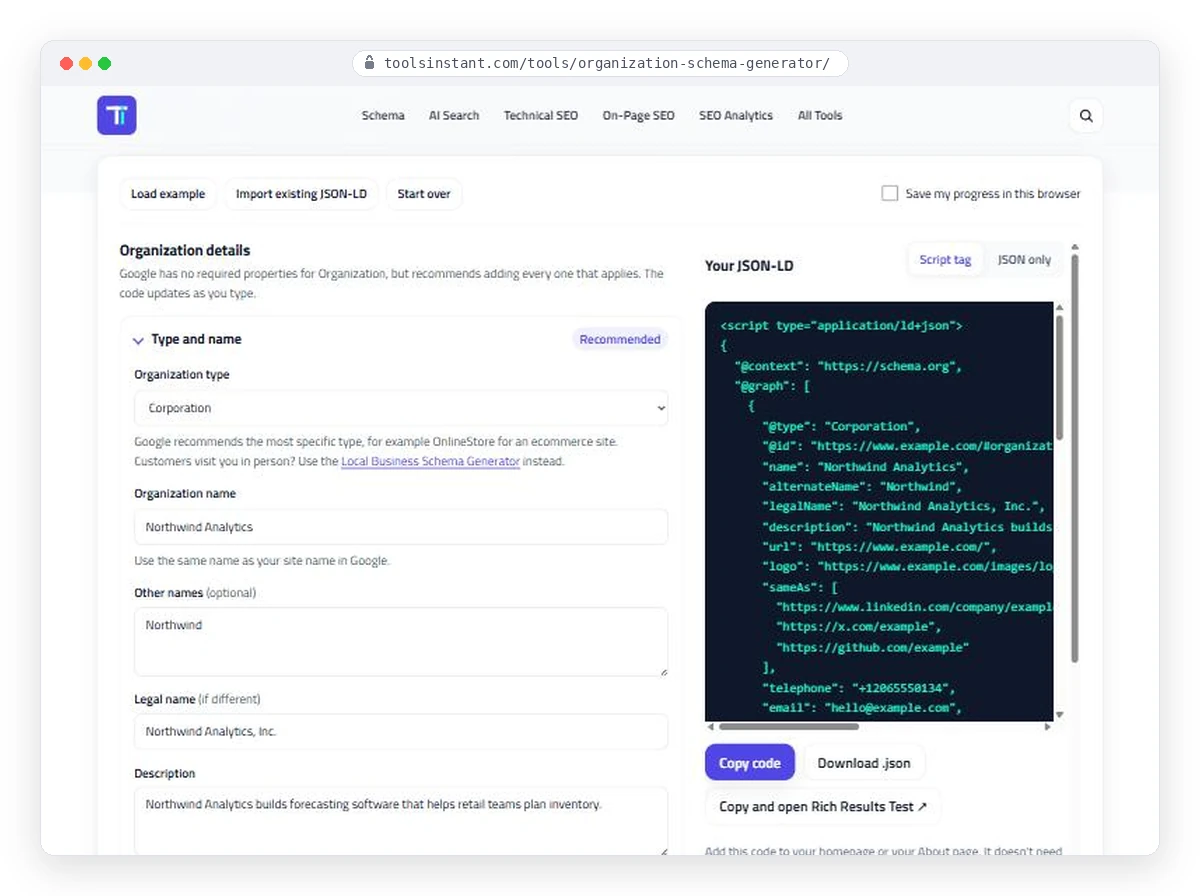
Every generator works the same way: fill the form on the left, watch valid JSON-LD build on the right as you type. No submit button, no page reload, no round trip to a server. The output panel offers the script tag or the bare JSON, a copy button, a download, and a one-click handoff into the Google Rich Results Test, because the next thing anyone does with generated schema is check it.
The theme is custom, at wp-content/themes/toolsinstant. No Elementor, no Bricks, no Divi. That is the right call here for a reason I would not apply to every project: the layout is nearly identical across 54 pages and almost never changes. A builder earns its place when people edit pages weekly. Nobody edits these.
This is the same judgement I apply on client work in the opposite direction. A marketing site whose content changes every week gets a builder, because the editing freedom is worth the page weight. The decision follows who maintains the site, not what I prefer to write.
Every tool that can work client side does. There are two reasons and only one of them is technical.
The technical reason is that a tool which processes input in the browser needs no server round trip, so it responds instantly and costs nothing to run at any volume. The other reason matters more to the people using it: if you are pasting a client robots.txt or a list of URLs from a site you do not own, you should not have to trust me with it. Processing it locally means I never receive it.
Fifty-four tools is past the point where a normal menu works. ToolsInstant uses a mega menu grouped by category, plus a site-wide tool search with a keyboard shortcut, because the fastest path for someone who already knows what they want is typing three letters rather than hunting through a nav.
Every one of the 54 is custom code. There are plugins that generate schema and plugins that check redirects, and using them would have been faster. It would also have meant 54 tools behaving 54 different ways, with a plugin author deciding what my site outputs.
The schema category is the one I would point at if you only had time to look at one thing, because building that many generators forces you to confront where the specification stops being helpful.
Three things come up again and again, and all three show up in client work.
Valid is not the same as parsing. A JSON-LD block can satisfy a validator you paste it into and still be discarded entirely on the live URL, because the validator checks the text you hand it rather than what the server actually sent. The most common cause is an escaping bug: a single invalid escape character makes the whole block unparsable, and it fails silently with no error anywhere. I have found exactly this on a live site, where every review and rating on the page was being thrown away because of one apostrophe. The JSON-LD validator on ToolsInstant exists because of that class of problem.
One entity, described once. The schema graph combiner was the hardest tool to build and the one I use most. Sites routinely emit a Person node on one template, a different Person node with the same identifier on another, and an Organization sharing the same name as the person. A parser arriving at that has no way to decide which version is true. Getting this right is less about markup and more about deciding what your site actually claims, which is why the tool makes you reconcile the nodes rather than just concatenating them.
The fields nobody fills in are the ones that matter. Most schema output in the wild carries a name, a URL and little else, which tells a parser almost nothing it could not have guessed from the page title. The generators push for the properties that actually resolve an entity: addresses, credentials, the links back to profiles on platforms you do not control.
The six AI search tools were built earlier than they probably should have been, commercially speaking. llms.txt was barely a convention, and most of the industry was still arguing about whether answer engine optimization and generative engine optimization were two different disciplines rather than one thing with two names.
They got built because the underlying problem was already real on client sites. Security plugins were blocking GPTBot and ClaudeBot by default, nobody had chosen that, and site owners had no easy way to find out. An AI crawler robots.txt generator is a small tool for a problem that costs real visibility, and the same is true of the AEO content checker: it exists because content written to be read and content written to be quoted are not the same thing, and most pages are only the first.
A schema tool site with no schema of its own would be a fair thing to hold against me, so here is what the ToolsInstant homepage actually ships, readable by anyone who opens the source:
The part worth looking at closely is the Person node.
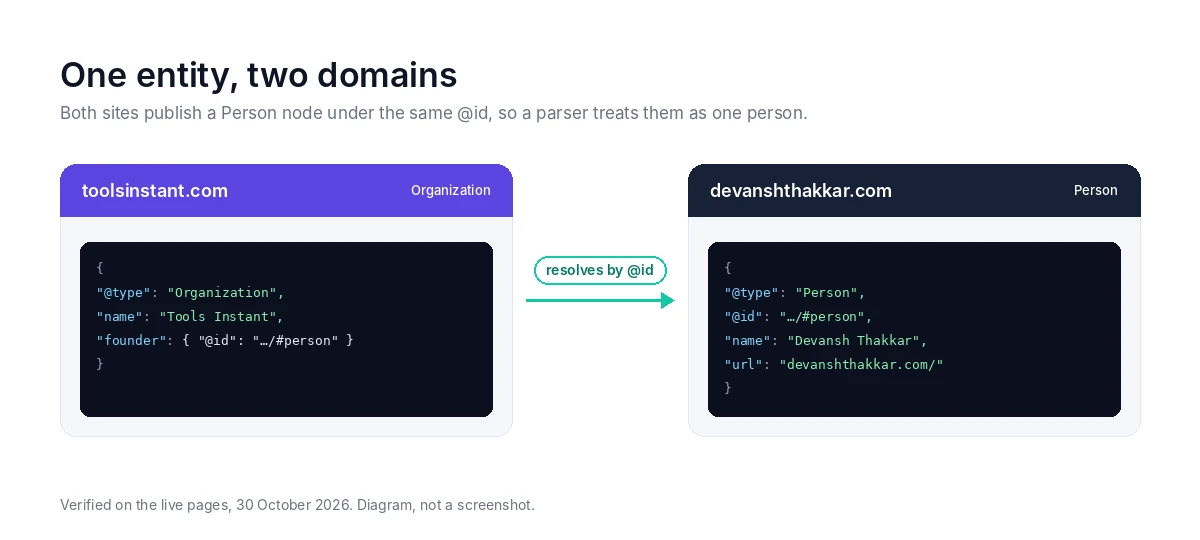
ToolsInstant does not describe me. ToolsInstant points at me. The Organization node names its founder by @id, and that @id is the same identifier devanshthakkar.com uses for its own Person node. A parser that reads both does not see a developer and a separate tool site run by someone with a similar name. It sees one entity with two properties.
That is the difference between a backlink and an entity link. A link says one page mentions another. An @id match says these are the same thing, which is what an answer engine needs before it will name you as the person behind something.
Measured on the live ToolsInstant homepage, not estimated:
No speed score appears in this case study. I measured the structure, not the network, and one load from one connection is not a benchmark. Request count and DOM size are deterministic, so those I will state. If you want Core Web Vitals, run the URL yourself. That is the honest version, and it is the version I would want from someone pitching me.
A portfolio of client work tells you someone can follow a brief. A project like this tells you something different, so here is what I think it actually evidences.
Publishing a ToolsInstant case study that lists only its strengths is a sales page wearing a case study costume, so here is the other half.
One tool is missing from the navigation. The Return Policy schema generator is live, and it sits on its category page and the all-tools page, but it never made it into the mega menu. So the newest tool is the one with the fewest internal links pointing at it. My own orphan page finder exists to catch exactly this, which is the joke at my expense: the tool was built before the habit was.
Shares render without an image. The Twitter card is declared as summary_large_image, and there is no og:image or twitter:image behind it. Paste a link into Slack or LinkedIn and you get a bare blue line instead of a card. It is a single 1200×630 asset and it has been sitting on the list too long.
There is no article hub. Every tool page carries a worked example and a practical guide, so the pages are not thin. But there is nothing above them: no cluster pages, no supporting posts, nothing feeding link equity down into the tools. Every ranking has to be earned by a tool page on its own. That is a deliberate deferral rather than an oversight, and it is still a real ceiling on how far ToolsInstant can get.
I mention these because a case study where nothing went wrong is not a case study. It is advertising.
If you are weighing up a WordPress developer, the useful question is not whether their portfolio looks nice. It is whether they can make judgement calls you will still agree with in a year.
ToolsInstant is 54 of those decisions in one place, and all of them are visible. The theme choice, the client-side processing, the navigation, the refusal to lean on plugins, and the things I got wrong and then fixed. Go and look at it before you talk to me, and bring any disagreements to the first call.
Yes. Design, theme, every one of the 54 tools, and the ongoing maintenance. It is a personal project rather than client work, which is exactly why it can be shown in full while the client case studies on this site have to anonymise the company.
A free SEO tool platform covering schema markup, AI search, technical SEO, on-page SEO and analytics. Fifty-four tools, no sign-up, and most of them run entirely in your browser so pasted content is never uploaded.
Yes, on a hand-coded custom theme with no page builder. The choice is deliberate: the layout barely changes across 54 pages and nobody edits them weekly, which is the condition under which a builder stops earning its page weight.
Speed and privacy. Client-side processing needs no server round trip, so it responds instantly and costs nothing at any volume. More importantly, if you paste a robots.txt or a URL list from a site you do not own, processing it locally means I never receive it.
It proves different things. Client work shows someone can deliver against a brief and a deadline. A project like this shows the judgement calls, because every one of them is visible and permanent rather than hidden behind an NDA. Both matter, which is why this site carries both.
The front end is fully inspectable, which is most of what matters for judging a build: markup, structured data, how assets load, how the tools behave. The theme source is not public, but anything you would want to assess before hiring someone is visible in the browser.
It is ongoing rather than finished, built in the gaps between client work over an extended period. Tools get added when I find myself doing the same job by hand twice on client sites, which is where most of them came from.
Because a speed score depends on the connection it was measured over, and one load from one machine is not a benchmark. What you will find here instead is the structural measurement: 8 HTTP requests and 574 DOM nodes on the ToolsInstant homepage, both counted on the live page and both the same whoever loads it. Every other case study on this site states how each figure was measured, and I am not going to break that rule on my own project where the temptation to flatter myself is highest. If you want Core Web Vitals, run the URL through PageSpeed Insights yourself and you will have better data than a screenshot I chose.
Yes, all 54 tools, with no sign-up required. It exists as a working portfolio and because the tools are ones I needed anyway.
Put every new tool into the navigation on the day it ships rather than after it is already live, build the share image into the page template instead of treating it as an asset to add later, and plan the article hub alongside the tools instead of deferring it. All three are in the “what I would still change” section above, and all three are mistakes worth naming.

Luxury villa rental website showcasing a premium Punta Cana property with elegant design and booking calendar.
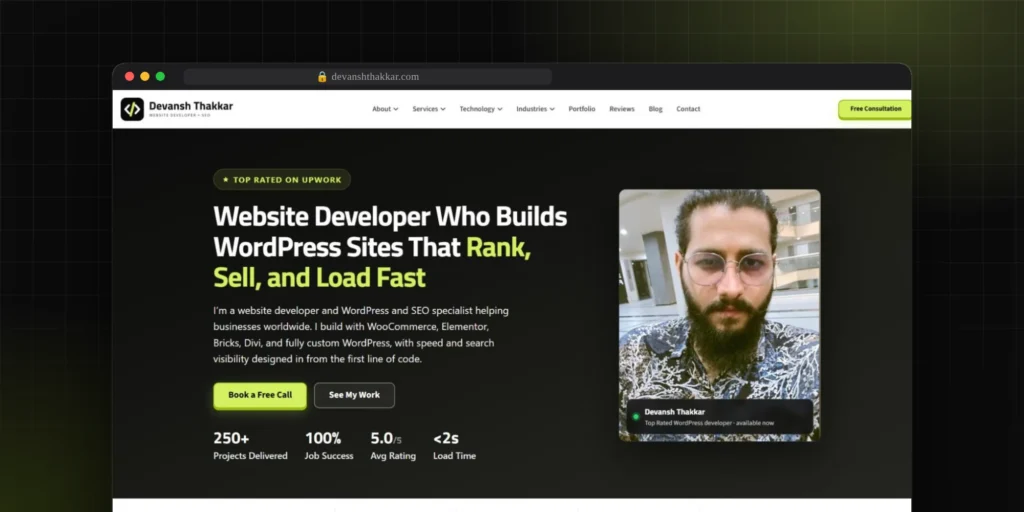
The site you are on: 21 priced service pages, live blog search, a connected schema graph and lead...
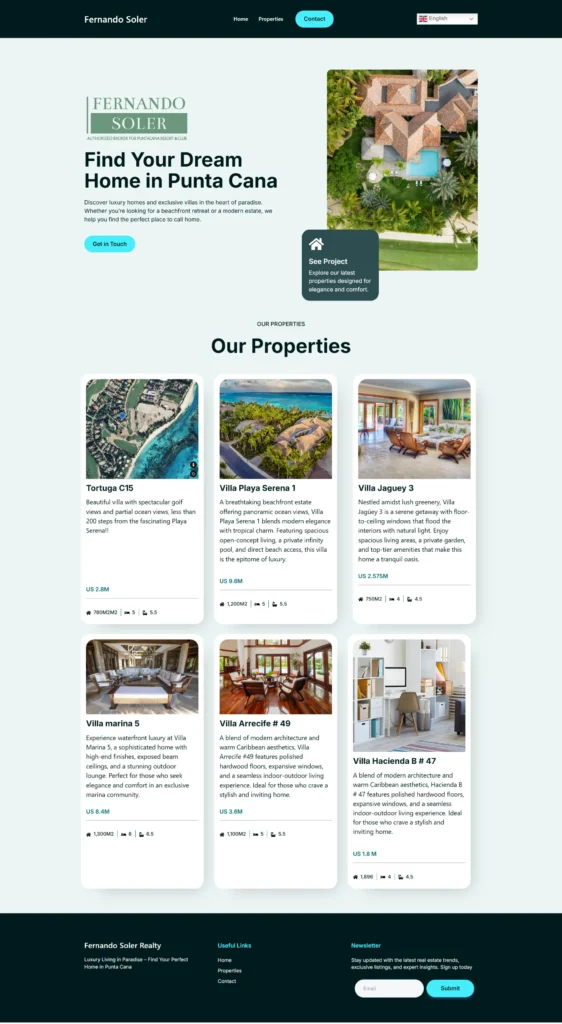
Luxury real estate platform showcasing premium villas and properties in Punta Cana with dynamic listings and multi-language support.
Free 30-minute call. Tell me what is going wrong and you get a fixed-price quote within 48 hours. If a smaller fix would do, I will say so.

I reply personally, usually within a few hours. No pushy sales calls.
Devansh Thakkar
Get your free quote
Takes 30 seconds. I reply personally within a few hours with a clear plan and a fixed price.
