
Figma to WordPress Conversion That Stays Pixel-Perfect on Every Device
Figma to WordPress Conversion by a Top Rated freelancer specializing in manual implementation rather than AI plugin auto-converters. Pixel-perfect mobile responsive, animations implemented properly, performance built in, and your choice of custom theme, Elementor, Bricks, or Divi delivery.
- Manual conversion, not AI plugin auto-output
- Pixel-perfect mobile responsive across all breakpoints
- Animations and interactions implemented properly
- Multi-path delivery: custom theme, Elementor, Bricks, Divi
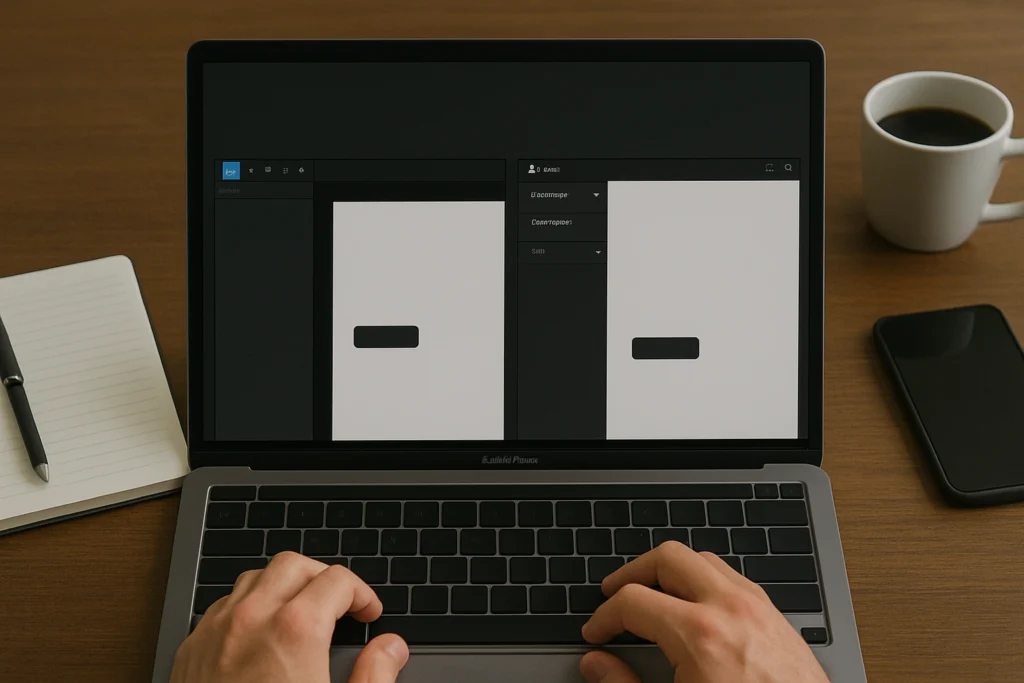
What is Figma to WordPress Conversion?
Figma to WordPress Conversion is the focused work of translating a finished Figma design file into a working WordPress site that stays pixel-perfect on every device, performs well on Core Web Vitals, and remains editable for content teams. Real Figma to WordPress Conversion covers Figma file audit and discovery, manual implementation rather than AI plugin auto-conversion, pixel-perfect mobile responsive output, multi-path WordPress delivery (custom theme, Elementor, Bricks, Divi), performance optimization, ACF integration for dynamic content, animation and interaction implementation, WCAG 2.1 AA accessibility, and WooCommerce integration if applicable. AI plugin auto-converters produce 82-91% accurate output requiring extensive cleanup; manual conversion delivers production-ready results.
What goes wrong with cheap Figma to WordPress conversion
Most underperforming Figma to WordPress conversions share the same six issues. Cheap freelance work and AI plugin auto-converters produce output that approximates the Figma file rather than implementing it accurately, with mobile and animations being the most common failure points.
AI plugin output with no cleanup
Conversion shipped at 82-91% accuracy because nobody fixed the gap between auto-converter output and production-ready code. Visible inconsistencies across pages, components misaligned with design system.
Mobile responsive broken on common widths
Auto-converters apply generic responsive patterns missing the specific design intent. Layouts collapse incorrectly at 360px, 414px, and 768px common phone and tablet widths. Touch targets too small, type scaling broken.
Animations skipped entirely
Hover states, scroll-triggered animations, micro-interactions from the Figma prototype absent on the live site. The site feels static and dated compared to the design vision presented to stakeholders.
Performance ignored at conversion stage
Hero images shipped at 4MB without WebP conversion. Custom fonts loading synchronously causing layout shift. JavaScript bundles loaded globally. Site scores 50-65 on PageSpeed Insights when proper builds reach 85+.
Generic page builder lock-in
Cheap conversions default to Elementor with stock widgets, applying the page builder defaults instead of the Figma design system. Brand identity gets lost in builder aesthetics. Custom typography overridden by plugin settings.
Accessibility skipped
Color contrast not validated, heading hierarchy wrong, focus states invisible, keyboard navigation broken. ADA lawsuit risk grows as accessibility expectations tighten through 2026.
Everything included in Figma to WordPress Conversion
Discovery + Figma file audit
Complete review of file structure, mobile and tablet frames, components and auto-layout usage, design system documentation, dynamic content patterns, animation and interaction inventory.
Manual conversion (not plugin output)
Custom HTML and CSS produced for your specific design rather than auto-generated from generic patterns. 100% accuracy across all breakpoints rather than 82-91% from AI tools.
Pixel-perfect mobile responsive
Mobile frames in Figma file used as source of truth. Media queries set to design-specified values. Container queries where appropriate. Touch targets 44x44 minimum, type scales tuned per breakpoint.
Multi-path WordPress delivery
Custom theme for maximum performance, Elementor for marketing team flexibility, Bricks for performance plus visual editing, Divi for design freedom. Right path picked during discovery.
Performance optimization built in
WebP image conversion, font loading strategy avoiding layout shift, animation respecting prefers-reduced-motion, lazy loading. Sites pass Core Web Vitals on launch day.
ACF + dynamic content
Patterns identified during audit (post lists, portfolio grids, team pages, testimonials) implemented as templates with custom post types and ACF rather than hardcoded example content.
Animations + interactions
Hover states, scroll-triggered animations, micro-interactions implemented using CSS transitions or vanilla JavaScript. Reduced motion preferences respected. Keyboard accessibility maintained.
WCAG 2.1 AA accessibility
Color contrast 4.5:1 minimum, focus states visible, heading hierarchy correct, form labels associated, keyboard navigation works, ARIA labels where needed for non-obvious interactive elements.
WooCommerce integration
Single product templates, archive layouts, cart and checkout pages styled to match Figma design system. WooCommerce template hierarchy followed. Updates remain compatible.
How a Figma to WordPress Conversion engagement works
-
01
Discovery + Figma file audit
Free 30-minute call covering project goals, Figma file structure review, mobile and tablet frames check, dynamic content patterns identification, and timeline constraints.
30 min -
02
Audit + fixed quote
Complete Figma file audit, scope identification, conversion path recommendation (custom theme vs Elementor vs Bricks vs Divi). Written proposal with fixed-quote pricing.
1-2 business days -
03
Frame review + path confirmation
Mobile and desktop frame review with you, missing frame identification if any, design system documentation review, conversion path final confirmation. Sign-off before development.
1-2 business days -
04
WordPress conversion
Manual implementation of the design across all breakpoints. Custom HTML and CSS, dynamic content with ACF where needed, animations implemented properly. Internal QA on staging.
3-28 business days -
05
Animations + accessibility + performance
Hover states, scroll animations, micro-interactions implemented. WCAG 2.1 AA accessibility verified. Performance tuned for Core Web Vitals. Mobile device testing across iOS and Android.
2-3 business days -
06
Launch + 30-day monitoring
Coordinated launch with Search Console resubmission. 30 days monitoring of Core Web Vitals, search rankings, conversion metrics. Loom handover walkthrough.
Final + 30 days
The Figma to WordPress Conversion stack I work with
I work with all major WordPress paths rather than defaulting to one approach for every Figma to WordPress Conversion project. The right path depends on your team capability, content workflow, and performance requirements identified during discovery.
Real projects, real outcomes
Recent work delivered for clients worldwide.
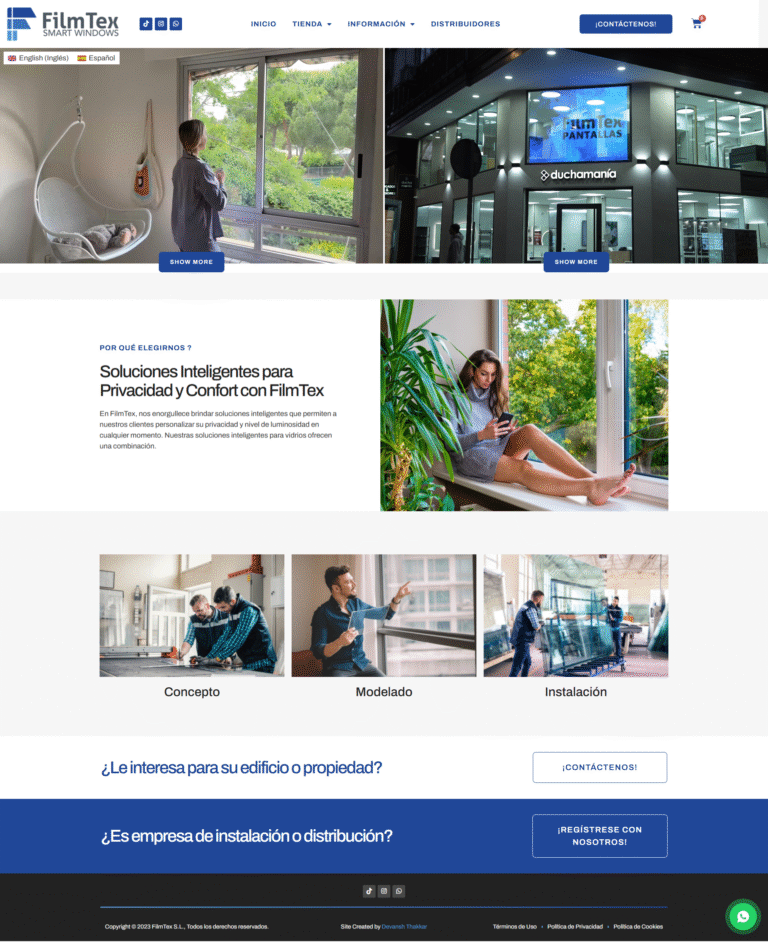
FilmTex Smart Windows
Bilingual e-commerce website with integrated filmsheet measurement and ordering functionality for smart window films.
Read case study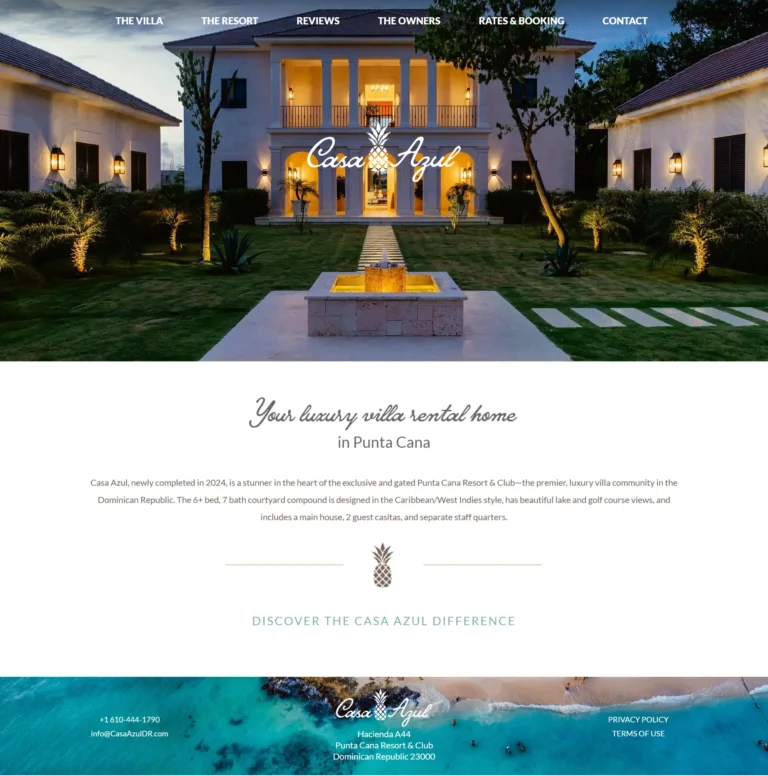
Casa Azul Punta Cana
Luxury villa rental website showcasing a premium Punta Cana property with elegant design and booking calendar.
Read case study
Naqvest Solutions
Technology-driven corporate platform showcasing insurance and workers compensation solutions with B2B lead generation.
Read case studyReal numbers from real Figma to WordPress Conversion projects
What clients say
Highly recommend working with him. We were working on very strict deadlines and Devansh managed to deliver exceptional results with quick turnaround time.
Lovely guy to work with!
Great and professional guy to work with. I totally recommend.
Transparent Figma to WordPress Conversion pricing
Three tiers cover most Figma to WordPress Conversion projects. From a single-page conversion for landing pages and one-pagers, to multi-page conversion for standard business sites, to full site conversion with custom post types, dynamic content, and WooCommerce integration.
Single-Page Conversion
Landing page or one-pager
- Single-page Figma conversion
- Discovery + Figma file audit
- Frame review + path confirmation
- Manual conversion (not AI plugin)
- Pixel-perfect mobile responsive
- Animations + hover states
- Performance optimization included
- WCAG 2.1 AA accessibility
- Rank Math SEO setup
- Choice of custom HTML or Elementor
- 30 days post-launch support
- Delivered in 1-2 weeks
Multi-Page Conversion
Most popular: standard business site (5-8 pages)
- Everything in Single-Page tier
- Up to 8 page conversions
- Consistent design system across pages
- Custom post types if needed (up to 2)
- Basic ACF integration
- Multi-path delivery option
- Schema markup implementation
- Cross-page navigation tested
- Form integrations included
- Loom handover walkthrough
- 60 days post-launch support
- Delivered in 3-5 weeks
Full Site Conversion
Comprehensive site with dynamic content
- Everything in Multi-Page tier
- Up to 20 page conversions
- Multiple custom post types
- ACF Pro field groups throughout
- Dynamic content templates
- Advanced animations and scroll effects
- WooCommerce integration if applicable
- CRM and email platform integrations
- Multi-language setup (WPML or Polylang)
- Performance budget enforcement
- 90 days post-launch support
- Delivered in 5-8 weeks
All prices in USD, fixed-quote per project, no hidden fees. Custom quotes for very large sites (50+ unique templates), enterprise multi-language conversions, headless WordPress with separate Figma-converted frontend, or marketplace platforms. WordPress hosting, ACF Pro license, premium plugin licenses, photography, and copywriting not included unless agreed.
AI plugin auto-conversion vs manual conversion by Devansh
Everything you need to know about Figma to WordPress Conversion
Figma to WordPress Conversion is the focused work of translating a finished Figma design file into a working WordPress site that stays pixel-perfect on every device, performs well on Core Web Vitals, and remains editable for content teams. The work sits between design (already done by you or your designer) and full WordPress development, focusing specifically on accurate implementation rather than design decisions. Done right, Figma to WordPress Conversion delivers sites that match the Figma file across desktop, tablet, and mobile breakpoints with 100 percent visual fidelity. Done badly through AI plugin auto-converters, you get 82 to 91 percent accurate output that breaks on mobile and requires extensive cleanup. This guide explains what real Figma to WordPress Conversion includes in 2026, what it should cost, and how to choose the right developer.
I’m Devansh Thakkar, a Top Rated freelancer on Upwork with 5+ years of experience and 100+ projects delivered. Figma to WordPress Conversion is one of my core specialties, with sites shipped for designers, agencies, and businesses across the United States, United Kingdom, Australia, Canada, and beyond. Every conversion engagement follows the same standard: read the Figma file thoroughly before quoting, manually implement the design rather than relying on auto-converter plugins, deliver pixel-perfect mobile responsive output across all breakpoints defined in the file, integrate Advanced Custom Fields where dynamic content is needed, and produce code that performs well rather than just looks right at launch.
What Figma to WordPress Conversion Actually Includes
Modern Figma to WordPress Conversion covers nine distinct areas. Most cheap freelance conversion work focuses on getting the desktop view to look approximately like the Figma file and skips the supporting work that separates production-ready conversion from rough prototypes. Real specialists deliver complete implementation because the difference between 90 percent accurate and 100 percent accurate often determines whether the site looks professional or amateur.
Discovery and Figma File Audit
Real Figma to WordPress Conversion engagements begin with a thorough audit of the Figma file. The audit identifies whether mobile and tablet frames exist, whether components are properly used, whether auto-layout is configured correctly, whether the design system is documented (color styles, text styles, effect styles), and whether interactive elements have hover and active states defined. Files missing these elements get flagged before quoting because they affect both timeline and final accuracy. Skipping this phase produces cost surprises and accuracy problems that surface after the work is already underway.
Manual Conversion, Not Plugin Auto-Conversion
AI plugin auto-converters (Figmentor, UiChemy, Anima, Locofy) produce output that tests at 82 to 91 percent accuracy in real-world projects. The remaining 9 to 18 percent gap is exactly where mobile breakpoints, hover states, animations, and design system consistency matter most. Real Figma to WordPress Conversion uses manual implementation specifically because the gap matters. Custom HTML and CSS produced for your specific design rather than auto-generated from generic component patterns delivers pixel-perfect output without the cleanup work that AI tools defer to the developer afterward.
Pixel-Perfect Mobile Responsive
Mobile responsive implementation is where most Figma to WordPress Conversion projects fail. AI auto-converters apply generic responsive patterns that break on the specific layouts your design uses. Real Figma to WordPress Conversion builds responsive layouts based on the mobile and tablet frames in the Figma file directly, with media query breakpoints set to the values the design specifies rather than generic defaults. Container queries are used where they make sense for component-level responsiveness. The result is mobile output that matches the Figma file pixel-by-pixel rather than approximating it.
Multi-Path WordPress Delivery
Figma to WordPress Conversion can target multiple WordPress paths depending on your team capability and editing requirements. The same Figma file can become a custom WordPress theme for maximum performance, an Elementor implementation for marketing team editing flexibility, a Bricks Builder build for performance plus visual editing, or a Divi implementation for design freedom plus lifetime licensing. Real Figma to WordPress Conversion picks the right path during discovery based on your specific needs rather than defaulting to one approach for every project.

Performance Optimization Built In
Figma files frequently contain heavy hero images, custom fonts, and complex animations that affect performance if implemented naively. Real Figma to WordPress Conversion includes WebP image conversion, font loading strategy that avoids layout shift, animation implementation that respects the prefers-reduced-motion media query, and lazy loading for below-the-fold content. Sites pass Core Web Vitals on launch day rather than after weeks of post-launch optimization. This overlaps with my WordPress Speed Optimization service for sites needing deeper work.
ACF Integration for Dynamic Content
Most Figma designs include sections that look static but actually represent dynamic content: blog post lists, portfolio grids, team pages, testimonial carousels, service grids. Real Figma to WordPress Conversion identifies these patterns during the audit and implements them with custom post types and Advanced Custom Fields rather than hardcoding the example content. The site scales as new content gets added without requiring template rebuilds for each new entry, which is why the audit phase matters so much.
Animations and Interactions
Figma prototypes frequently include animations, transitions, hover states, and micro-interactions that auto-converters skip entirely. Real Figma to WordPress Conversion implements these correctly using CSS transitions for simple effects, GSAP or Framer Motion patterns ported to vanilla JavaScript for complex animations, and proper accessibility considerations (respecting reduced motion preferences, ensuring keyboard accessibility for interactive elements). The implemented site feels alive rather than static.
WCAG 2.1 AA Accessibility
Real Figma to WordPress Conversion ensures the converted site meets WCAG 2.1 AA accessibility standards regardless of whether the original Figma file specifically considered accessibility. Color contrast ratios are validated against the 4.5:1 minimum for normal text and 3:1 for large text. Focus states are visible and clearly distinguished. Heading hierarchy is correct semantically rather than just visually. Form labels are properly associated. Keyboard navigation works for all interactive elements. ARIA labels are added where needed for non-obvious interactive elements.
WooCommerce Integration if Applicable
For e-commerce projects, Figma to WordPress Conversion includes proper WooCommerce template integration. Single product templates, archive layouts, cart and checkout pages, and customer account areas are styled to match the overall design system from the Figma file. Real conversion follows WooCommerce template hierarchy correctly, overrides only what needs custom styling, and remains compatible with WooCommerce updates. This pairs with my WooCommerce Development service for stores needing custom functionality beyond visual design.
How Much Does Figma to WordPress Conversion Cost?
Figma to WordPress Conversion pricing varies based on page count and complexity. A single-page conversion (landing page, one-pager, marketing page) typically costs $499 to $999 for most freelance projects. Multi-page conversion (5 to 8 pages with consistent design system) runs $999 to $2,499. Full site conversion with custom post types, dynamic content, and WooCommerce integration costs $1,999 to $4,999. Agency pricing for equivalent scope typically runs $3,000 to $10,000. AI plugin tools cost $15 to $99 monthly forever for unlimited conversions but produce output requiring significant cleanup before being production-ready.
Beware of pricing that seems too good. A $50 to $150 Figma to WordPress conversion almost always means an AI plugin auto-conversion with minimal cleanup. The pattern looks acceptable on desktop at launch but breaks on mobile, lacks animations, fails accessibility audits, and produces page weight that affects rankings. Equally beware of agency quotes at $5,000 to $15,000+ for simple conversions that bundle strategy decks and project management overhead delivering similar technical results to good freelance work.
Manual vs AI Plugin Figma to WordPress Conversion
The biggest decision in Figma to WordPress Conversion is whether to use AI plugin auto-converters (Figmentor, UiChemy, Anima, Locofy, Yotako) or manual conversion by a developer. Each path has tradeoffs that determine the right fit for specific projects.
AI plugin auto-converters work well for fast prototyping, internal stakeholder presentations, and simple landing pages where 80 to 90 percent accuracy is acceptable. Conversion time drops from days to minutes. Plugin pricing runs $15 to $99 monthly with unlimited conversions for active users. The downside is the 9 to 18 percent gap that affects mobile responsive output, animations, design system consistency, and performance. Output usually requires cleanup before it can ship to production. Manual conversion delivers pixel-perfect output across all breakpoints, full animation implementation, design system fidelity, and performance built in. Time costs more (3 to 5 days per page versus minutes) but the result is production-ready without cleanup.
The right choice depends on the project. For prototypes, internal demos, or quick landing pages where 90 percent accuracy works, AI plugins are the smart choice. For production marketing sites, brand-defining homepages, or any site where mobile responsive output and animations matter, manual Figma to WordPress Conversion delivers significantly better results.
The Real Cost of Cheap Figma to WordPress Conversion
Cheap Figma to WordPress Conversion has measurable downsides that compound over months. Most clients see the upfront cost difference and underestimate how much cleanup work the cheap path actually requires.
- AI plugin output with no cleanup. Conversion shipped at 82 to 91 percent accuracy because nobody fixed the gap. Mobile breakpoints break on common screen sizes. Design system consistency drifts across pages.
- Mobile responsive broken. Auto-converters apply generic responsive patterns that miss the specific design intent. Layouts collapse incorrectly at common mobile widths. Touch targets are too small. Type sizes don’t scale properly.
- Animations skipped entirely. Hover states, scroll-triggered animations, and micro-interactions from the Figma prototype don’t exist on the live site. The site feels static and dated compared to the design vision.
- Performance ignored. Hero images shipped at 4MB without WebP conversion. Custom fonts loaded synchronously causing layout shift. JavaScript bundles loaded globally rather than scoped. Site scores 50-65 on PageSpeed Insights.
- Generic page builder lock-in. Cheap conversions often default to Elementor with stock widgets, applying the page builder’s defaults instead of the Figma design system. Brand identity gets lost in builder aesthetics.
- Accessibility skipped. Color contrast not validated, heading hierarchy wrong, focus states invisible, keyboard navigation broken. ADA lawsuit risk grows as accessibility expectations tighten.
The real cost of cheap Figma to WordPress Conversion is rarely the build itself. It is the cleanup work, the mobile fixes, the missing animations, the performance problems, and the inevitable rebuild when the next developer realizes the existing site needs to start over.
Pixel-Perfect Mobile in Figma to WordPress Conversion
Mobile responsive implementation is the single most important difference between professional and amateur Figma to WordPress Conversion work. Most Figma files include desktop, tablet, and mobile frames with specific layouts for each breakpoint. The conversion has to honor those layouts, not approximate them with generic responsive patterns.
Real Figma to WordPress Conversion uses the mobile frames in the Figma file as the source of truth for mobile output. Media query breakpoints are set to the exact values the design specifies (often 768px for tablet, 480px for mobile, sometimes custom values like 1024px for laptop). Container queries handle component-level responsiveness where they make more sense than viewport queries. Type scales adjust at each breakpoint following the design system rather than just shrinking proportionally.
Touch targets are sized correctly for mobile use (minimum 44 by 44 pixels per WCAG 2.1 AA). Spacing scales adjust at each breakpoint instead of using the same desktop spacing crammed into mobile widths. Navigation patterns adapt appropriately (hamburger menus, mobile-specific layouts, bottom navigation where the design requires it). Performance considerations include image sizes appropriate for each breakpoint via srcset and proper picture element usage. The result is mobile output that matches the Figma file pixel-by-pixel rather than being a desktop layout squeezed into a phone screen.
Who Needs Figma to WordPress Conversion?
Not every WordPress project benefits from a dedicated conversion engagement. Sites where the design happens during development can use a different workflow. Figma to WordPress Conversion becomes the right specialist work when specific conditions apply.
Your designer (or you, if you design) has produced a finished Figma file with desktop, tablet, and mobile frames covering all key page layouts. The design system is documented in Figma with color styles, text styles, and component definitions. You need accurate implementation rather than design changes. You want a developer who reads Figma files thoroughly rather than approximating from screenshots.
You are a designer scaling your business by partnering with a development specialist for the implementation work. You are an agency with a design team and need a reliable backend partner for client delivery. You are a startup that hired a freelance designer for the Figma file and now need someone to build it. You are migrating from a hand-coded prototype to WordPress and the prototype lives in Figma. The conversion is the bridge between design and live website regardless of which scenario describes you.

How to Choose a Figma to WordPress Conversion Specialist
The freelance market for Figma to WordPress Conversion is large and uneven in quality. Most providers list it as a skill but few deliver pixel-perfect mobile responsive output. Look for these signals when hiring a real specialist.
Real Figma file reading capability, demonstrated through their process. A genuine specialist asks specific questions about your file: do mobile and tablet frames exist, are components used, is auto-layout configured, is the design system documented. Generic providers ask only how many pages and quote based on count alone. Verified client reviews on platforms like Upwork that mention Figma to WordPress projects with mobile and accessibility specifics carry weight because the platform is competitive enough that fake claims get exposed.
Live URLs of real Figma to WordPress projects to inspect on multiple devices. Open them on phones, tablets, and desktops. Resize browser windows to non-standard widths. Test hover states and animations. Run PageSpeed Insights. Anything below 80 on mobile suggests AI plugin auto-conversion with minimal cleanup. Multi-path delivery capability (custom theme, Elementor, Bricks, Divi) rather than defaulting to one approach for every project. Direct work without agency middlemen, since Figma to WordPress Conversion involves rapid visual iteration that does not delegate well across handoffs.
Figma to WordPress Conversion Trends in 2026
The Figma to WordPress Conversion landscape changed dramatically through 2024-2025 with AI tools maturing significantly. The trends shaping the work in 2026 reflect both tool evolution and how agencies now think about conversion as part of broader design-to-development workflows.
AI plugin tools matured from rough prototypes to genuinely useful prototyping accelerators. Figmentor reached 91 percent accuracy on Elementor exports. Locofy added AI-driven component pattern recognition. UiChemy maintained the most affordable Figma-to-Elementor pipeline. The category remains useful for prototyping and simple sites but has not replaced manual conversion for production-quality work where the 9 to 18 percent gap matters.
Hybrid workflows became standard for serious agencies: AI plugin output as the starting point with manual cleanup and refinement to reach production quality. This combination delivers faster turnaround than pure manual work while maintaining the quality manual conversion alone provides. Figma’s own design system features (variables, modes, advanced auto-layout) reached parity with what code can express, making conversion more straightforward when designers use them properly. WordPress block themes and Full Site Editing reached production maturity, opening a new conversion target beyond classic themes and page builders. Mobile-first design patterns finally became universal in Figma files rather than the exception, simplifying conversion projects where the file already includes complete mobile frames.
The Figma to WordPress Conversion Process and Timeline
Real Figma to WordPress Conversion follows a methodical process designed to maximize accuracy and minimize revision cycles. Skipping phases creates the underperforming conversions where mobile breaks at common widths or animations get missed entirely.
Discovery and Figma file audit take 1 to 2 business days for most projects. The phase covers complete review of the Figma file, identification of missing mobile or tablet frames if any, dynamic content pattern identification, animation and interaction inventory, and design system documentation review. Audit findings get communicated before quoting so scope expectations are clear. Audit and fixed quote run 1 to 2 business days based on file complexity.
WordPress conversion with the chosen path (custom theme, Elementor, Bricks, Divi) takes 3 to 5 business days for single-page conversion, 7 to 14 business days for multi-page conversion, and 14 to 28 business days for full site conversion with custom post types and dynamic content. Animations, accessibility, and performance tuning take 2 to 3 business days. Pre-launch testing includes mobile device testing across iOS and Android phones and tablets, browser compatibility testing, animation testing, and accessibility verification with screen readers. Total timeline from kickoff to launch ranges from 1 to 2 weeks for landing pages to 6 to 8 weeks for full site conversions with extensive functionality.
Get a Figma to WordPress Conversion Quote Today
If your finished Figma design deserves a pixel-perfect WordPress build rather than an AI plugin approximation, the next step is a free 30-minute discovery call. Share your Figma file link before the call so we can review the file structure, mobile frames, and design system together. Within 48 hours of that call, you’ll receive a written proposal with fixed-quote pricing, page-by-page breakdown, and projected timeline.
You can also browse my portfolio of recent work to see real Figma to WordPress Conversion examples across industries, or read what past clients have said about working with me on conversion projects.
Figma to WordPress Conversion questions, answered
How much does Figma to WordPress Conversion cost?
How long does Figma to WordPress conversion take?
Can you convert any Figma design to WordPress?
Should I use AI plugins or manual conversion?
What about mobile responsive design from Figma?
Which WordPress approach: custom theme, Elementor, Bricks?
Will my animations from Figma work in WordPress?
Do you handle Figma file cleanup before conversion?
Can you convert Figma designs to WooCommerce stores?
What if my Figma file is not fully ready?
More to dig into
-
WooCommerce Development Services
Custom WooCommerce Development by a Top Rated freelancer with 5+ years and stores delivered for clients in 8+...
View service -
Divi Website Development
Divi Website Development by a Top Rated freelancer specializing in Divi 5 native architecture. Variable Manager design tokens,...
View service -
WordPress Website Redesign
WordPress Website Redesign by a Top Rated freelancer. Modern design, lifted conversions, Core Web Vitals from the start,...
View service
Ready to start?
Book a free 30-minute call. No pitch, no pressure. We discuss your project and decide if we're a fit.