
Bricks Builder Website Development That Hits typically 95+ PageSpeed on comparable builds Without Compromise
Bricks Builder Website Development by a Top Rated freelancer specializing in performance-first WordPress builds. Class-first design with ACSS or Core Framework, full-site editing, Query Loop Builder expertise, and Core Web Vitals passing on day one.
- typically 95+ PageSpeed on comparable builds Insights scores standard
- ACSS or Core Framework expertise
- Query Loop Builder + dynamic data fluency
- Core Web Vitals passing on launch day
What is Bricks Builder Website Development?
Bricks Builder Website Development is the focused work of designing and building WordPress sites using Bricks as a complete theme rather than as one of several stacked page builder tools. Unlike Elementor or Divi, Bricks replaces the WordPress theme entirely and handles design, functionality, and templating in one integrated package. Real Bricks Builder Website Development covers Bricks-native theme architecture, class-first design with ACSS or Core Framework, Query Loop Builder for dynamic content, Core Web Vitals optimization built in, full-site editing, WooCommerce templates, custom CSS and JavaScript and PHP support, dynamic data integration, and migration from other builders. Sites typically score 95+ on PageSpeed Insights without aggressive optimization.
What goes wrong with generic Bricks builds
Most underperforming Bricks Builder sites share the same five issues. Generic builders treat Bricks like Elementor and miss most of what makes the platform worth choosing in the first place.
Used like Elementor, ignoring architecture
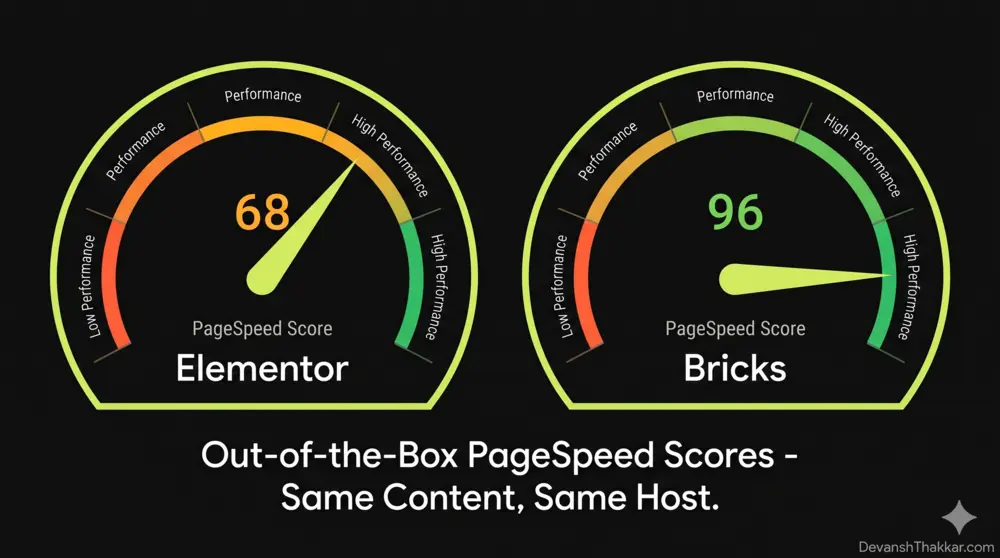
Builder treats Bricks as just another visual editor. Wrapper-heavy structure, no utility framework, inline styles everywhere. Site scores 70-80 on PageSpeed when it should hit 95+.
No ACSS or Core Framework
Spacing, typography, and colors applied element-by-element instead of through a utility framework. Design system drifts within months as different developers add inconsistent values.
Hardcoded content instead of Query Loop
Pages duplicated for similar content rather than templated. Adding 20 portfolio items means 20 manual page builds instead of one template auto-generating from a custom post type.
Missing custom field integration
Custom Fields data sits in the database but never displays through dynamic data tags. Sites have the appearance of templates but the maintainability of static pages.
Performance left to defaults
No image optimization, no font loading strategy, no lazy loading configuration. Bricks ships fast by default but cannot save sites that load 5MB of unoptimized hero images.
No documentation, unmaintainable handover
Custom classes named cryptically, no design system documentation, no Loom walkthrough. Next developer spends weeks understanding the build before any change is safe.
Everything included in Bricks Builder Website Development
Bricks-native architecture planning
Site mapped against Bricks template hierarchy. Custom post types planned upfront. Framework choice (ACSS, Core Framework, custom) made before design starts.
Class-first design with ACSS
ACSS or Core Framework as primary utility system. Consistent spacing, typography, color scales across the site. Design tokens that scale instead of inline styles.
Query Loop Builder fluency
Dynamic content lists for portfolios, case studies, blogs, products, directories. Custom queries, taxonomy filtering, and pagination configured visually.
Core Web Vitals built in
WebP image conversion, font loading strategy, lazy loading, render-blocking CSS removal. Sites pass Core Web Vitals on launch day, not after weeks of fixes.
Full-site editing with Bricks
Header templates, footer templates, archive layouts, single post templates, 404 pages, search results pages all designed visually with conditional template logic.
WooCommerce Builder for stores
Single product templates, archive layouts, cart and checkout, account pages, custom emails. Pixel-perfect store control without bolting on commercial extensions.
Custom CSS, JavaScript, PHP
Code where it makes sense, Bricks where it does not. Custom CSS per element, global JS, PHP through Code Snippets or function hooks integrated cleanly.
Dynamic data + custom fields
Native integration with ACF, Meta Box, Pods, CMB2 through dynamic data tags. Content-driven sites that handle new entries automatically through templates.
Migration from Elementor or Divi
Complete site audit, design pattern mapping, ACSS or Core Framework integration during rebuild, content migration with custom fields preserved, performance verification.
How a Bricks Builder Website Development engagement works
-
01
Discovery + framework call
Free 30-minute call covering project goals, content architecture, performance targets, ACSS or Core Framework preference, and timeline constraints.
30 min -
02
Audit + fixed quote
Existing site audit if migrating, content type identification, integration requirements, framework choice. Written proposal with fixed-quote pricing and timeline.
2-3 business days -
03
Design + framework setup
Design mockups for key page templates, ACSS or Core Framework configuration, design system documentation, custom post types and fields scaffolded.
5-10 business days -
04
Bricks development
Template build, Query Loop configuration, dynamic data integration, custom CSS/JS/PHP where needed. Internal QA on staging with Core Web Vitals verification.
5-15 business days -
05
Performance + accessibility tuning
WebP image conversion, font loading strategy, lazy loading, render-blocking CSS removal. WCAG 2.1 AA accessibility verified. Mobile device testing.
2-3 business days -
06
Launch + 30-day monitoring
Coordinated launch with Search Console resubmission. 30 days monitoring of Core Web Vitals, search rankings, and conversion metrics. Loom handover walkthrough.
Final + 30 days
The Bricks Builder Website Development stack I work with
I work with the full Bricks ecosystem rather than treating the page builder in isolation. Most projects use the technologies below in the right combination for your design system preference, content architecture, and performance requirements.
Real projects, real outcomes
Recent work delivered for clients worldwide.

Multilingual WordPress Site Built From Scratch: Custom Theme, Video-Led Pages, Two Languages
A custom-built bilingual WordPress site for a Spanish smart glass and transparent LED manufacturer. Custom theme, square-metre product configurator, video-led presentation, and…
Read case study
Vermeer Dakspecialisten
Roofing services platform with project galleries, customer reviews, and lead-generation forms for a Dutch roofing company.
Read case study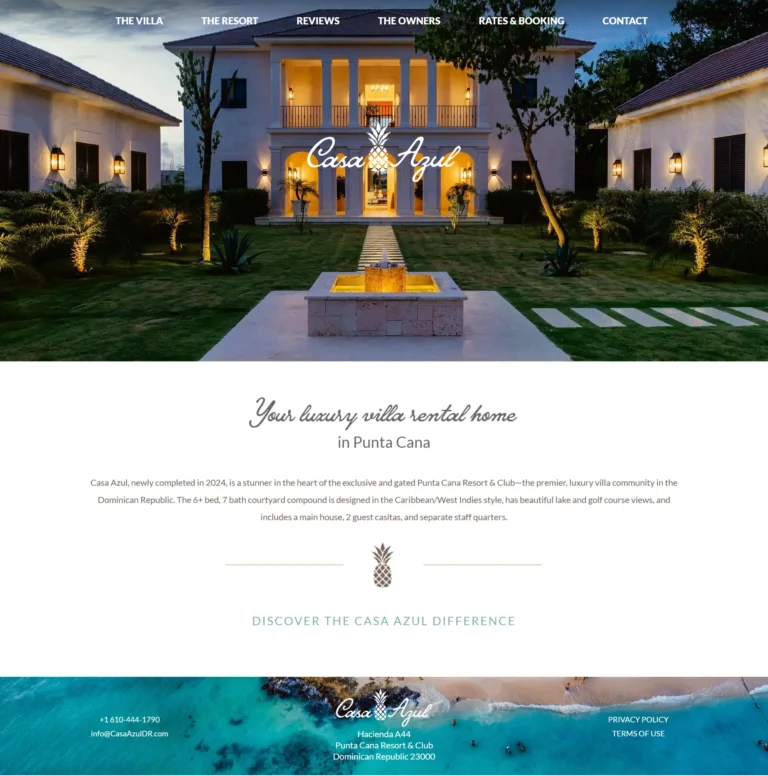
Casa Azul Punta Cana
Luxury villa rental website showcasing a premium Punta Cana property with elegant design and booking calendar.
Read case studyReal numbers from real Bricks Builder Website Development projects
What clients say
I worked many times with this person and it's always better and better. I totally recommend him!
Always supportive and ready to work. I recommend him a lot.
Great and honest guy. I liked working with him as he is always available specially whenever there is an issue. All the best Devansh!!
Transparent Bricks Builder Website Development pricing
Three tiers cover most Bricks Builder Website Development projects. From a single business site, to multi-page custom builds with dynamic content, to ongoing specialist retainers for agencies that need consistent Bricks expertise across multiple client projects.
Single Bricks Site
Small business or service site
- Single Bricks site, up to 8 templates
- Discovery and framework choice
- ACSS or Core Framework setup
- Custom theme replacement (Bricks)
- Mobile-first responsive design
- Query Loop for blog or portfolio
- Core Web Vitals optimization
- WCAG 2.1 AA accessibility
- Custom post types if needed
- Rank Math SEO setup
- 30 days post-launch support
- Loom handover walkthrough
- Delivered in 2-4 weeks
Custom Bricks Build
Most popular: full custom site with dynamic content
- Everything in Single Site tier
- Up to 20 page templates
- Multiple custom post types
- Advanced Themer integration if needed
- Frames component library where useful
- Custom fields with dynamic data tags
- Custom CSS, JavaScript, PHP integration
- WooCommerce templates if applicable
- Migration from Elementor or Divi included
- Schema markup implementation
- Performance budget enforcement
- 60 days post-launch support
- Delivered in 4-8 weeks
Bricks Specialist Retainer
For agencies with ongoing Bricks work
- Up to 6 hours of Bricks work per week
- New page builds and templates
- Performance optimization on existing sites
- Bricks updates and compatibility checks
- ACSS or Core Framework refinements
- Query Loop and dynamic data tuning
- WooCommerce template iterations
- Bug fixes within 24 business hours
- Quarterly design system reviews
- Direct Slack or email access
- Cancel anytime
- Best for agencies with active Bricks portfolios
All prices in USD, fixed-quote per project for one-time work, no hidden fees. Custom quotes for very large sites (50+ unique templates), complex multi-language Bricks builds, custom Bricks element development, or marketplace platforms. Bricks license, premium plugin licenses (Advanced Themer, Frames, etc.), photography, and copywriting not included unless agreed.
Generic page builder freelancer vs Bricks specialist
Everything you need to know about Bricks Builder Website Development
Bricks Builder Website Development is the focused work of designing and building WordPress sites using Bricks as the foundation rather than as one of several stacked tools. Unlike Elementor, Divi, or other plugin-based page builders, Bricks is a complete WordPress theme that replaces your existing theme entirely. It outputs cleaner code, scores 95+ on PageSpeed Insights with minimal optimization, and gives developers a class-first design system that scales without the wrapper div bloat that slows down most page-builder sites. This guide explains what real Bricks Builder Website Development includes in 2026, what it should cost, and how to choose the right specialist for your project.
I’m Devansh Thakkar, a Top Rated freelancer on Upwork with 7+ years of experience and 250+ projects delivered. Bricks Builder Website Development is one of my core specialties, with high-performance sites shipped for clients across the United States, United Kingdom, Australia, Canada, Sweden, and beyond. One of my recent clients found me by searching exactly that term. Every Bricks engagement follows the same standard: leverage Bricks as a complete theme system rather than just another visual editor, structure projects with ACSS or Core Framework for maintainability, optimize Core Web Vitals from the start, and deliver sites that other developers can pick up later without confusion.
What Bricks Builder Website Development Actually Includes
Modern Bricks Builder Website Development covers nine distinct areas. Generic page builder work treats Bricks as just another visual editor and misses most of what makes the platform powerful. Real specialists use the full ecosystem deliberately because Bricks rewards developers who understand its architecture rather than fighting against it.
Bricks-Native Theme Architecture
Bricks is a complete WordPress theme, not a plugin layered on top of an existing theme. This architectural difference matters significantly. When Elementor or Divi runs, it loads on top of whatever theme you have, adding its own CSS, JavaScript, and DOM elements to everything the theme already produces. Bricks replaces the theme entirely and handles design, functionality, and templating in one integrated package. Real Bricks Builder Website Development structures the site to take full advantage of this architecture rather than treating Bricks like just another page builder.
Class-First Design with ACSS or Core Framework
Most page builders create wrapper-heavy code where every visual element produces extra div nesting. Bricks supports a class-first approach using utility frameworks like Automatic CSS or Core Framework. Instead of styling every element individually with inline CSS, you build a design system of utility classes that scale across the entire site. The result is consistent typography, spacing, color, and responsive behavior with significantly less generated code. Real Bricks Builder Website Development establishes the framework choice during the planning phase, not bolted on later.
Query Loop Builder for Dynamic Content
The Bricks Query Loop Builder is one of the standout features of the platform. It lets you build dynamic content lists from any WordPress source — posts, custom post types, custom fields, taxonomies, user data, or custom queries — entirely through visual configuration. For sites with portfolios, case studies, blogs, product catalogs, or directory functionality, the Query Loop Builder eliminates 80 to 90 percent of custom WP_Query work. Real Bricks Builder Website Development uses Query Loop Builder for dynamic sections rather than hardcoding content into static pages.
Core Web Vitals Optimization Built In
Bricks consistently scores 95 or higher on PageSpeed Insights with minimal optimization, compared to 70 to 85 for Elementor sites without aggressive caching. The platform produces clean HTML output, smaller CSS bundles, and lighter JavaScript footprint by default. Real Bricks Builder Website Development extends this advantage with WebP image conversion, font loading strategy, lazy loading configuration, and CDN setup. Sites typically pass Core Web Vitals on day one without bolt-on optimization plugins. This overlaps with my Core Web Vitals Optimization service for sites needing deeper work.

Full-Site Editing With Custom Headers and Footers
Bricks supports full-site editing including header templates, footer templates, archive layouts, single post templates, 404 pages, and search results pages. You design these visually rather than coding template files. Real Bricks Builder Website Development uses the template system to build cohesive sites where every page type follows consistent design patterns. Conditional template logic lets the same template adapt based on user role, post type, taxonomy, or custom rules — replacing significant amounts of custom theme code that traditional WordPress development would require.
WooCommerce Builder for Custom Stores
The Bricks WooCommerce Builder gives pixel-perfect control over every store page without extra plugins. Single product templates, archive layouts, cart and checkout pages, account pages, and custom email templates can all be designed visually. Real Bricks Builder Website Development for e-commerce uses this capability to build stores that look custom-coded but remain editable. This pairs with my WooCommerce Development service for stores requiring custom functionality beyond visual design.
Custom CSS, JavaScript, and PHP Support
Bricks distinguishes itself from purely visual builders by exposing custom code at every level. Each element supports custom CSS in a built-in editor with variable autocomplete. Custom JavaScript can be added per page or globally. Custom PHP through Code Snippets or function hooks works alongside Bricks elements. Real Bricks Builder Website Development uses code where it makes sense rather than fighting with visual workarounds, while keeping the bulk of work in Bricks for editability.
Dynamic Data and Custom Fields Integration
Bricks integrates natively with Advanced Custom Fields, Meta Box, Pods, and CMB2 through dynamic data tags. You can pull custom field values, post meta, user meta, taxonomy data, or custom queries directly into any element without writing code. Real Bricks Builder Website Development uses dynamic data tags extensively for content-driven sites where templates need to handle different content automatically rather than requiring manual page setup for each new entry.
Migration From Elementor or Other Builders
Many Bricks Builder Website Development projects start as migrations from Elementor, Divi, or WPBakery. The performance gains alone often justify migration for agencies maintaining client sites. Real migration work includes complete site audit, design pattern mapping, ACSS or Core Framework integration during the rebuild, content migration with custom fields preservation, redirect mapping where URL structures change, and Core Web Vitals verification on the new build. This overlaps with my WordPress Migration Services for sites combining platform changes with the Bricks rebuild.
How Much Does Bricks Builder Website Development Cost?
Bricks Builder Website Development pricing varies based on project scope and complexity. A single-page or small business Bricks site typically costs $799 to $1,499 for most freelance projects. Multi-page custom builds with dynamic content, custom post types, and integrations run $1,499 to $4,999. Bricks specialist retainers for agencies and ongoing client work start at $999 monthly. WooCommerce stores built in Bricks typically start at $1999 due to the additional product configuration and template work involved.
Beware of pricing that seems too good. A $90 Bricks “conversion” job from Upwork’s bottom tier usually means a generic implementation that fails to use ACSS or Core Framework, ignores accessibility, skips Core Web Vitals optimization, and produces sites that look fine on launch but become unmaintainable within months. Equally beware of agency quotes at $5,000 to $10,000+ that bundle Bricks development with strategy decks, account managers, and project overhead that delivers similar technical results to good freelance work. The Bricks specialist sweet spot is direct work with someone who lives in the platform daily.
Why Choose Bricks Over Elementor or Divi?
Most WordPress site owners default to Elementor or Divi because they have larger communities and more tutorials available. For many use cases, those builders work fine. Bricks Builder Website Development becomes the right choice when specific priorities outweigh community size. Performance is the most common reason. Sites built in Bricks consistently score 95+ on PageSpeed Insights with minimal optimization, while Elementor sites typically need aggressive caching, asset optimization, and CDN setup to reach typically 90+ scores on comparable builds.
Long-term cost is another factor. The Bricks lifetime license at $249 to $599 pays back against Elementor Pro renewals within one to two sites for agencies running 20+ client projects. Code quality matters for sites that will be maintained for years. Bricks outputs cleaner HTML with less wrapper div nesting, which makes future updates and migrations significantly easier. Developer experience also matters. Bricks supports custom CSS, JavaScript, and PHP at every level, treating developers as first-class citizens rather than forcing them into visual workarounds.
The Real Cost of Generic Bricks Builder Website Development
Cheap Bricks Builder Website Development has measurable downsides that compound over months and years. Most clients see the upfront cost difference and underestimate the cascading damage from poor execution.
- Performance regression when builders use Bricks like Elementor without leveraging the architectural advantages. Sites can launch on Bricks and score 70-80 on PageSpeed when they should score 95+. The performance investment gets wasted entirely.
- Inconsistent design system when builders skip ACSS or Core Framework. Spacing, typography, and colors get applied inline element-by-element. The site becomes unmaintainable within months as design tokens drift across pages.
- Hardcoded content instead of Query Loop Builder use. Pages get duplicated for similar content rather than templated. Adding 20 case studies takes 20 manual page builds instead of one template that auto-generates from a custom post type.
- Missing accessibility when builders skip semantic HTML, proper heading hierarchy, ARIA attributes, and keyboard navigation. Bricks supports accessibility well, but only when developers configure it intentionally.
- No design documentation when other developers cannot pick up the work later. Bricks rewards documentation more than other builders because the technical bar is higher. Cheap work skips this entirely.
- Missed dynamic data opportunities when Custom Fields data sits in the database but never displays through dynamic tags. Sites end up with the appearance of templates but the maintainability of static pages.
The real cost of generic Bricks Builder Website Development is rarely the build itself. It is the wasted performance potential, unmaintainable design system, and migration costs when the next developer has to start over because the original work did not leverage what makes Bricks worth choosing in the first place.
Bricks Builder Website Development vs Elementor Custom Development
Many buyers compare Bricks Builder Website Development directly against Elementor custom development. Both can produce excellent sites in skilled hands. The differences come down to architectural priorities and long-term ownership preferences.
Elementor offers a larger community, more tutorials, more third-party widgets, and a more familiar interface for buyers who already know it. The downside is recurring annual licensing for Elementor Pro, code output that requires aggressive caching to hit competitive PageSpeed scores, and a plugin-on-top-of-theme architecture that adds DOM weight to every page load. Bricks offers a one-time lifetime license that scales without per-site costs, code output that hits typically 95+ PageSpeed on comparable builds without aggressive optimization, and a unified theme architecture that produces cleaner overall systems.
For sites where editing flexibility for non-developers matters most, Elementor often wins. For sites where performance, code quality, and long-term cost matter most, Bricks Builder Website Development typically wins. For agencies running many client sites, the Bricks lifetime license model produces significantly lower total cost of ownership across a 3-year horizon.
Who Needs Bricks Builder Website Development?
Not every WordPress project needs Bricks specifically. Small static sites with minimal content can succeed on simpler stacks. Bricks Builder Website Development becomes worth the specialist investment when any of the following apply.
You are running paid traffic and Core Web Vitals affect Quality Score and conversion rate measurably. You are migrating from Elementor or Divi specifically because performance is no longer acceptable. You are building a content-heavy site with dynamic content from custom post types, custom fields, or external data sources. You are an agency looking to standardize on a performance-first builder for client work going forward.
You have technical experience or a developer team that values custom CSS, JavaScript, and PHP support directly in the page builder workflow. You are building a WooCommerce store and want pixel-perfect template control without bolting on commercial Elementor extensions. You are running a multi-site agency and want to amortize a Bricks lifetime license across many client builds rather than paying recurring Elementor Pro fees per site.
How to Choose a Bricks Builder Specialist
The freelance market for Bricks Builder Website Development is smaller than the Elementor market but growing rapidly. Most providers in this space are competent at the basic level but few have deep expertise in the supporting ecosystem. Look for these signals when hiring a real specialist.
Real expertise in ACSS or Core Framework as primary design system, not just basic Bricks usage. A genuine specialist names their preferred utility framework, explains why they chose it, and shows how they apply it consistently across projects. Verified references in the Bricks Builder Experts directory or third-party reviews on Upwork and similar platforms. Verified client reviews mentioning specific Bricks projects carry weight because the platform is small enough that fake claims get exposed quickly.
Performance benchmarks they can demonstrate. Ask for live URLs of Bricks sites they built and check PageSpeed Insights yourself. Anything below 90 on mobile suggests the developer is not leveraging the platform properly. Knowledge of Frames, Advanced Themer, or other supporting tools that accelerate quality work. Direct work without agency middlemen, since Bricks Builder Website Development involves rapid iteration with the visual editor that does not delegate well across handoffs.
Bricks Builder Website Development Trends in 2026
The Bricks ecosystem evolved significantly in 2024-2025, and the trends shaping Bricks Builder Website Development in 2026 reflect both platform maturity and how agencies now think about page builder choice.
ACSS and Core Framework reached production-ready maturity, with most serious Bricks specialists standardizing on one or the other. Frames and other component libraries became standard parts of efficient Bricks workflows, giving developers production-ready section templates instead of building every section from scratch. The Bricks Builder Experts directory grew significantly, providing verified hiring options for clients who previously had to evaluate freelancers without external validation.
Migrations from Elementor to Bricks accelerated as Quality Score and Core Web Vitals impact on paid traffic became more measurable. Block theme integration improved, letting Bricks coexist with WordPress block themes for hybrid editing workflows. AI-driven layout generation features started appearing in Bricks-adjacent tools, accelerating the strategy and wireframe phases of new projects without replacing the developer skill that quality builds still require.
The Bricks Builder Website Development Process and Timeline
Real Bricks Builder Website Development follows a methodical process designed to maximize what the platform can deliver rather than treating it as a generic page builder. Skipping phases creates the underperforming Bricks sites that give the platform a mixed reputation.
Discovery and strategy take 2 to 3 business days for most projects. The phase covers existing site audit if migrating, content architecture planning, custom post type identification, design system framework choice (ACSS vs Core Framework vs custom), and integration requirements. Design and prototyping run 5 to 10 business days based on customization complexity and revision rounds.
Bricks development with the chosen framework takes 5 to 15 business days depending on page count, dynamic content complexity, and custom code requirements. WooCommerce setup if applicable adds 3 to 7 business days. Performance tuning, accessibility verification, and Core Web Vitals validation take 2 to 3 business days. Pre-launch testing includes mobile device testing, real form submission testing, dynamic data verification across templates, and cross-browser checks. Total timeline from kickoff to launch ranges from 14 days for simple business sites to 8 weeks for complex multi-template builds with custom integrations.
Get a Bricks Builder Website Development Quote Today
If your next WordPress project deserves a performance-first builder, the next step is a free 30-minute discovery call. We’ll review your project requirements, design preferences, performance targets, and timeline constraints. Within 48 hours of that call, you’ll receive a written proposal with fixed-quote pricing, phase breakdown, and projected timeline.
You can also browse my portfolio of recent work to see real Bricks Builder examples across industries, or read what past clients have said about working with me on performance-focused projects.
Bricks Builder Website Development questions, answered
How much does Bricks Builder Website Development cost?
How long does it take to build a Bricks site?
Is Bricks Builder a plugin or a theme?
Why is Bricks faster than Elementor?
Should I use ACSS or Core Framework with Bricks?
Can you migrate my Elementor site to Bricks?
Does Bricks work with WooCommerce?
What is the Query Loop Builder in Bricks?
Will my Bricks site be maintainable by other developers?
Do I need to buy a Bricks license?
More to dig into
-
Expert in WordPress: 10 Simple Tests of Proven Skill
What separates an expert in WordPress from a confident implementer: five layers of skill, ten plain questions that...
Read article -
Custom WordPress Theme vs Page Builder: The Complete 2026 Guide
Table of Contents The Quick Verdict The Real Difference Performance and Core Web Vitals Cost and Maintenance Design...
Read article -
Bricks Builder Editor Not Loading: 7 Easy Proven Fixes 2026
Home › Blog › Bricks Builder Editor Not Loading: 7 Easy Proven Fixes 2026 Table of Contents Why...
Read article
-
Core Web Vitals Optimization
Core Web Vitals Optimization by a Top Rated freelancer. Specialist focus on LCP, INP, and CLS with real...
View service -
WooCommerce Development Services
Custom WooCommerce Development by a Top Rated freelancer with 7+ years and stores delivered for clients in 8+...
View service -
WordPress Website Redesign
WordPress Website Redesign by a Top Rated freelancer. Modern design, lifted conversions, Core Web Vitals from the start,...
View service
Ready to start?
Book a free 30-minute call. No pitch, no pressure. We discuss your project and decide if we're a fit.