Facets that return in under 300ms, and a crawl budget no longer spent on filter permutations
| Metric | Before | After | How measured |
|---|---|---|---|
| LCP, category pages | 4.1s | 1.4s | PageSpeed Insights, field data, 90 days after launch |
| Filter response time | 3.2s | 280ms | Chrome DevTools, XHR, median of 10 requests |
| Indexed URLs | 38,400 | 1,240 | Search Console, Pages report, 4 months after launch |
| Organic sessions | 3,100/mo | 7,400/mo | Search Console, 3 months either side of launch |
If your WooCommerce product filter takes three seconds to return results, you are losing buyers at the exact moment they were ready to choose. This is a case study of a WooCommerce electrical supplier where filtering timed out on mobile, and where Google was quietly spending its crawl budget on tens of thousands of filter URLs nobody would ever search for.
Both WooCommerce product filter problems had the same root cause, and neither was going to be fixed by swapping one WooCommerce product filter plugin for another.
WooCommerce stores product attributes as taxonomy terms and post meta. For an author that is the right decision, because it means you can add a new attribute without touching the database schema. For a query it is expensive.
A filtered request on a WooCommerce store joins across wp_posts, wp_postmeta, wp_term_relationships and wp_term_taxonomy. There is no single index that covers that shape, so MySQL works through it row by row. At two hundred products nobody notices. At several thousand, with five facets and a live result count beside every option, the cost grows faster than the catalog does.
The result count is the part people underestimate. Showing “Brand X (34)” beside a checkbox means running a counting query for every option on the page. Five facets with a dozen options each is sixty queries before a single product renders.
Most plugins answer this with caching. That helps the second visitor, does nothing for the first, and goes stale the moment stock changes. It is a way of hiding the cost rather than removing it.
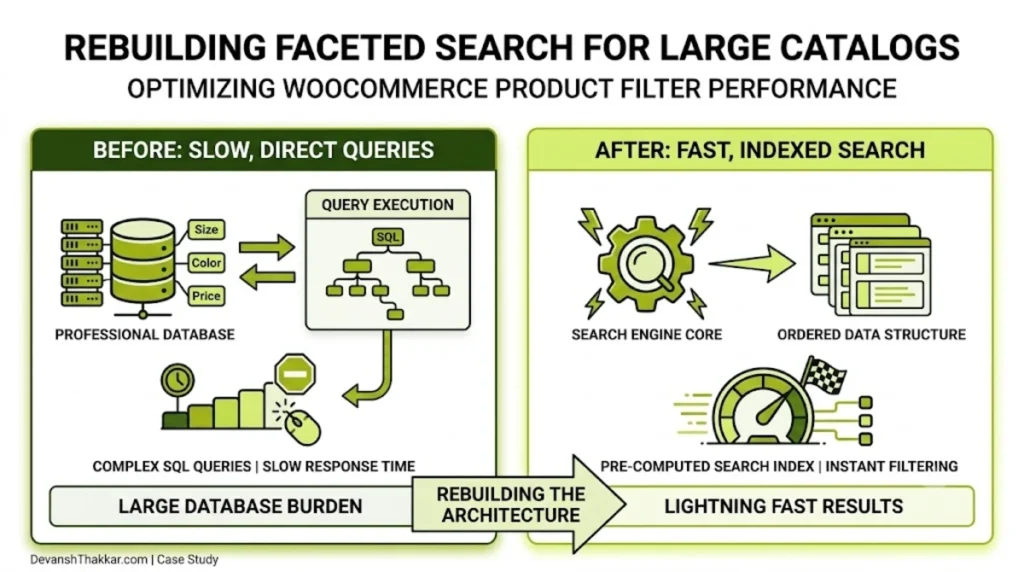
The fix is to move where the cost falls. A WooCommerce product filter that reads from a flat lookup table refreshed on product save pays the price once, when a product changes, rather than on every click by every customer.
There is a second reason a WooCommerce product filter degrades that has nothing to do with query cost. Every filter state is a URL. Unless somebody deliberately decides which of those URLs deserve to exist, the default answer is all of them, and the number grows multiplicatively with each facet you add.
Those two problems, slow queries and uncontrolled URLs, arrive together because they share a cause: nobody made a decision about scale at the point the catalog was small enough not to need one.
The client sells electrical products to trade and retail buyers. The catalog runs to thousands of SKUs and the products are near-identical to anyone who is not an electrician. Voltage, amperage, brand, connector type, certification: get one wrong and the part does not fit.
The WooCommerce product filter was not a nice-to-have on this site. It was the only realistic way to find anything.
And it did not work. A facet click on a large category took over three seconds, which is long enough that buyers assume the site has frozen. On mobile data it frequently timed out. Every click reloaded the whole page, ran an unindexed query across the full product set, and rebuilt every sidebar count from scratch.
The second problem was invisible from the front end. Each filter combination generated its own crawlable URL. Five facets with a handful of options produce tens of thousands of permutations, and Google was working through them patiently.
Search Console reported over 38,000 indexed URLs on a catalog with a small fraction of that many products. Crawl budget that belonged to product pages was going to ?filter_voltage=240&filter_brand=x&orderby=price and its thousands of siblings.
A Lighthouse run on a fast connection would have shown a far milder problem than buyers were actually living with. So the baseline came from Chrome UX Report field data, plus DevTools timings on a throttled mid-range Android.
Alongside that, a full crawl to count how many filter permutations were reachable, and the Search Console Pages report to see how many Google had taken.
That second number changed the scope of the job. This looked like a speed problem and was substantially an architecture problem.
The existing WooCommerce product filter ran a broad meta query across every product, then counted results per facet by running more queries. I replaced it with a flat lookup table keyed on the attribute combinations that actually get used, refreshed when a product saves rather than rebuilt on every request.
Facet counts now come from one aggregate query instead of one per option. The WooCommerce product filter now runs over AJAX, so the browser swaps the product grid rather than rebuilding the entire page.
Median WooCommerce product filter response went from 3.2 seconds to 280 milliseconds.
Filter URLs now carry a canonical pointing at the clean category, and the filter parameters are disallowed in robots.txt.
The combinations buyers genuinely search, brand plus category, are kept indexable as real landing pages with their own copy. Those match how people look for parts, so they earn a URL.
That distinction is the whole job. Blocking everything loses the pages worth having. Blocking nothing spends your crawl budget on noise.
Product images were uploaded at full camera resolution and scaled down in the browser, so a category page pulled several megabytes to show thumbnails. Regenerated at sensible sizes and served as WebP, which is standard speed optimization work.
Cart fragments were firing an admin-ajax request on every page load, including pages with no cart on them. Scoped to where the cart actually appears.
Caching had been installed rather than configured. Page caching now excludes cart, checkout and account. Delay JavaScript runs with an exclusion list built by testing every interactive element. The filter endpoints are excluded, so a cached response can never return the wrong product set.
The first version of the lookup table rebuilt on every product save. Fine day to day, until the client ran a bulk price import across the catalog and the import took most of an hour.
The rebuild is now queued and debounced, so a bulk operation triggers one rebuild at the end rather than one per product.
Worth writing down, because that only appears under real conditions. Finding it after launch rather than before is the honest version of how this work goes.
A WooCommerce product filter that is fast on launch day and slow again in eighteen months has not really been fixed. Three things keep it honest.
The lookup table carries a composite index on the columns the facets actually query, so adding products grows the table without changing the query plan.
A weekly task compares the WooCommerce product filter lookup table row count against the product count and logs a mismatch, which is how you catch a failed rebuild before a customer does.
And the filter endpoints are excluded from page caching but have their own short-lived object cache, so repeated identical requests are cheap without ever serving a stale product set.
Category pages went from an LCP of 4.1 seconds to 1.4 on field data. Median WooCommerce product filter response fell from 3.2 seconds to 280 milliseconds. Indexed URLs dropped from 38,400 to 1,240 as the crawl trap closed.
Organic sessions roughly doubled over the following two quarters, which is the part that compounds. Crawl budget spent on filter permutations is crawl budget not spent on the product pages you want ranking.
Before building anything custom, it is worth knowing where the off-the-shelf options stop working. Rough guidance from having deployed all of these:
| Approach | Works well up to | Where it breaks |
|---|---|---|
| WooCommerce core widgets | A few hundred products | No AJAX, full page reload on every click |
| General WooCommerce product filter plugin | 1,000 to 2,000 products | Facet counts become the bottleneck |
| Filter plugin plus object cache | 3,000 to 5,000 products | First visitor still waits, stale on stock change |
| Custom lookup table | Tens of thousands | Needs a developer and a rebuild strategy |
| Dedicated search service | Effectively unlimited | Monthly cost, another system to maintain |
Most stores never need the bottom two rows. If you are under about two thousand products and your WooCommerce product filter feels slow, the cause is usually images or an unconfigured cache rather than the filter itself.
So you know what you are buying, rather than a vague promise that things will get faster:
What it does not include is a redesign. A WooCommerce product filter rebuild sits behind the interface, and in most cases nobody looking at the site can tell it happened except that it is now fast.
Five minutes with DevTools will tell you whether a rebuild is the right spend:
That last point matters. I have been asked to rebuild a WooCommerce product filter three times where the real problem was 4MB of uncompressed product photography, and the filter was fine.
The other quick test is to turn the facet result counts off for an afternoon. If your WooCommerce product filter suddenly feels responsive, the counting queries were the bottleneck and you have just narrowed the work considerably.
A slow WooCommerce product filter is almost always the facet result counts. Showing a number beside each option means a counting query per option, and those multiply with every facet you add. Turning the counts off is a free test: if the filter suddenly feels fast, you have found it.
It will shave something off and it will not solve it. A query that scans the full product set is slow on good hardware too. Better hosting raises the ceiling; it does not change the shape of the query.
They can, badly. Left crawlable, they consume crawl budget and create thousands of near-duplicate pages. The fix is canonicals back to the clean category and a robots.txt disallow on the filter parameters, while keeping the handful of genuinely searched combinations as real landing pages.
Three to five weeks for a catalog of this size, quoted fixed-price after an audit. The audit comes first because the answer is sometimes that your filtering is fine.
Some are considerably better than others, and none of them changes the underlying query shape. A well-built plugin will get you comfortably to a couple of thousand products. Past that, every plugin is solving the same problem with the same tools and hitting the same ceiling.
It is a reasonable answer above roughly twenty thousand products, or when you need typo tolerance and relevance ranking rather than plain filtering. The trade is a monthly cost and another system that can go down. Below that threshold a lookup table is cheaper to run and simpler to reason about.
No. The markup and styling stay as they are. What changes is where the data comes from and how the page updates, which is invisible to anyone except that the results now appear immediately.
Yes. This work sits behind the interface. The client kept their existing Bricks design and template; only the query layer and the crawl rules changed.
The first question is always whether filtering is the real bottleneck, because a rebuild is an expensive answer to the wrong question. Send me a category URL through the contact page or book a free call, and I will run the check above and tell you which it is.
If it is images or an unconfigured cache, I will say so, and that is a much cheaper week for you.

Luxury real estate platform showcasing premium villas and properties in Punta Cana with dynamic listings and multi-language support.

Modern fashion e-commerce platform specializing in ethnic wear with seasonal sales, discount logic, and responsive shopping layouts.

Technology-driven corporate platform showcasing insurance and workers compensation solutions with B2B lead generation.
Free 30-minute call. Tell me what is going wrong and you get a fixed-price quote within 48 hours. If a smaller fix would do, I will say so.
