- To refresh old content, update its facts, depth, and intent match, then improve on-page SEO and internal links, all on the same URL.
- Refreshing usually beats publishing new, because it builds on a URL’s existing authority instead of starting from zero.
- Prioritize decayed pages that lost traffic and “striking distance” pages ranking just off page one.
- Re-check search intent first, since the SERP format may have shifted since you published.
- Never just change the date. Google detects date changes without real improvement, so update the content itself.
To refresh old content for SEO, you find pages that have lost rankings or sit just off page one, re-check what searchers now want, then update the facts, depth, experience, and on-page elements, all on the same URL. Refreshing is often higher-ROI than publishing new, because you build on authority the page already has. This guide walks the whole process of how to refresh old content.
After running content refreshes and learning how to refresh old content for clients in 15+ countries, here is the shift that changes everything. Most people treat old content as finished instead of learning how to refresh old content, and pour all their energy into new posts. That is backwards. Your existing pages have history, links, and ranking signals that a brand-new URL does not, so knowing how to refresh old content matters, so improving them is often the fastest way to grow. Here is how to refresh old content the right way, start to finish.
Why Refreshing Beats Publishing New
The choice to refresh old content usually delivers faster SEO gains than publishing new content, because you are improving a page that already has authority, history, and ranking signals. A new URL starts from zero. A refresh builds on everything the existing page has already earned, which is why the returns show up sooner.
The reason this matters so much is content decay. Rankings and traffic quietly slip over time as information ages, competitors update their pages, and search intent shifts. Industry analysis puts the drift at meaningful levels, with sites losing a notable share of organic clicks every six months to decay, which is why Google’s helpful content guidance rewards keeping pages genuinely current. Left alone, your best pages slowly bleed traffic. A refresh reverses that.
Pro tip: As your library grows, the balance should tip toward refreshing. A small site with 50 to 100 pages should lean heavily toward new content, there is not much to protect yet. But once you have hundreds of pages, your existing library becomes both your biggest asset and your biggest liability if you let it decay.
Refreshing pays off, but only if you refresh the right pages. Most of the value is in choosing well.
Which Pages to Refresh First
The best pages to refresh old content on are the ones with the most upside: pages that lost traffic, and pages ranking just off page one. Trying to refresh old content everywhere is a waste, the goal is to spend your effort where a small improvement produces the biggest ranking gain.

Your highest-priority refresh candidates:
- Decayed pages. In Search Console, compare the last three months against the same period a year ago to find pages that dropped in clicks and position.
- Striking-distance pages. Pages ranking in positions five to twenty, close enough that a solid refresh can push them onto page one.
- Pages with aging facts. Anything citing old statistics, years, or examples, especially posts with a year in the title or content.
- High-value pages. Prioritize your top pages by traffic and revenue, where compounding returns show up fastest.
Pro tip: Search Console is all you need to build your list. Compare the last three months to the same period last year, sort by the biggest drops in clicks, and cross-reference with average position. Pages that fell from a strong spot, or that hover at positions six to twelve, are your fastest wins.
Once you have your priority list, the refresh itself follows a clear sequence.
How to Refresh Old Content, Step by Step
To refresh old content properly, you work through a repeatable sequence when you refresh old content: re-check intent, update the substance, improve on-page SEO, and strengthen internal links, all on the same URL. The depth of how you refresh old content varies from a light update to a deep rewrite, but the order stays the same.
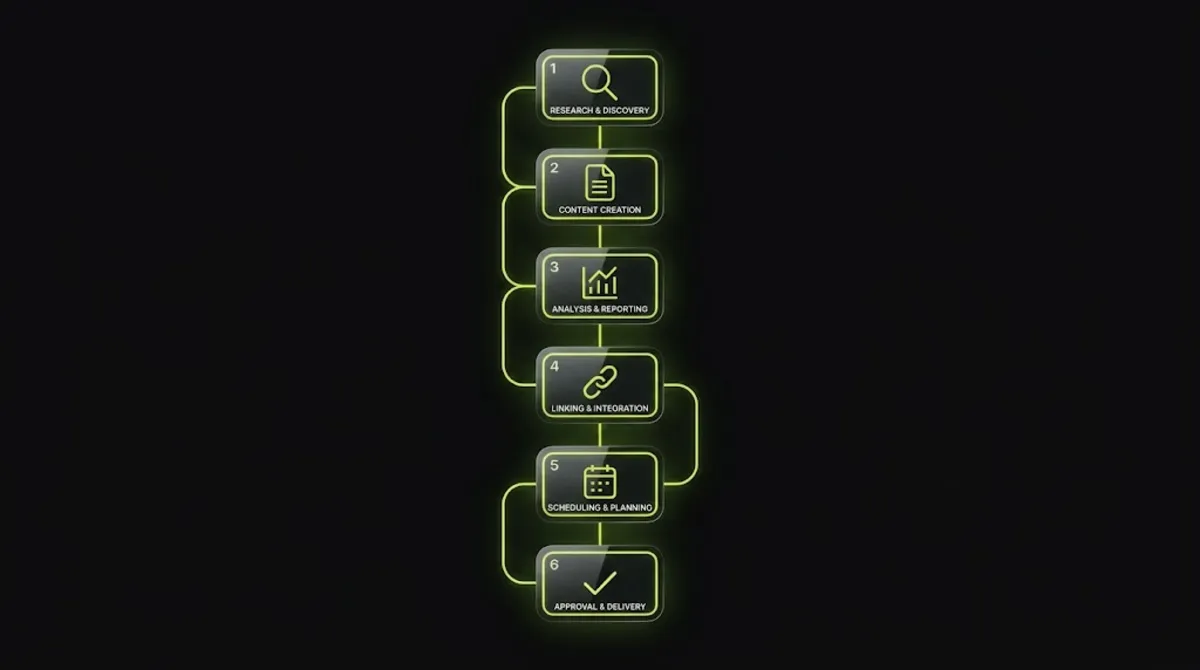
- Re-check search intent first. Before you refresh old content, look at what currently ranks for your keyword. If the SERP now favors comparisons, listicles, or a different format, your page may need restructuring, not just new facts.
- Update facts, stats, and examples. As you refresh old content, replace outdated statistics, screenshots, tool references, and years, and fix any broken links.
- Add depth and first-hand experience. When you refresh old content, fill gaps the top results cover that you do not, and add original data, examples, and lived insight for genuine information gain.
- Improve on-page SEO. Refine the title and meta description, tighten headings to match how people search, and improve readability and structure.
- Strengthen internal links. As you refresh old content, add links from newer, high-performing posts to the refreshed page, and link out from it to relevant pages, so it reads as part of an active cluster.
- Update the date honestly, then re-index. Update the last-modified date only because you made real changes, keep the same URL, and request indexing in Search Console.
The intent check is the step people skip: a query that once wanted a broad explainer may now want a direct comparison, a checklist, or a short answer. If your page opens with scene-setting while the whole SERP has moved to comparison tables, no amount of updated stats will save it. Match the format searchers are actually shown now.
Sometimes, though, a refresh is not the right move at all. Knowing when is what separates good content maintenance from wasted effort.
Refresh, Consolidate, or Prune?
Not every old page should be refreshed when you set out to refresh old content. Some should be consolidated with others, and some should be removed entirely, and choosing correctly is central to a good content strategy. The right call, before you refresh old content, depends on whether the page still has value, equity, and a real audience.
| Action | When to choose it |
|---|---|
| Refresh | The page still matches intent, has SEO equity or links, and simply needs updated, deeper content. |
| Consolidate | Two or more pages target the same keyword and compete with each other. Merge them and redirect the weaker URLs. |
| Prune | The topic is dead, demand has vanished, or the page is thin and never earned traffic or links. Remove or redirect it. |
Consolidation deserves special attention, because keyword cannibalization is one of the most common reasons a page seems to be decaying when it is really competing against itself. If you have two or three thin pages splitting authority on one topic, merging them into a single strong page, then redirecting the rest, often outperforms refreshing any of them alone.
Whichever route you take, the work is only finished once you know it worked.
Measuring the Results
After you refresh old content, you measure the impact in Search Console and analytics, tracking more than just rankings. A refresh can succeed in several ways at once, so a single metric will miss half the story. When you refresh old content, give it time, since re-crawling and re-assessment are not instant.

The signals worth tracking after a refresh:
- Impressions and average position. The first signs of movement, showing the page is being re-evaluated for more or better queries.
- Clicks and click-through rate. Whether the improved title, meta, and content are winning more of the traffic available.
- Conversions. Whether the refreshed page turns its traffic into leads or sales, not just visits.
- Cluster performance. How the refresh affects related pages, since better internal links lift the whole topic cluster.
Pro tip: Be patient and give a refresh a few weeks before judging it. Google needs to re-crawl and re-assess the page, and movement is often gradual. Requesting indexing in Search Console after a substantial refresh can speed up that first re-crawl, but the fuller re-rating still takes time.
Do all of this well, and learning to refresh old content becomes a reliable growth engine. Here is what quietly sabotages it.
Sitting on a library of decaying pages and not sure where to start?
I audit your content, find the highest-upside pages, and refresh them into rankings again. See my WordPress and SEO service.
What Most People Get Wrong
The single biggest mistake when you refresh old content is changing the date without changing the content. Google explicitly warns against making pages look fresh by updating the date when nothing substantial has changed, and its systems detect it. A new date on the same stale content does nothing, and signals exactly the kind of search-first behavior Google penalizes.

Here is the observation from client work. The attempts to refresh old content that fail almost always share one of three flaws: only the date changed, the page was refreshed but search intent had shifted and nobody re-checked the SERP, or the effort went into low-value pages with no real upside. Refreshing a page that already ranks fine, or one that never had potential, burns time you could have spent on a striking-distance page that was one solid update away from page one.
The second trap is refreshing pages that are actually cannibalizing each other. If two thin pages target the same keyword, updating one rarely helps, because they keep splitting authority. The fix is to consolidate first, merge them into one strong page and redirect the rest, then refresh the survivor. Diagnosing that before you start saves you from polishing pages that are competing against themselves.
When your library is large and you cannot tell which pages to refresh, consolidate, or cut, that is where an experienced content audit turns guesswork into a clear plan.
Traffic slowly fading and not sure which pages to save?
I audit your whole library, then refresh, consolidate, or prune each page based on real data, not guesses. See my WordPress and SEO service or book a free call.
Frequently Asked Questions
What does it mean to refresh old content?
Refreshing old content means updating an existing page, its facts, depth, structure, and on-page SEO, to make it accurate and competitive again, while keeping the same URL. Unlike writing a new post, a refresh preserves the page’s existing authority, links, and ranking history, which is why it often recovers or grows traffic faster than publishing something new.
How do I know which content to refresh?
Use Google Search Console. Compare the last three months against the same period a year ago to find pages that lost clicks and position, and look for pages ranking in positions five to twenty that a solid update could push onto page one. Prioritize high-traffic, high-value pages and anything citing outdated statistics or years.
How often should I refresh content?
It depends on the topic. Fast-moving areas like technology, marketing, and SaaS benefit from a refresh every three to six months, while finance and health content is often every six months, and stable local business content once or twice a year. The trigger matters more than the calendar: refresh when traffic drops, facts age, or competitors overtake you.
Does updating old content really help SEO?
Yes, often more than publishing new content. Refreshing builds on a page’s existing authority and ranking signals, so improvements tend to show up faster. It also counters content decay, the gradual loss of rankings and traffic as content ages. The key is making genuine improvements, not superficial ones, so the page truly serves searchers better.
Should I change the publish date when I refresh?
Only update the last-modified date when you have made real, substantial improvements. Google explicitly warns against changing dates to fake freshness when the content has not meaningfully changed, and its systems detect it. Keep the original publish date and update the “last updated” date, but let genuine content changes justify it, never the date alone.
Should I keep the same URL when refreshing?
Yes. Keeping the same URL is central to why refreshing works, since it preserves the page’s accumulated authority, backlinks, and ranking history. Changing the URL forces you to start over and risks losing that equity unless you redirect carefully. Refresh the content in place, on the existing URL, and let it keep everything it has earned.
What if search intent has changed since I published?
Then a light update is not enough. If the current SERP favors a different format, such as a comparison, listicle, or checklist instead of a broad explainer, you need to restructure the page to match. Always re-check what actually ranks for your keyword before refreshing, since a format mismatch will hold the page back no matter how current the facts are.
Should I hire someone to refresh my content?
Consider it when you have a large library, unclear which pages to prioritize, or traffic quietly declining across the site. Auditing for decay, diagnosing intent shifts, and deciding what to refresh, consolidate, or prune is high-leverage work that is easy to do inefficiently. My WordPress and SEO service covers full content audits and refreshes.
Conclusion
Learning how to refresh old content for SEO is one of the highest-return skills in the whole discipline, because you are growing from assets you already own. Find your decayed and striking-distance pages in Search Console, re-check what searchers now want, then genuinely update the facts, depth, experience, on-page SEO, and internal links, all on the same URL. Decide honestly whether each page deserves a refresh, a merge, or removal, and never fake freshness by changing the date alone. Start today by opening Search Console, comparing the last three months to the same period last year, and picking the one page that dropped the most from a strong position. That single refresh is often the fastest ranking win available to you.
Ready to turn your old posts back into traffic?
I find your highest-upside pages and refresh them into rankings again, no guesswork. Book a free call or browse my recent project portfolio.
This article was last reviewed and updated in June 2026 to reflect current Google guidance on content freshness and quality.