The Elementor vs Bricks Builder 2026 decision is the most consequential page builder choice a WordPress developer or site owner makes this year. Elementor powers 10 million+ sites and has the largest ecosystem in WordPress. Bricks Builder outputs cleaner code, scores 95+ on PageSpeed without optimization, and costs less over time with its lifetime license. Both are excellent. Neither is “the best” for every project.
WordPress developer Devansh Thakkar builds with both Elementor and Bricks Builder across client projects in 15+ countries. This is not a review from someone who tried each builder for a weekend. This is an honest comparison from a developer who has shipped 100+ production sites and knows exactly where each builder excels and where it falls short. The Elementor vs Bricks Builder 2026 answer depends on your project, your budget, and who will manage the site after launch.
Elementor vs Bricks Builder 2026: The Full Comparison
Here is the Elementor vs Bricks Builder 2026 comparison across every factor that matters for real projects. Not marketing claims. Tested facts:
| Factor | Elementor Pro | Bricks Builder |
|---|---|---|
| Active Installations | 10,000,000+ | Growing rapidly (exact number not public) |
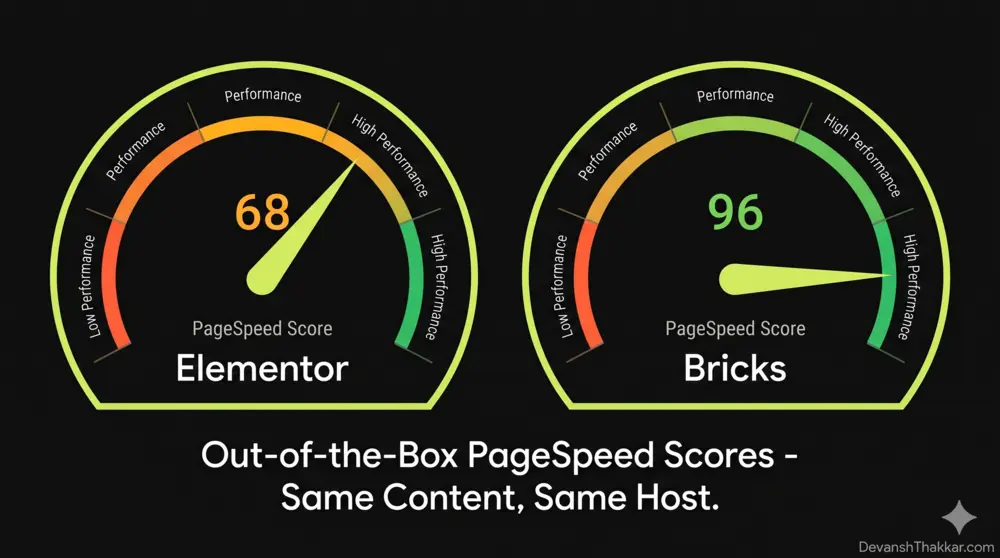
| PageSpeed (out of box) | 60-75 (needs optimization to hit 90+) | 90-98 (green scores without extra work) |
| Code Output | Heavy DOM, inline styles, wrapper divs | Clean, semantic HTML with CSS classes |
| Learning Curve | Beginner-friendly, visual, forgiving | Intermediate to advanced, requires CSS knowledge |
| Pricing Model | Annual subscription ($59-$399/year) | Lifetime license ($99-$249 one-time) |
| 3-Year Cost (1 site) | $177 ($59 x 3) | $99 (one-time) |
| 3-Year Cost (25 sites / agency) | $2,997 ($999 x 3) | $249 (one-time) |
| Template Library | Hundreds of templates and kits | Smaller, curated library + design sets |
| Third-Party Addons | Thousands (Essential Addons, JetPlugins, etc.) | Growing (BricksExtras, BricksForge, Jetera) |
| WooCommerce Support | Full (product builder, cart, checkout widgets) | Full (query loops, WooCommerce elements, product templates) |
| Theme Builder / FSE | Full site editing (header, footer, archive, single) | Full site editing (built-in theme, all templates) |
| Dynamic Data | Supported via dynamic tags | Advanced query loops, custom PHP queries, API queries |
| CSS Control | Limited (moving toward classes in V4 alpha) | Full CSS classes, Flexbox, Grid, cascade layers |
| WordPress 7.0 Compatibility | Updates expected (iframed editor may affect some widgets) | Updates expected (Bricks is a theme, not a plugin, reducing conflict surface) |
| Client Editing | Excellent (intuitive for non-technical users) | Steeper learning curve for clients |
Pro Tip: The most expensive mistake in the Elementor vs Bricks Builder 2026 decision is choosing based on what YouTube influencers recommend instead of what your specific project needs. I have built sites with both that rank on page 1 and convert at 5%+. The builder matters less than the developer using it. That said, if performance is your primary concern, Bricks wins before you write a single line of custom code. – Devansh Thakkar, WordPress Developer
Performance: Where Bricks Builder Wins Clearly
This is the biggest differentiator in the Elementor vs Bricks Builder 2026 comparison, and it is not close. Bricks generates cleaner HTML and CSS than Elementor. The result: faster load times, better Core Web Vitals, and higher Google PageSpeed scores without any optimization work.
Why the Performance Gap Exists
- Elementor uses inline styles, generates extra wrapper divs, loads jQuery by default, and adds significant DOM weight. A typical Elementor page has 800-1,500+ DOM elements. Getting PageSpeed above 90 requires caching (LiteSpeed Cache, WP Rocket), image optimization, script deferral, and CSS cleanup.
- Bricks uses CSS classes instead of inline styles, outputs semantic HTML with minimal wrappers, uses Vue.js instead of jQuery, and generates leaner DOM. A typical Bricks page has 300-600 DOM elements. PageSpeed scores of 95+ are standard without any optimization plugins.
For WooCommerce stores, this performance gap translates directly to revenue. Google reports that every 100ms of additional load time reduces conversions by up to 1%. A Bricks-built product page that loads in 1.2 seconds will outperform an unoptimized Elementor product page loading in 3.5 seconds. This matters for SEO rankings and for customer experience.
For more on WordPress performance, see my speed optimization service.
Can Elementor Match Bricks on Performance?
Yes, with effort. An experienced developer can optimize an Elementor site to hit 90+ on PageSpeed. This requires configuring LiteSpeed Cache or WP Rocket, deferring non-critical JavaScript, removing unused CSS with a tool like Asset CleanUp, compressing and serving images in WebP/AVIF, and limiting the number of Elementor widgets per page. Devansh Thakkar does this on every Elementor project as part of the standard build. But it takes 2-4 hours of optimization work that Bricks does not require.
Ecosystem: Where Elementor Wins Clearly
In the Elementor vs Bricks Builder 2026 ecosystem comparison, Elementor’s 10+ year head start is impossible to ignore:
- Elementor addons: Essential Addons (1M+ installs), JetPlugins by Crocoblock (JetEngine, JetSmartFilters, JetBooking), ElementsKit, Premium Addons, Ultimate Addons. Hundreds of third-party widget packs.
- Bricks addons: BricksExtras (the most feature-rich), BricksForge, Jetera by Crocoblock, BricksUltimate. Growing fast but still a fraction of Elementor’s ecosystem.
If your project requires a specific functionality – a booking system, an event calendar, a real estate listing plugin, a learning management system integration – the chances of finding an Elementor-compatible solution are significantly higher than for Bricks. This matters for complex client projects where custom development time directly affects the budget.
Template Libraries
Elementor’s template library includes hundreds of full page layouts, section templates, and website kits. For agencies that need to launch sites quickly, this is a genuine advantage. Bricks has a smaller, more curated library with design sets (Liv, Sizzle, Reality, Digital) that focus on quality over quantity. If you build custom designs from scratch (which Devansh Thakkar does on most projects), the template library size is irrelevant.
Pricing: The 3-Year Reality Check
This is where the Elementor vs Bricks Builder 2026 comparison gets painful for Elementor users. The pricing models are fundamentally different:
| Plan | Elementor Pro (Annual) | Bricks Builder (Lifetime) |
|---|---|---|
| 1 Site | $59/year ($177 over 3 years) | $99 one-time |
| 3 Sites | $99/year ($297 over 3 years) | $99 one-time (covers unlimited personal sites) |
| 25 Sites | $199/year ($597 over 3 years) | $249 one-time |
| 1,000 Sites (Agency) | $399/year ($1,197 over 3 years) | $249 one-time |
For a freelance developer or agency managing 10+ sites, Bricks pays for itself in the first month compared to Elementor’s annual renewal. The lifetime license means no renewal anxiety, no feature gates behind higher tiers, and no surprise price increases.
Pro Tip: If you are a freelance WordPress developer managing 10+ client sites, switching to Bricks saves you $150-$750 per year in licensing fees alone. Add the 2-4 hours per site you save on performance optimization, and the savings compound fast. I still use Elementor for projects where the client needs to self-edit, but every new developer-managed build goes on Bricks. – Devansh Thakkar, WordPress Developer
WooCommerce: Both Work, Bricks Is Faster
Both Elementor and Bricks support WooCommerce with product page templates, shop archives, cart, and checkout customization. The Elementor vs Bricks Builder 2026 WooCommerce comparison comes down to performance again:
- Elementor WooCommerce: Dedicated WooCommerce widgets (Product Title, Price, Add to Cart, Related Products, etc.). Visual, drag-and-drop product page building. Adds significant DOM weight to product pages, which affects mobile PageSpeed on large catalogs.
- Bricks WooCommerce: Product data accessed via query loops and dynamic data tags. Since Bricks 1.10, dedicated WooCommerce query settings let you pull featured products, related products, and upsells natively. Cleaner code output means faster product pages and better INP (Interaction to Next Paint) scores on mobile.
For a WooCommerce store with 50+ products where mobile PageSpeed directly affects Google rankings and checkout conversion, Bricks is the stronger choice. For a small shop with 10 products where the owner manages their own product pages, Elementor’s visual editing is more accessible.
Client Handoff: The Factor Nobody Talks About
This is the most underrated factor in the Elementor vs Bricks Builder 2026 decision. After you build the site, who maintains it?
- If the client edits the site themselves: Elementor wins. Its visual editor is intuitive enough for non-technical users. Clients can update text, swap images, and adjust layouts without calling the developer. This reduces ongoing support requests and makes the client self-sufficient.
- If a developer manages the site ongoing: Bricks wins. Its cleaner architecture, CSS class system, and component-based workflow make maintenance faster and more predictable. Changes propagate through components globally. Performance stays consistent because the code stays clean.
Devansh Thakkar uses this as the primary decision filter for client projects. When a client says “I want to update my own content regularly,” the build goes on Elementor with a training session. When the client says “just handle everything for me” (which is most of the 100+ projects delivered), the build goes on Bricks or custom code.
WordPress 7.0 Compatibility: Both Need Updates
With WordPress 7.0’s revised release schedule due any day, both builders need compatibility updates. Here is how the Elementor vs Bricks Builder 2026 compatibility picture looks:
- Elementor is a plugin. WordPress 7.0’s iframed block editor and DataViews admin changes may affect Elementor widgets that interact with the editor. Elementor typically ships compatibility updates within the first week of any major WordPress release.
- Bricks is a theme (not a plugin). This gives it a different relationship with WordPress core. Theme-level builders have a smaller conflict surface with admin changes. Bricks 2.2+ already includes updates for WordPress 7.0 preparation.
Neither builder should break on WordPress 7.0, but test on staging before updating production. This applies to every builder. See the WordPress 7.0 WooCommerce update guide for the full testing checklist.
When to Choose Elementor in 2026
Choose Elementor when:
- The client will edit the site themselves and is not technical
- You need a specific third-party addon that only works with Elementor (JetEngine, JetBooking, etc.)
- The project is a marketing site or landing page where launch speed matters more than PageSpeed score
- You are a beginner WordPress developer still learning CSS and layout concepts
- The project requires a specific Elementor template kit that saves significant design time
When to Choose Bricks Builder in 2026
Choose Bricks when:
- Performance and Core Web Vitals scores are project requirements
- You are a developer comfortable with CSS Flexbox, Grid, and class-based styling
- The project is a WooCommerce store where mobile speed affects conversions
- You manage 5+ client sites and want to minimize annual licensing costs
- You need advanced dynamic data: custom query loops, PHP queries, API queries, meta queries
- The client has a maintenance plan and the developer handles all updates
Pro Tip: The worst thing you can do in the Elementor vs Bricks Builder 2026 debate is switch mid-project. If you have an existing Elementor site that works, keep it on Elementor and optimize it. Rebuilding on Bricks means redesigning every page from scratch because page builder content does not transfer between builders. The switch only makes sense for new projects or full redesigns where you are starting fresh anyway. – Devansh Thakkar, WordPress Developer
What About Elementor’s Editor V4?
Elementor is developing Editor V4, their biggest overhaul in eight years. It introduces CSS classes, global variables, and a class-based styling system for the first time. In other words, Elementor is adopting the approach Bricks has used since launch.
Editor V4 is currently in alpha and not production-ready. When it ships (no confirmed date in 2026), it could significantly narrow the performance gap between Elementor and Bricks. If Elementor V4 delivers clean code output comparable to Bricks while maintaining Elementor’s superior ecosystem and beginner-friendly editing experience, the Elementor vs Bricks Builder 2026 debate will need a complete revision.
Until that happens, the comparison stands as outlined in this article. Judge builders by what they ship today, not what they promise for next year.
Need a Site Built on the Right Builder for Your Project?
If you are not sure whether Elementor or Bricks is right for your project, Devansh Thakkar builds with both daily and will recommend the right tool based on your specific requirements, not personal bias.
With 5+ years of experience, 100+ projects, 100% Upwork job success, and deep expertise in both Elementor and Bricks Builder, the recommendation is always based on what produces the best result for your project: performance, client editing needs, budget, and long-term maintainability.
Also available: speed optimization (including Elementor performance tuning), WooCommerce development, bug fixing, and ongoing maintenance.
Book a call or send a message with your project requirements, and I will tell you which builder is the right fit and why.
Frequently Asked Questions
Is Bricks Builder faster than Elementor in 2026?
Yes. Bricks Builder scores 90-98 on Google PageSpeed out of the box. Elementor typically scores 60-75 without optimization. An experienced developer can optimize Elementor to 90+, but Bricks achieves those scores by default due to cleaner HTML output, CSS classes instead of inline styles, and a leaner DOM structure.
Should I switch from Elementor to Bricks Builder?
Only if you are starting a new project or doing a full site redesign. Elementor and Bricks content does not transfer between builders. Migrating means rebuilding every page from scratch. If your existing Elementor site works, optimize it rather than rebuilding.
Which is cheaper, Elementor or Bricks Builder?
Bricks is significantly cheaper long-term. Bricks uses a lifetime license ($99-$249 one-time) while Elementor charges annually ($59-$399/year). For an agency managing 25 sites over 3 years, Elementor costs $597+ while Bricks costs $249 total.
Can non-technical clients use Bricks Builder?
Bricks has a steeper learning curve than Elementor. Non-technical clients can learn basic content editing in Bricks, but Elementor’s visual editor is more intuitive for beginners. If client self-editing is a priority, Elementor is the safer choice.
Does Bricks Builder support WooCommerce?
Yes. Bricks supports full WooCommerce integration with product templates, shop archives, cart, and checkout customization. Since version 1.10, Bricks includes dedicated WooCommerce query settings for featured products, related products, and upsells. The WooCommerce pages built with Bricks load faster than Elementor equivalents due to cleaner code output.
Is Elementor or Bricks better for SEO?
Bricks has a slight SEO advantage because of faster page load times, lower DOM size, and better Core Web Vitals scores. Page speed is a Google ranking factor. However, both builders work with SEO plugins like Rank Math and Yoast, and both support proper heading hierarchy, schema, and meta tag configuration. The SEO difference comes from performance, not from builder-specific SEO features.
What is Elementor Editor V4?
Editor V4 is Elementor’s upcoming major overhaul introducing CSS classes, global variables, and class-based styling. It is currently in alpha and not production-ready. When released, it could narrow the performance gap with Bricks by generating cleaner code output.
Can I use Elementor and Bricks on the same site?
No. Bricks Builder is a WordPress theme with a built-in visual editor. It is not compatible with Elementor. You must choose one builder per site. You cannot install both simultaneously.
Which builder does Devansh Thakkar recommend?
Devansh Thakkar recommends Elementor for client-managed sites where non-technical users need to edit content independently, and Bricks Builder for developer-managed sites where performance, clean code, and long-term maintainability are priorities. For WooCommerce stores where mobile speed affects revenue, Bricks is the default recommendation. Visit DevanshThakkar.com to discuss your specific project.
Is Bricks Builder safe and well-supported?
Yes. Bricks is actively developed with regular updates (version 2.3 as of early 2026), has a responsive support team, an active community forum, and a growing ecosystem of third-party addons and courses. The lifetime license includes all future updates and support.