
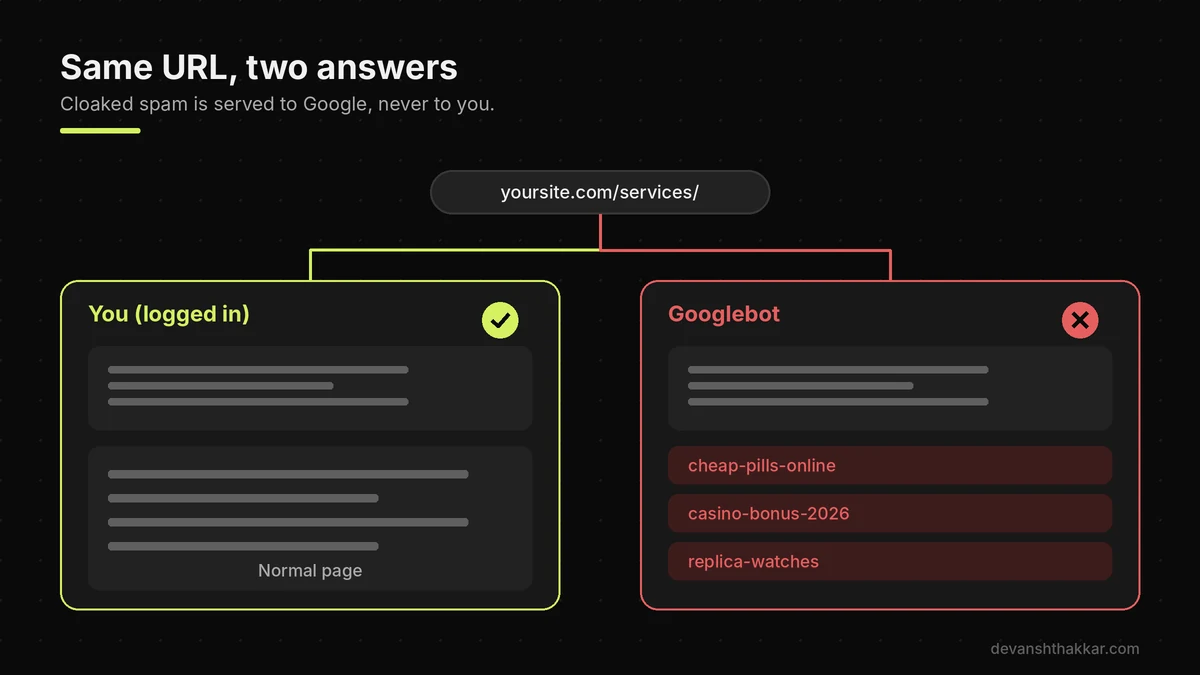
- A hacked WordPress site often looks normal to its owner, because modern malware hides from logged-in admins and shows spam only to Google.
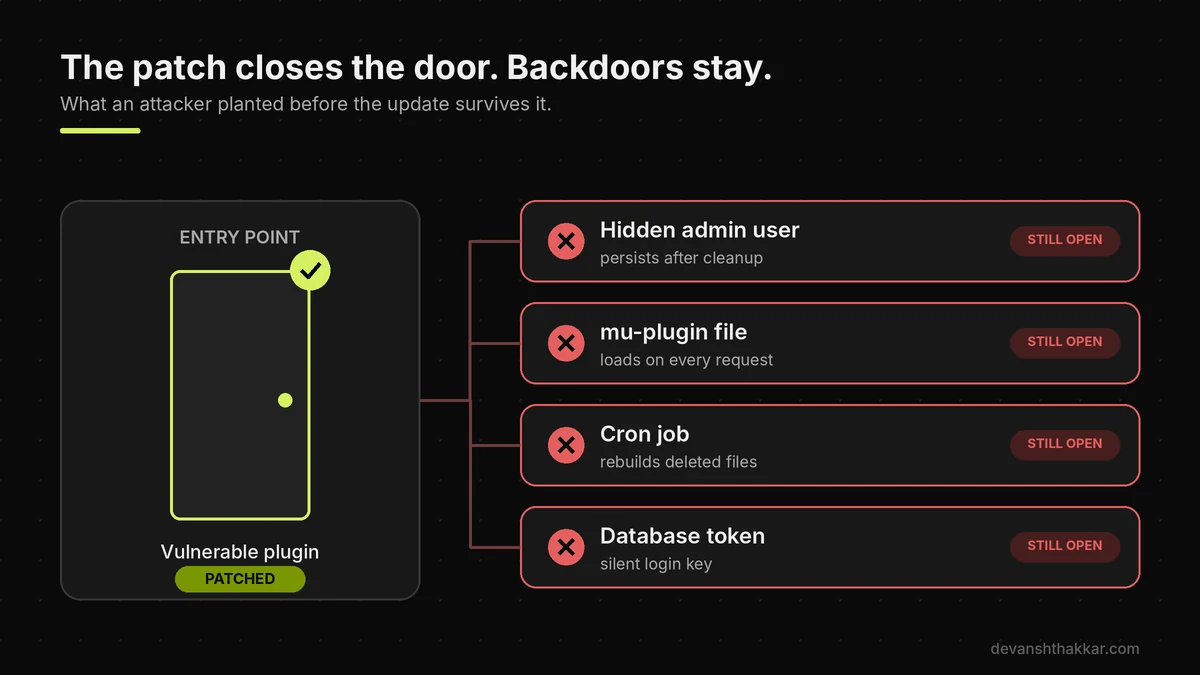
- Updating the vulnerable plugin closes the entry point, but hidden admins, mu-plugins and cron jobs planted before the patch stay behind.
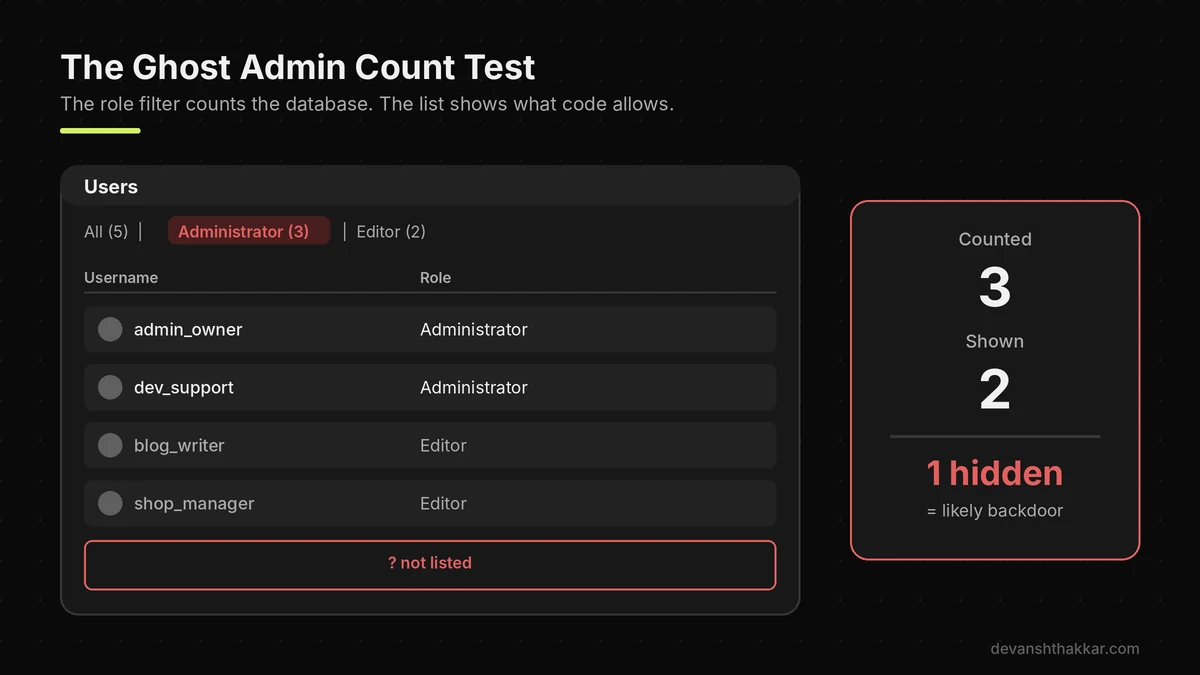
- Compare the Users screen role count with the rows listed. A mismatch usually means an account is being hidden by code.
- In October 2026, stolen UpdraftCentral keys were used to push backdoor plugins and fake Editor accounts with admin powers to WordPress sites.
- Contain first, preserve evidence, then clean, rotate every credential and salt, and fix the entry point, or the site gets reinfected.
A hacked WordPress site shows itself through unknown users, spam pages in Google, redirects that only visitors see, or PHP files where none belong. To check, review Search Console’s Security Issues report, compare user counts, verify core file checksums, and inspect the uploads folder, mu-plugins, database options and cron jobs.
Across 250+ WordPress and WooCommerce projects over 7+ years, the hacked WordPress site I see most often is not the dramatic one. It is the quiet one, where the site still loads, orders still arrive, and an extra account has been sitting in the database for weeks. October 2026 produced a lot of those. So if you patched a plugin this month and moved on, this guide shows you how to confirm nobody got in before you did.
How Do I Know If My WordPress Site Is Hacked?
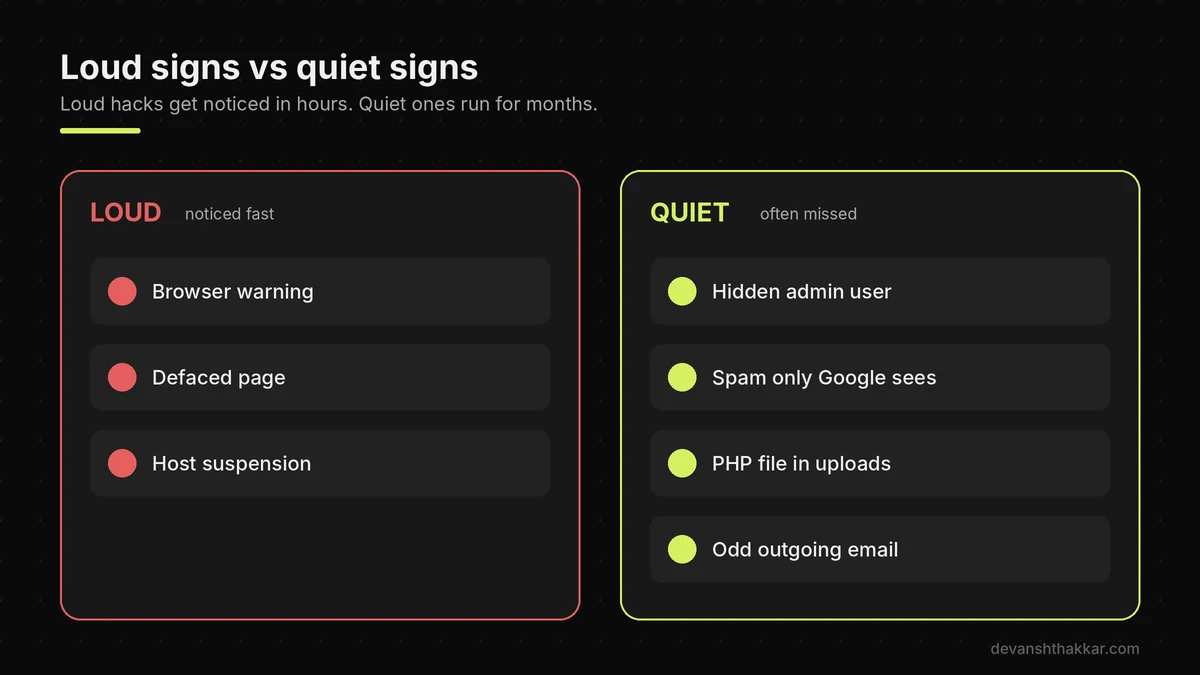
You know your WordPress site is hacked when you find something you did not create: a user, a plugin, a page in Google, a redirect, or a PHP file. The loud signs are easy to spot. Google shows “This site may be hacked” in results, Chrome shows a red warning, the homepage is defaced, or your host suspends the account.
However, most attacks today are built to stay quiet, because a hidden foothold is worth more than a defaced homepage. For example, a hacked WordPress site may show Japanese spam pages to Googlebot while you see your normal homepage. It may redirect visitors who arrive from search but not visitors who type the address. It may also send spam email that quietly ruins your domain reputation. So a hacked WordPress site with no loud signs is still a hacked WordPress site. In short, treat any unexplained change as evidence until you can explain it, and check the hidden layers rather than the homepage.
The quiet signs most owners miss
Watch for these smaller clues. Your site search in Google returns pages you never wrote. Search Console shows a sudden spike in indexed pages or impressions for pharmacy, casino or replica brand terms. Your host’s email logs show messages you never sent. Meanwhile, the Plugins screen lists something with a generic name like “Site Health Cache” or “Speed Kit”. Admin passwords stop working, or a password reset email arrives that you did not request. Finally, a security plugin you installed suddenly shows as deactivated. None of these alone proves you have a hacked WordPress site. Together, though, they are a strong reason to run the checks below.
The next question is why a hacked WordPress site can stay hacked after every plugin is up to date.
Why Updating Does Not Clean a Hacked WordPress Site
Updating does not clean a hacked WordPress site, because the update only closes the hole the attacker used. Everything they planted through that hole stays where they left it. Think of a burglar who copied your house key. Changing the lock stops the next copy. It does nothing about the burglar already hiding in the loft. Attackers know this, so the first thing an automated exploit does is install a second way back in. That second door is usually a new admin account, a must-use plugin, a scheduled task, a stored token in the database, or a PHP file in the uploads folder.
The October 2026 campaigns show this clearly. The UpdraftCentral backdoor created an account that looked like an Editor but held admin powers. Patchstack noted that the account “persists after the plugin is removed.” So an owner who simply updated and deleted the odd plugin still had a hacked WordPress site, with an intruder holding a working login.
What October 2026 taught us about persistence
Three incidents in one month followed the same pattern. First, the Bricksforge flaw (CVE-2026-85097, CVSS 10) let attackers upload PHP files through a form, with webshells landing as login_admin_*.php files in the uploads folder, according to The Hacker News. Second, Patchstack reported active exploitation of Ninja Forms (CVE-2026-94504), used to create rogue admin accounts. Third, the UpdraftCentral key theft pushed 99 differently named backdoor plugins. In every case, the vendor patch stopped new attacks. However, none of those patches cleaned a hacked WordPress site of what was already planted.
What most guides get wrong: they tell you to “update everything and run a scan.” A scan helps, but scanners mostly look for known malware signatures in files. A fake Editor account with extra capabilities is not malware. It is a normal database row, so many scans report a hacked WordPress site as clean.
Pro tip: If you run UpdraftPlus, check for UpdraftCentral keys even if you never used UpdraftCentral. Patchstack found the TeamUpdraft connection checkbox creates keys by default. Delete them under UpdraftPlus Backups, Advanced Tools, UpdraftCentral.
Before running all nine checks, a quick triage tells you how urgent your situation is.
Quick Triage: Is Your Site Compromised?
You can triage a possibly hacked WordPress site in about a minute by answering four questions about what you noticed, which plugins you run, your user counts, and stray PHP files. The answers will not replace a full check. They do tell you whether to keep reading calmly, run the checks today, or stop and contain the site right now.
Speed matters here. Patchstack’s 2026 security report found that the weighted median time to first exploit for heavily targeted flaws was just 5 hours. So a site left unpatched for a weekend deserves a careful look. Equally, many owners panic over a slow site that is really a caching problem, not a hacked WordPress site. This diagnostic separates the two. Answer honestly, including “I do not know”, because not knowing is itself useful information about how much checking you still have to do.
Whatever your result, the nine checks below are the same, and they work from the outside in.
How to Check If a WordPress Site Is Hacked: 9 Checks
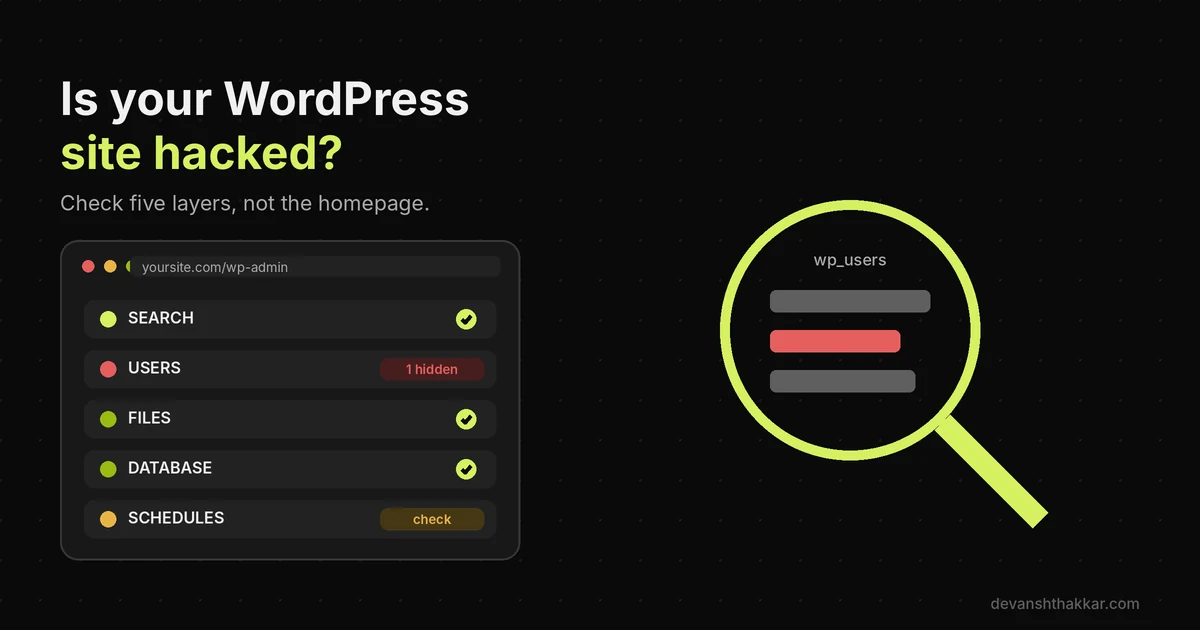
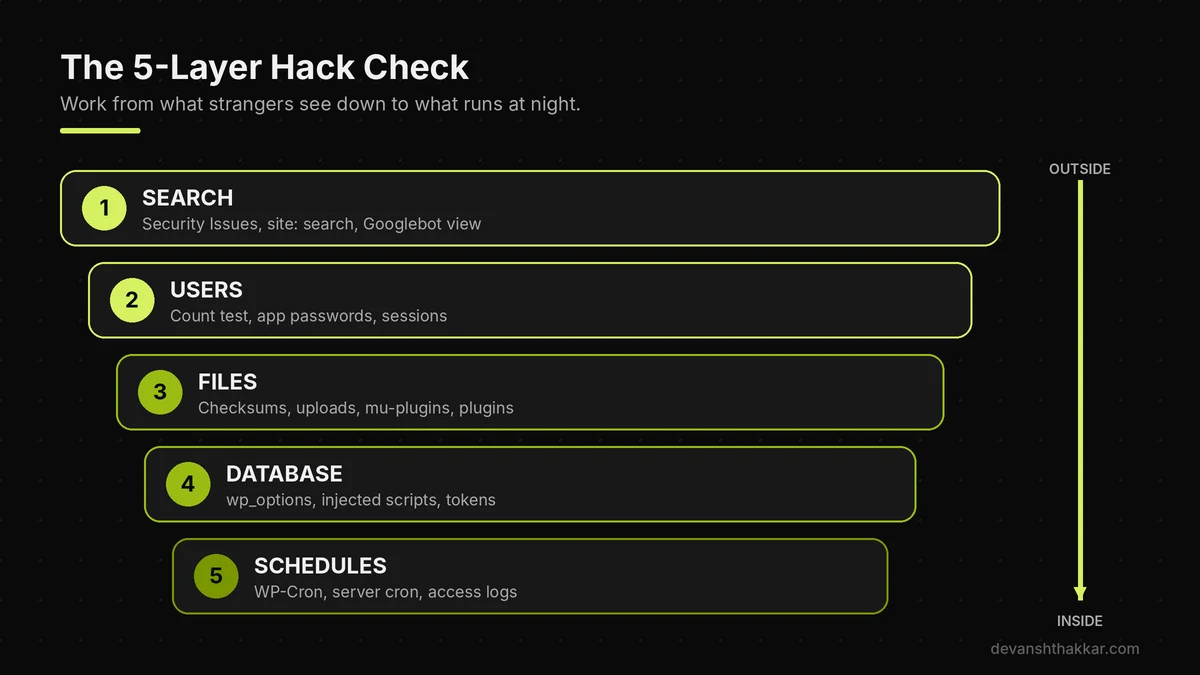
To check if a WordPress site is hacked, work through five layers in order: what Google sees, who can log in, which files changed, what the database stores, and what runs on a schedule. I call this the 5-Layer Hack Check, and it works on any hacked WordPress site. The order matters. Search comes first because it shows you what strangers already see, and because a Google warning changes how fast you must act. Users come next because a hidden login is the most common backdoor and the easiest to miss. Files, the database and schedules follow, since that is where attackers store code that rebuilds everything you delete.
Most checks need only wp-admin, your hosting file manager and phpMyAdmin. A few go faster with WP-CLI over SSH. Take notes as you go, with dates and file names, because a hacked WordPress site leaves a timeline. If you later need a developer or your host, those notes save hours. Above all, do not delete anything yet. Find first, then contain, then clean.
1. Check Search Console's Security Issues report
Open Google Search Console and go to Security and Manual Actions, then Security Issues. Google lists hacked content, code injection, content injection and URL injection here, with sample URLs. According to Google's Security issues report help page, the samples are not a complete list, so treat them as a starting point. Next, search Google for site:yourdomain.com and scan for pages you never published. On a hacked WordPress site, spam often hides deep, so add terms like "casino", "viagra" or Japanese characters to the search.
2. View your pages the way Googlebot does
Many hacks use cloaking, so a hacked WordPress site can look perfect to you. The spam appears only for search engines. Google's own guide to checking for a hack explains that a page may look empty to you while Google "will see spammy words and links." So use URL Inspection in Search Console. Then open View Crawled Page and read the HTML. Also open your site in a private window from a Google search result, not by typing the address, because some redirects fire only for search visitors.
3. Run the Ghost Admin Count Test
This is the check I rely on most, and very few guides mention it. Go to Users. At the top, WordPress shows role filters such as "Administrator (3)". That number comes from a direct count of the database. The list underneath comes from a normal user query, which malware can filter with a hook so its own account disappears. So count the admin rows actually listed. If the filter says three and you see two, code is hiding a user, and you are almost certainly looking at a hacked WordPress site. Additionally, look past the Administrator role. The UpdraftCentral backdoor created Editors that secretly held admin capabilities, so check every unfamiliar account, whatever its role.
Pro tip: Do not trust WP-CLI's user list for this. Malware usually hides users from inside a must-use plugin, and mu-plugins still load when you add--skip-plugins. Query thewp_usermetatable in phpMyAdmin for capabilities rows containingadministratorormanage_optionsinstead.
4. Review application passwords and active sessions
Application passwords let an app log in without your main password, and they survive a password reset. Open each admin profile and scroll to Application Passwords. Revoke anything you do not recognise. Then, on the same screen, use "Log Out Everywhere Else" to end other sessions. Attackers like both, because owners usually reset passwords and assume the job is done.
5. Verify WordPress core files against official checksums
Core files should match WordPress.org exactly. Over SSH, run wp core verify-checksums, which, according to the WP-CLI documentation, "verifies WordPress files against WordPress.org's checksums." Run wp plugin verify-checksums --all for plugins from the official directory as well. Without SSH, a security plugin such as Wordfence offers a similar file comparison. Any changed or unknown file in wp-admin or wp-includes is a strong sign of a hacked WordPress site.
6. Search the uploads folder and mu-plugins
The uploads folder should hold images, PDFs and similar media. It should almost never hold PHP. Open wp-content/uploads in your file manager and search for .php, including odd extensions like .phtml and .php5. Then open wp-content/mu-plugins. Must-use plugins load on every request and cannot be switched off from the Plugins screen, which makes them a favourite hiding place on a hacked WordPress site. If you did not put a file there, ask whoever did.
Found PHP files in uploads or a user you cannot explain?
That is a hacked WordPress site, not a maybe. I contain it, remove every backdoor and fix the entry point, on a fixed quote built from a $30/hour emergency rate. Get emergency WordPress support.
7. Audit installed plugins and themes
Next, go to Plugins and read every name and description. Backdoors on a hacked WordPress site use dull, believable names. In the UpdraftCentral campaign, every sample carried the same description, "Small maintenance toolkit: keeps option storage tidy," according to Patchstack. Also check the Must-Use and Drop-in tabs if they appear. Compare the plugin folder list in wp-content/plugins with the Plugins screen, because a plugin can hide itself from the screen but not from the folder. Delete inactive themes you do not use, since old themes are common entry points.
8. Inspect the database for injected settings and scripts
In phpMyAdmin, open wp_options. Check that siteurl and home show your real domain. Look at active_plugins for entries you do not recognise. Then search the options and posts tables for <script, eval( and base64_decode. Also look for odd option names, such as one ending in _sync_token, which Patchstack linked to the UpdraftCentral backdoor. Your table prefix may differ from wp_, so check wp-config.php first.
9. Check scheduled tasks and server logs
Finally, look at what runs without anyone clicking. Run wp cron event list, or install WP Crontrol to see scheduled hooks in the dashboard. Unknown hooks that fire every minute are a classic sign of a hacked WordPress site. Then open the cron jobs in your hosting panel, because server cron can rebuild deleted files from outside WordPress. Last, download recent access logs and search for POST requests to unusual files, especially anything inside uploads.
If any check turned something up, the order of your next moves decides whether the cleanup sticks.
What to Do First When You Find a Hack
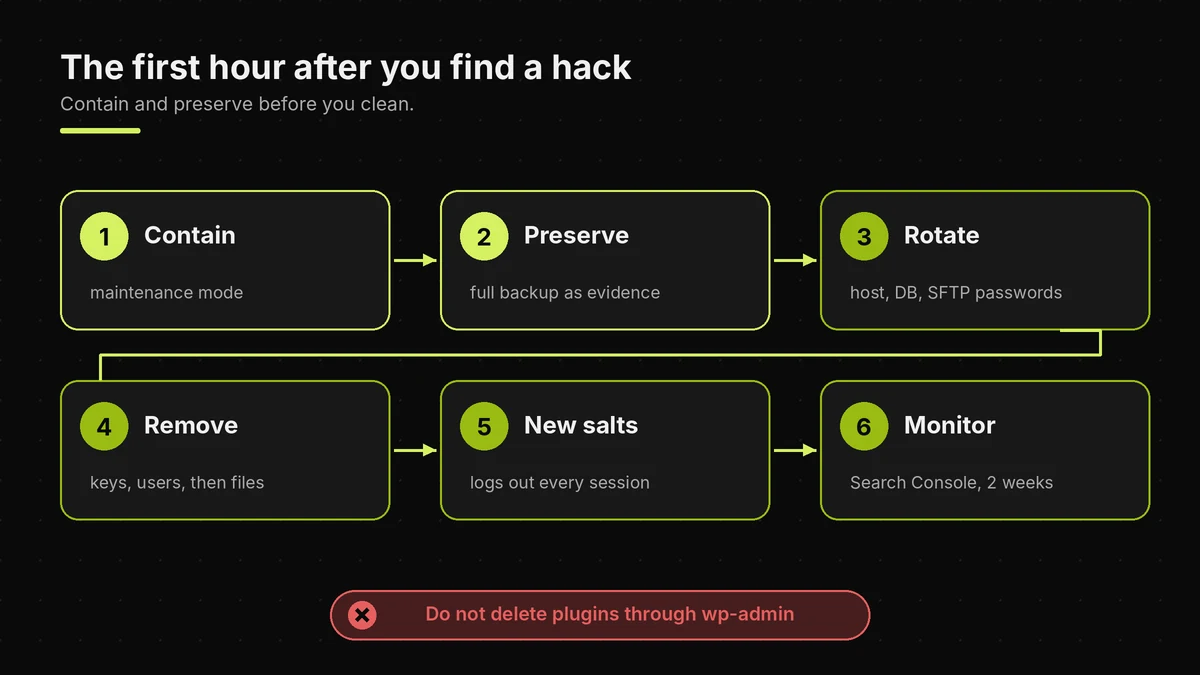
When you find a hacked WordPress site, contain it first, preserve evidence second, and only then start cleaning, because hasty deleting destroys the clues. Those clues reveal the entry point. Start by putting the site into maintenance mode or restricting access by IP through your host, especially on a store that handles customer data. Next, take a full backup of the hacked WordPress site as it is now. That feels strange. However, this copy is your evidence, and your host or a developer will need it to trace the entry point.
Then change your hosting, database, SFTP and email passwords from a clean device. After that, remove backdoors in a careful order: delete keys and tokens first, remove the hidden users, move suspicious plugins out of the web root, and only then delete files. Finally, rotate the WordPress salts in wp-config.php, which logs out every session at once.
Reader trap: restoring a backup without finding the entry point
Restoring yesterday's backup feels like the fastest fix. Sometimes it is. However, if the backup was taken after the intruder got in, you restore the backdoor too. Even a clean backup brings back the same vulnerable plugin, so the hacked WordPress site is reinfected within days. Before restoring, find the date of the first suspicious file or user, and pick a backup from before it. Then update everything immediately after the restore. On a WooCommerce store, never restore over the live database, or you lose every order placed since the backup.
Cleaning the site is half the job, and the other half is making sure the attacker cannot simply walk back in.
How to Stop a Hacked WordPress Site Getting Reinfected
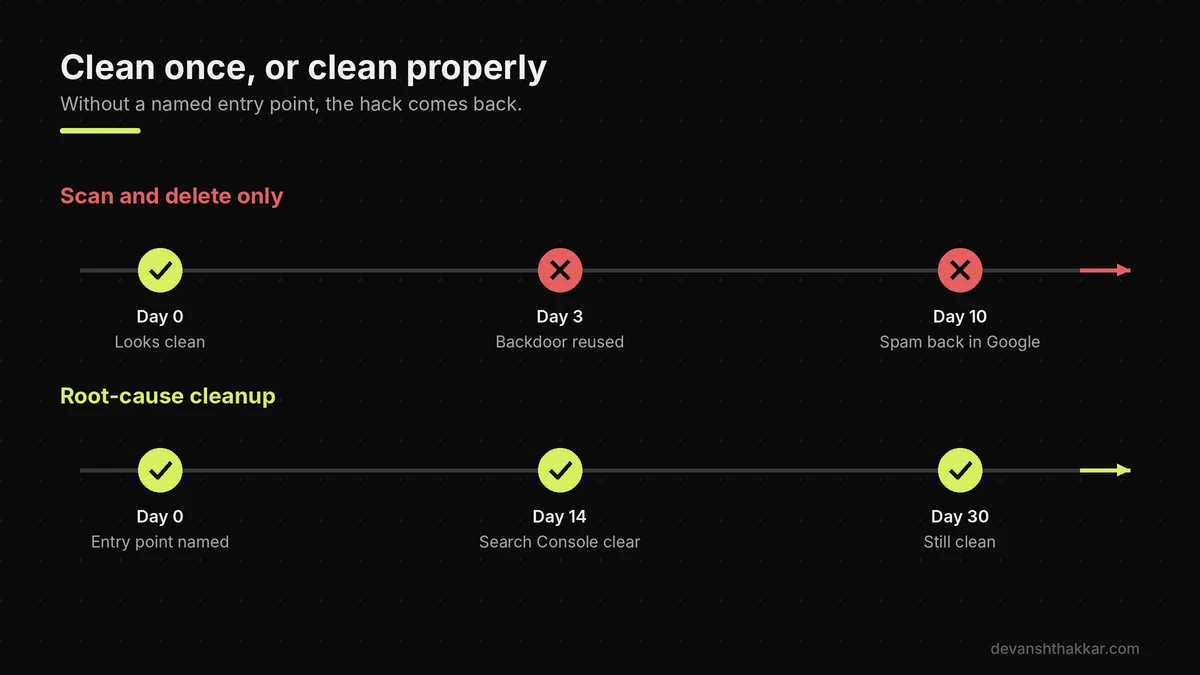
You stop a hacked WordPress site getting reinfected by fixing the entry point, removing every persistence method, and then closing the common doors that automated attacks try first. Reinfection is the most frustrating part of fixing a hacked WordPress site, and it almost always has one of three causes. Either the vulnerable plugin is still installed, a second backdoor was missed, or a stolen credential still works. So treat the cleanup of a hacked WordPress site as incomplete until you can name the entry point.
The numbers explain why this matters. According to Patchstack's State of WordPress Security in 2026 report, 91% of new vulnerabilities in 2025 were found in plugins, and 46% did not receive a fix in time for public disclosure. (Patchstack, 2026) In practice, that means some plugins you rely on will be exposed before any update exists, so layered defences matter more than any single tool.
The hardening list that blocks most repeat attacks
Remove plugins and themes you do not use, rather than just deactivating them. Turn on two-factor authentication for every admin and editor account. Disable file editing in the dashboard by adding define( 'DISALLOW_FILE_EDIT', true ); to wp-config.php. Block PHP execution inside the uploads folder at the server level. Also disable XML-RPC if nothing on your site needs it. Meanwhile, keep off-site backups for at least 30 days, so you always have a version from before any intrusion. Finally, review remote management tools such as UpdraftCentral, ManageWP or MainWP, because one stolen key can reach every connected site. A professional WordPress security hardening pass covers all of this in one go.
Pro tip: After any cleanup, check Search Console daily for two weeks. If spam returns to a hacked WordPress site, Google often sees it before you do, because the attacker still serves it only to crawlers.
If you have run the checks and still are not sure, that uncertainty is itself the signal to get a second pair of eyes.
Still not sure whether your hacked WordPress site is clean?
Quiet backdoors are designed to beat a quick look, and a missed one costs more than a proper check. I audit all five layers, name the entry point and harden the site, without losing orders or rankings. Get emergency hack cleanup or book a free call.
Frequently Asked Questions
How do I know if my WordPress site has been hacked?
Your WordPress site has likely been hacked if you find users, plugins, pages or PHP files you did not create, or if Google or Chrome shows a warning. Many hacks stay quiet, so also check Search Console's Security Issues report, compare user counts on the Users screen, and search the uploads folder and mu-plugins for unknown PHP files.
Can a WordPress site be hacked without me noticing?
Yes, a WordPress site can be hacked for months without the owner noticing. Modern malware hides users from the Users list, loads from must-use plugins, and shows spam only to Googlebot through cloaking. The site looks normal to a logged-in admin. That is why checking the database, file system and Search Console matters more than looking at the homepage.
Does updating plugins remove malware from WordPress?
No, updating plugins does not remove malware. An update closes the vulnerability, but backdoors planted before the update stay in place. Hidden admin accounts, mu-plugin files, injected database options and scheduled tasks all survive. After any critical plugin advisory, update first, then check for these leftovers, or a hacked WordPress site keeps a working way back in for the attacker.
How do I find hidden admin users in WordPress?
To find hidden admin users, compare the Administrator count shown in the role filter on the Users screen with the number of admin rows listed. A higher count means code is hiding an account. Confirm in phpMyAdmin by searching the usermeta table for capabilities containing administrator or manage_options, because hidden users can also escape WP-CLI.
Was my site affected by the UpdraftCentral key compromise?
Your site may be affected if UpdraftPlus had an UpdraftCentral key in October 2026, even if you never used UpdraftCentral. Look for plugins described as a "Small maintenance toolkit", accounts named data-ops43 or media-staff96, Editors with admin powers, and an option ending in _sync_token. Update to UpdraftPlus 1.26.13 or 2.26.13 and delete old keys.
Will Google remove the hacked site warning automatically?
Google does not always remove a hacked site warning on its own. After cleaning every issue across the whole site, open the Security Issues report in Search Console and select Request Review, describing what you fixed. Google's help page advises against resubmitting while a review is pending, because that can make the wait longer.
Should I restore a backup or clean a hacked WordPress site?
Restore a backup only if it predates the first sign of intrusion and you will patch the entry point straight away. Otherwise, clean the hacked WordPress site in place, because a recent backup may contain the backdoor. On a WooCommerce store, never restore over the live database, since every order placed after that backup would be lost.
Is my WordPress site hacked if it is just slow?
Slowness alone rarely means a hacked WordPress site. Caching problems, heavy plugins and hosting limits are far more common causes. However, a sudden slowdown with high CPU, unexplained outgoing email or traffic spikes to strange URLs can mean the server is sending spam or mining crypto. Check the access logs and the uploads folder before ruling it out.
Is my WordPress site hacked right now?
Your WordPress site is likely hacked right now if the Users count is higher than the rows listed, PHP files sit in uploads, unknown files appear in mu-plugins, or Search Console reports a security issue. If none of those apply, the risk is low. The 60-second triage in this guide scores your site from four quick answers.
When should I hire a professional to clean a hacked WordPress site?
Hire a professional when you find hidden users, PHP in uploads, or a Google warning, when the site handles payments or customer data, or when a cleanup came back. Those cases need a named entry point, not just a scan. Emergency WordPress support covers containment, cleanup, hardening and the Google review request.
Conclusion
A hacked WordPress site rarely announces itself, so checking it means looking below the homepage. Three points matter most. First, a patch closes the entry point but leaves every backdoor in place. Second, the Ghost Admin Count Test and a look inside uploads and mu-plugins catch most quiet hacks in minutes. Third, contain and preserve before you clean, then name the entry point, or the site comes back infected. If you patched anything in October 2026, run the 5-Layer Hack Check this week rather than waiting for Google to tell you.
Think your site has a backdoor? Get it confirmed and cleaned this week.
I check all five layers, remove every hidden user and file, fix the entry point, rotate credentials and request the Google review, with a fixed quote agreed before work starts. Get your hacked site cleaned now.
This article was last reviewed and updated in November 2026 to reflect the latest WordPress security incidents and cleanup practices.