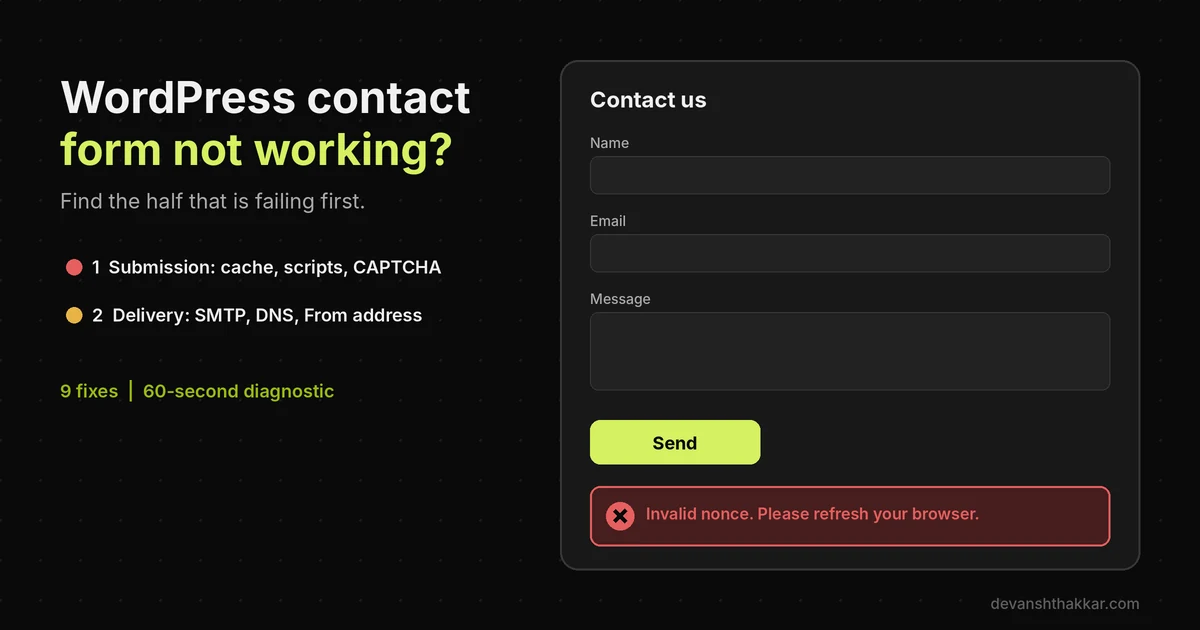
- A WordPress contact form fails in one of two halves: the submission never saves, or the entry saves but the email never arrives.
- Page caching longer than 12 hours can serve expired WordPress nonces, so visitors see “Invalid nonce” while logged-in owners see nothing wrong.
- LiteSpeed Cache ships with a 7-day public cache TTL, while WordPress nonces last only 12 to 24 hours.
- Microsoft turns off Basic authentication for SMTP AUTH by default at the end of December 2026, which breaks password-based Outlook SMTP setups.
- Send form email through authenticated SMTP with SPF, DKIM and DMARC, then test the form weekly as a logged-out visitor.
A contact form in WordPress usually stops working for one of two reasons: the submission fails before it is saved, or the entry is saved but the notification email never arrives. Check the form plugin’s entries first. No entry means a submission problem, such as caching or scripts. An entry with no email means a delivery problem.
Across 250+ WordPress projects over 7+ years, the broken contact form is the most expensive bug I see that nobody notices. The site looks fine. The form shows a spinner or a polite error, the visitor shrugs and calls a competitor, and the owner assumes it was a quiet month. Weeks later, someone finally asks why enquiries stopped. By then the leads are gone for good. Most owners try to handle this themselves, and that’s where the real cost begins.
Why Is My WordPress Contact Form Not Working?
Your WordPress contact form is not working because something fails in either the submission half or the delivery half of the process. In the submission half, the visitor clicks send, the browser runs a script, and WordPress checks a security token called a nonce before saving the entry. Caching, script conflicts, CAPTCHA errors and security plugins break this half. In the delivery half, WordPress hands the entry to its mail function, and a mail server tries to deliver it to your inbox. Missing SMTP authentication, wrong DNS records and blocked server IPs break this half.
The two halves have completely different fixes. That is why generic advice to “install an SMTP plugin” helps some owners and does nothing for others. So before you change any setting, find out which half is failing. One quick check does that, and most form plugins already include it.

The Two-Halves Test
Open a private browser window, where you are not logged in, and submit your own contact form. Then check the form plugin’s entries screen. WPForms, Forminator, Gravity Forms and Fluent Forms all store entries in the dashboard. Contact Form 7 does not by default, so add Flamingo, its companion plugin, to get a record. If the test entry is there, the submission half works and the problem is email delivery. If the entry is missing, the problem is the submission itself. Also note any message on screen, such as “Invalid nonce” or “Your session has expired.” That exact wording is your best clue.
Pro tip: Always run the test logged out. Most caching plugins skip the cache for logged-in users, so the owner sees a fresh, working contact form while every real visitor gets the cached, broken one.
That logged-in blind spot leads straight to the most common hidden cause.
Why Contact Forms Fail on Cached Pages
Contact forms fail on cached pages because the cached HTML can hold a security token that has already expired. Many form plugins embed a WordPress nonce in the page to prove the submission came from your site. According to the WordPress nonces documentation, “by default, a nonce has a lifetime of one day,” and in practice a nonce stays valid for between 12 and 24 hours. Page caches often keep pages much longer. LiteSpeed Cache, for example, ships with a default public cache TTL of 604,800 seconds, which is 7 days, according to Liquid Web’s LiteSpeed Cache guide.
So a visitor on day three loads a page with a two-day-old token. Their submission is rejected with a message such as “Invalid nonce. Please refresh your browser.” Meanwhile, the owner tests while logged in, bypasses the cache, and sees a working contact form. Nothing in the dashboard looks wrong.

What this looks like on a real site
In November 2026 I traced a contact form that had gone silent for weeks to exactly this. Forminator was installed, emails were configured, and every logged-in test passed. However, the public cache TTL was 7 days with Edge Side Includes switched off. Posting a stale token to the form handler returned “Invalid nonce” every time, while a fresh token passed. Cutting the public TTL to 10 hours and purging the cache fixed it the same evening. After fixing contact forms across dozens of sites, the pattern is always the same: a cache setting tuned for speed silently outlives a security token tuned for safety.
What most guides get wrong: they tell you to “clear your cache” as a quick fix. Clearing helps for a day. Then the cache refills, the tokens age, and the form breaks again a day or two later. The lasting fix is a TTL under 12 hours, an exclusion for the form page, or a nonce that refreshes itself.
If you are not sure which cause applies to your site, the diagnostic below narrows it down.
Diagnose It: What Is Breaking Your Contact Form?
You can diagnose a broken contact form in under a minute by answering up to four questions about entries, error messages and email. The first question applies the Two-Halves Test. If no entry is saved, the next question looks at what the visitor sees on screen, because each error message points to a different cause. If an entry is saved but no email arrives, the next question looks at how your site sends mail, because PHP mail, password-based SMTP and API-based services fail in different ways. Each path ends with the most likely cause, a concrete next step, and a way to get help if you need it.
It will not replace a full audit, but it stops you fixing the wrong half. That matters, because the most common wasted effort I see is an owner installing SMTP plugins for a form that never submits in the first place.
Whatever your result, the nine fixes below cover every cause in the tree.
9 Fixes for a WordPress Contact Form Not Working
The nine fixes for a WordPress contact form not working split into five submission fixes and four delivery fixes, in the order you should try them. Submission fixes come first, because an email setting cannot help a form that never saves. Each fix targets one specific failure, so stop as soon as the logged-out test passes and an email lands in your inbox. Most fixes need only the WordPress dashboard, your caching plugin and your domain's DNS settings. A few need the browser's developer tools, which every modern browser includes.
If your contact form is built with Contact Form 7, WPForms, Forminator, Gravity Forms or Fluent Forms, the steps are the same, although the menu names differ. Keep a short note of what you change. If the form still fails, that list saves a developer most of the diagnosis time.
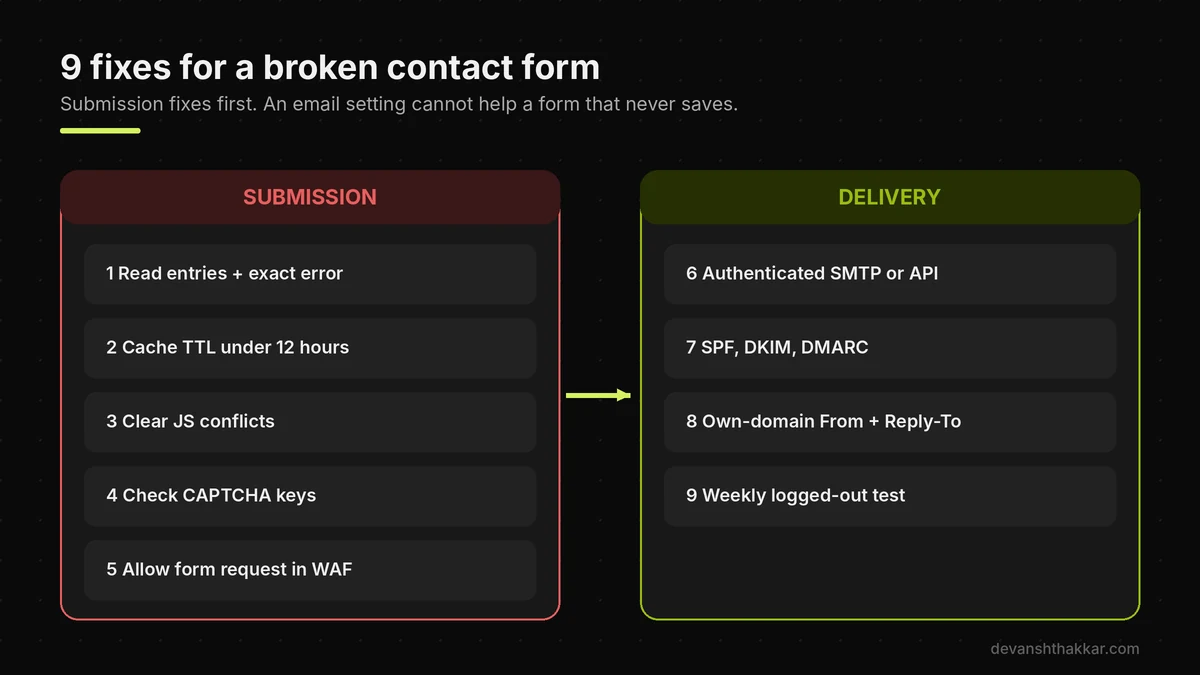
1. Read the entries and the exact error
Run the Two-Halves Test as a logged-out visitor. Note whether an entry is saved and copy any message word for word. "Invalid nonce" points to caching. A CAPTCHA message points to keys. A spinner points to scripts or a blocked request. No message and no entry often means the form's JavaScript never loaded at all.
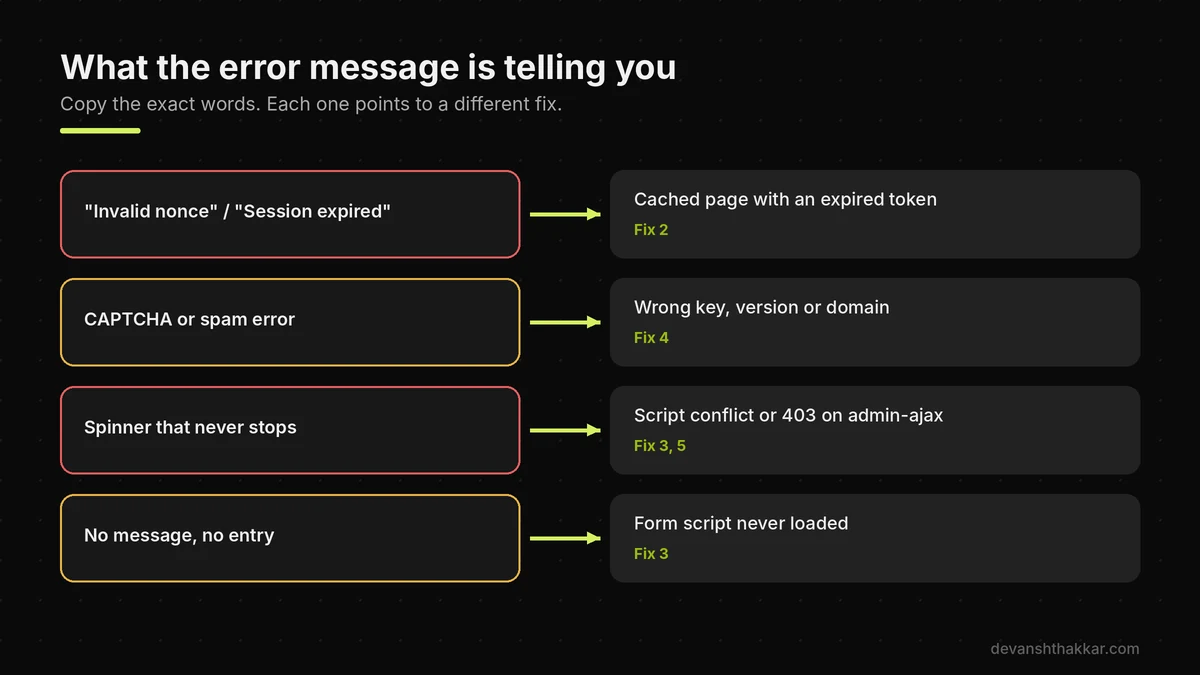
2. Stop the cache outliving the form's token
In your caching plugin, set the public cache lifetime below 12 hours. In LiteSpeed Cache, that is Cache, TTL, Default Public Cache TTL, and 36,000 seconds (10 hours) is a safe value. Alternatively, exclude your contact page from the cache, or turn on the plugin's option for nonces if it has one. Then purge the whole cache, because existing cached pages still hold old tokens. Retest logged out the next day, not just straight away.
3. Clear JavaScript conflicts and over-optimisation
Open the browser console with F12, submit the contact form, and look for red errors. Optimisation plugins often break forms by delaying, combining or deferring the form's script. Exclude the form plugin's scripts from "Delay JavaScript" and "Combine JS" settings in LiteSpeed Cache, WP Rocket or similar tools. Then test again. If the error names a theme or another plugin, deactivate that one on a staging copy to confirm.
4. Check CAPTCHA and Turnstile keys
Spam protection is a common silent blocker. Confirm the site key matches the CAPTCHA version your form plugin expects, because reCAPTCHA v2 and v3 keys are not interchangeable. Check that your exact domain, including any www version, is listed in the CAPTCHA console. If you recently moved domains or added staging, the keys may still point to the old one.
5. Let the form's request through your security layer
Security plugins and firewalls sometimes block the request a contact form makes when it submits. Open the browser's Network tab, submit the form, and look for a request to admin-ajax.php or wp-json that returns 403. If you see one, check the firewall log in Wordfence, your host's WAF or Cloudflare, and allow that specific rule for the form request rather than disabling protection.
Form saving nothing, or failing only for visitors?
Cache, script and firewall conflicts are quick to find with the right tools and slow by trial and error. Get your contact form fixed by a developer.
6. Send email through authenticated SMTP or an API
By default, WordPress sends mail through the server's own PHP mail function, with no login and no proof of who sent it. Install an SMTP plugin such as WP Mail SMTP, FluentSMTP or Post SMTP, and connect it to a real sending service. Transactional services such as Brevo, Postmark, Mailgun or Amazon SES work well for contact form notifications. Most connect with an API key, which avoids the password problems covered below.
7. Add SPF, DKIM and DMARC records
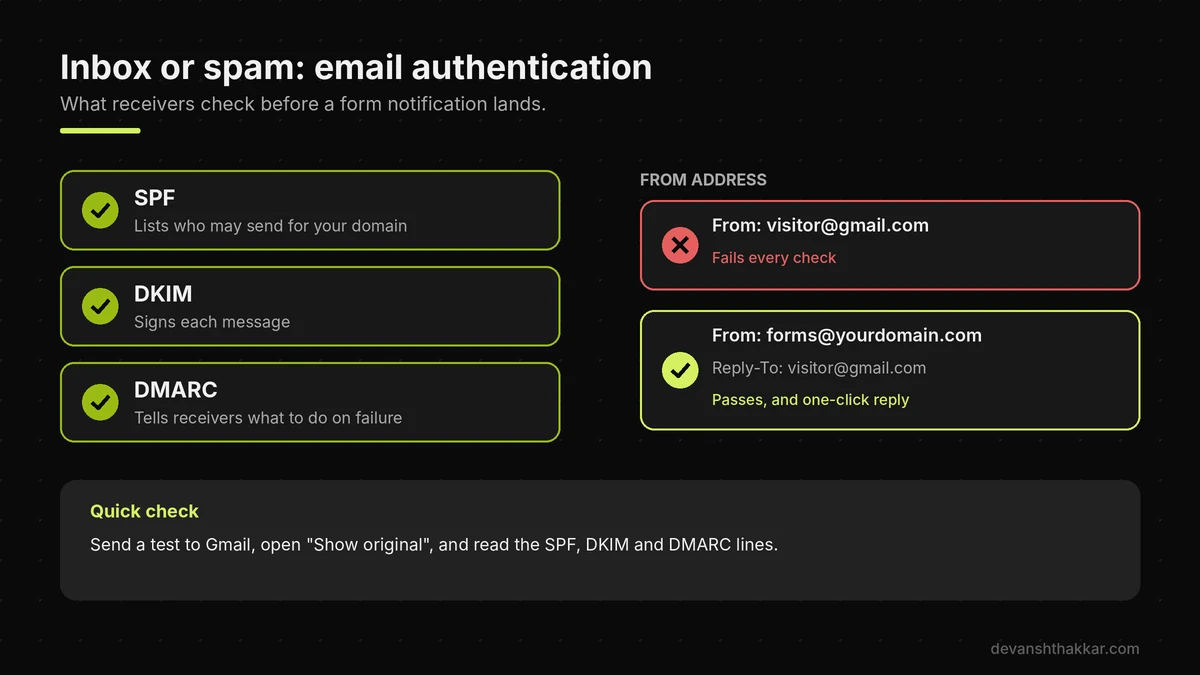
These three DNS records tell inboxes that your sending service may send for your domain. SPF lists the allowed senders. DKIM adds a signature. DMARC tells receivers what to do when checks fail. Your mail service gives you the exact records to add at your DNS provider. Without them, Gmail and Outlook increasingly treat form notifications as suspicious or reject them outright.
8. Fix the From address and Reply-To
A very common mistake is setting the form's From address to the visitor's email. That makes your site claim to be Gmail or Outlook, which fails every authentication check. Instead, send from an address on your own domain, such as forms@yourdomain.com, and put the visitor's email in Reply-To. You can still reply to them in one click.
9. Monitor the form every week
Forms break quietly, so check them on a schedule. Submit a logged-out test every week, confirm the entry saves, and confirm the email arrives. Recent form plugin releases help too. In October 2026, WPForms added a free weekly email summary that alerts admins when a busy form drops to zero entries, according to WPBeginner's October 2026 spotlight. Turn on the email log in your SMTP plugin as well.
Fixes six to eight matter more than usual right now, because two email changes are landing this winter.
The Email Changes Breaking Form Notifications This Winter
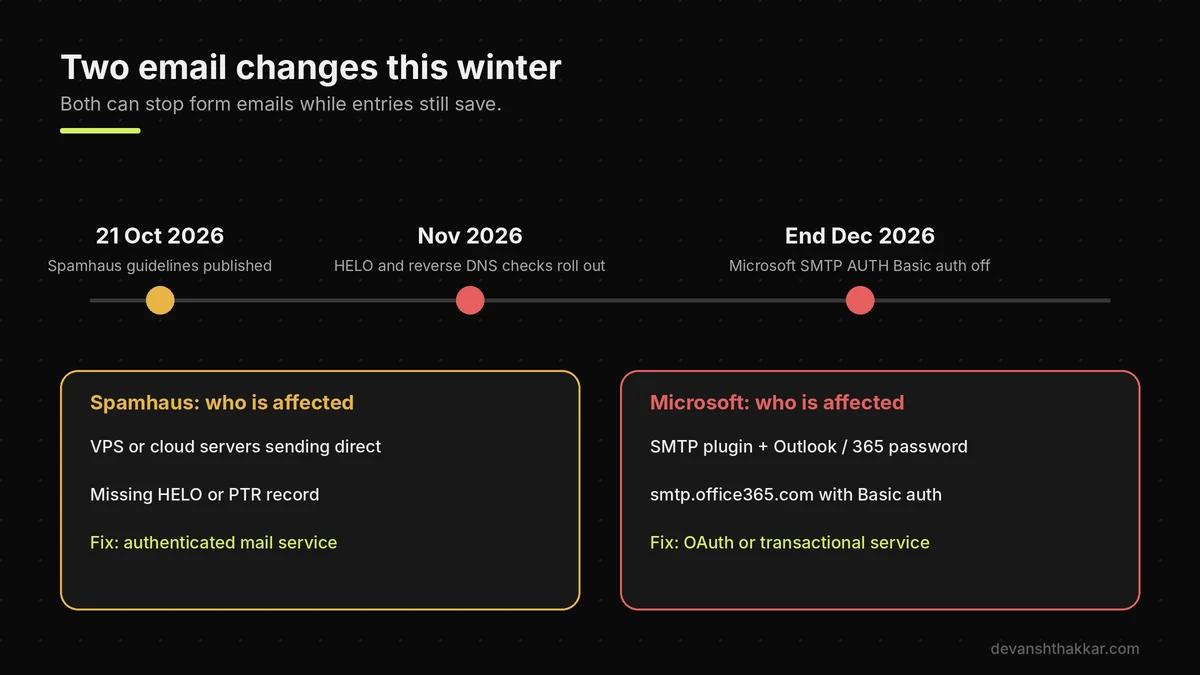
Two email changes are hitting WordPress form notifications this winter: Spamhaus's new sending checks, rolling out from November 2026, and Microsoft's retirement of Basic authentication for SMTP AUTH at the end of December 2026. Spamhaus now expects every sending IP to have a valid HELO name, a reverse DNS record and a matching forward record. That mostly affects sites on a VPS or cloud server that send mail directly, such as some DigitalOcean, AWS or self-managed setups. An IP that fails can be listed, and many inboxes check Spamhaus before accepting mail.
Microsoft's change affects any site whose SMTP plugin logs into Outlook or Microsoft 365 with a username and password. According to Cyber Security News, Basic authentication for SMTP AUTH "will remain unchanged until December 2026," then turns off by default for existing tenants. Admins can re-enable it temporarily, but it is a stopgap. In both cases the contact form keeps saving entries, so the failure is easy to miss.
Which sites need to act before December
Check your SMTP plugin settings now. If the mailer is "Other SMTP" with smtp.office365.com and a password, switch to the plugin's Microsoft OAuth option or to a transactional mail service before the end of December. If you have no SMTP plugin and your site runs on its own server, ask your host whether outgoing mail has proper reverse DNS, or simply move form email to an authenticated service. Shared hosting customers are usually covered by the host's mail setup, but an authenticated service is still the safer choice.
Pro tip: Send a test from your SMTP plugin to an address on a different provider, such as a Gmail account, and open "Show original." It shows SPF, DKIM and DMARC results in one line, which is the fastest way to confirm the email side is healthy.
If you have worked through all of this and the form still misbehaves, it is time to weigh up getting help.
When Should You Get Help With a Broken Form?
You should get help with a broken contact form when the logged-out test still fails after the cache, script and SMTP fixes, or when the form feeds real revenue and every lost day costs enquiries. Forms sit where caching, security, JavaScript, DNS and email meet, so the cause can hide in any of five systems. The right developer for this will test as a logged-out visitor first, read the browser console and the SMTP log rather than guessing, and check DNS records against your actual mail service. They will also leave you with monitoring, so the next failure is caught in days, not weeks.
Businesses that add a weekly logged-out test and an SMTP log after a fix typically catch the next breakage within days instead of discovering it weeks later from a missing client. If your site takes legal enquiries, the law firm intake form guide covers the extra notice and privacy steps.

Still not getting form emails?
When the obvious fixes fail, the cause is usually a cache, firewall or mail authentication conflict that takes a developer an hour to trace. I fix it, test it as a real visitor, and set up monitoring. Get it fixed or book a free call.
Frequently Asked Questions
Why is my WordPress contact form not sending emails?
It is frustrating when entries arrive in the dashboard but never in your inbox. Usually WordPress is sending through unauthenticated PHP mail, or your domain lacks SPF, DKIM and DMARC records. What makes the difference is sending through an authenticated SMTP or API service from an address on your own domain, then confirming the records pass.
Why does my contact form say "Invalid nonce"?
This error is confusing because the form works when you test it. It means the page was served from a cache that is older than the WordPress security token inside it, which lasts 12 to 24 hours. What makes the difference is a cache lifetime under 12 hours or excluding the form page from cache, then purging.
Why does my contact form work for me but not for visitors?
That mismatch is exactly what makes this bug so costly. Most caching plugins skip the cache for logged-in users, so you see a fresh page while visitors get an old one. Visitors may also hit a firewall rule you never trigger. What makes the difference is always testing in a private window, logged out.
Do I need an SMTP plugin for WordPress forms?
Many sites run for years without one, so it feels optional. Today, though, unauthenticated mail is increasingly rejected by Gmail and Outlook. An SMTP plugin connected to a real mail service fixes that and adds an email log. What makes the difference is the authenticated connection and DNS records behind the plugin, not the plugin alone.
Why do my contact form emails go to spam?
Spam-folder emails feel almost as bad as missing ones. The usual causes are a From address set to the visitor's email, missing DKIM, or an SPF record that does not include your mail service. What makes the difference is sending from your own domain, putting the visitor in Reply-To, and adding all three DNS records.
Will the Microsoft SMTP AUTH change affect my WordPress site?
It is easy to assume this only affects big companies. It affects any WordPress site whose SMTP plugin logs into Outlook or Microsoft 365 with a password. Basic authentication turns off by default at the end of December 2026. What makes the difference is switching to OAuth or a transactional mail service before then.
Can caching break Contact Form 7?
Yes, and it catches many site owners off guard. Contact Form 7 and other plugins can fail on long-cached pages, especially when optimisation settings delay or combine their scripts. What makes the difference is excluding the form's scripts from JavaScript optimisation, keeping the cache lifetime short, and retesting logged out the next day.
How do I test if my WordPress contact form works?
Most owners test once after launch and never again. Submit the form in a private window while logged out, confirm the entry saves, and confirm the email arrives in a different provider's inbox. What makes the difference is repeating that test weekly, because caching, updates and email changes can break a working form at any time.
What is breaking my contact form?
With so many moving parts, it can feel impossible to tell. Start with the Two-Halves Test: no saved entry means caching, scripts, CAPTCHA or a firewall, while a saved entry with no email means SMTP or DNS. What makes the difference is fixing the right half first. The diagnostic in this guide finds it in three questions.
When should I hire a developer to fix my contact form?
Most owners wait until they realise enquiries stopped weeks ago. Hire help when the logged-out test still fails after the basic fixes, or when the form drives revenue you cannot pause. What makes the difference is someone who checks cache, console, firewall and mail logs together. WordPress bug fixing covers exactly that.
Conclusion
A WordPress contact form that is not working fails in either the submission half or the delivery half, and the Two-Halves Test tells you which. Three points matter most. First, keep page cache lifetimes under 12 hours so tokens never expire on cached pages. Second, send form email through authenticated SMTP with SPF, DKIM and DMARC, and move off Outlook password SMTP before December. Third, test your contact form weekly as a logged-out visitor.
If reliable enquiries are now a real priority, the fastest path forward is working with someone who tests as a real visitor and reads the logs before changing anything, not rebuilding the process from scratch.
Losing enquiries to a broken form? Get it fixed this week.
I find the failing half, fix the cache, scripts or email setup, test it as a real visitor and set up weekly monitoring. Rates start at $20 an hour, and fixes are quoted up front. Get your contact form fixed.
This article was last reviewed and updated in November 2026 to reflect the latest caching, email and form plugin changes.