- WooCommerce subscriptions need a dedicated plugin, since WooCommerce core does not handle recurring billing on its own.
- The official WooCommerce Subscriptions extension is the standard, and capable alternatives exist at lower prices.
- Your payment gateway must support automatic renewals. Stripe, WooPayments, and PayPal Payments are the safe choices.
- You create recurring products as Simple or Variable Subscription types, with a billing interval, trial, and signup fee.
- Always run a full test cycle, including a renewal and a failed payment, before you go live.
Setting up WooCommerce subscriptions takes three things: a dedicated subscriptions plugin, a payment gateway that supports automatic renewals, and a subscription product configured with the right billing cycle. WooCommerce core cannot do recurring billing alone, so the plugin is essential. This guide walks you through the whole WooCommerce subscriptions setup, from choosing tools to testing your first recurring product before launch.
After building WooCommerce subscriptions for clients selling into 15+ countries, here is what I have learned matters most about getting them right. The WooCommerce subscriptions setup itself is not hard, it is maybe thirty minutes of work. What separates smooth WooCommerce subscriptions from a support nightmare is choosing the right gateway and testing the renewal cycle before real customers arrive. Get those two right and the rest is straightforward. Here is the whole process.
What You Need Before You Start
Before setting up WooCommerce subscriptions, you need three things in place for recurring billing to work: a working WooCommerce store, a subscriptions plugin, and a payment gateway that supports automatic recurring payments. Miss the last one and you end up manually chasing renewals every month, which defeats the entire purpose.
The essentials, plainly:
- A WooCommerce store on hosting that can reliably run scheduled tasks, since renewals depend on WordPress cron firing on time.
- A subscriptions plugin, because WooCommerce core does not include recurring billing. This is non-negotiable.
- A recurring-capable payment gateway. The gateway is what actually charges the card each cycle, so it must support automatic renewals, not just one-time payments.
Pro tip: Reliable renewals depend on your hosting running scheduled tasks on time. On cheap shared hosting, WordPress cron can stall, which delays or misses renewal charges. If subscriptions are core to your business, put them on hosting that handles cron reliably.
With the foundation clear, the first real decision is which plugin to use.
Choosing a Subscriptions Plugin
The plugin you choose is the biggest decision in your WooCommerce subscriptions setup overall, because it defines your billing options, your ongoing cost, and how your data is stored. For WooCommerce subscriptions there is one official option and several strong alternatives, and the right pick depends on your budget and how complex your billing needs are.

Your main options:
- WooCommerce Subscriptions (official). The most established and flexible option, built by Woo, integrating with 25+ gateways. It is the safe default, though at a premium annual price it can feel heavy for a small store.
- Native third-party plugins. Options like WPSubscription, YITH, and similar cost far less, keep data native to WooCommerce, and cover the needs of most stores comfortably.
- Gateway-native billing. Some setups lean on Stripe’s own billing engine, which shifts the recurring logic to the gateway rather than your site.
Whichever plugin you pick, it is only half the equation. The gateway is the other half.
Setting Up a Payment Gateway
Your payment gateway is the engine that makes WooCommerce subscriptions actually recurring, so it must support automatic renewals rather than one-time charges only. This is where stores most often trip, choosing a gateway that cannot charge the card automatically each cycle.
Per WooCommerce’s payment gateway documentation, the reliable choices for automatic recurring payments are:
| Gateway | Automatic renewals | Best for |
|---|---|---|
| Stripe | Yes, via card and some SEPA-based methods | Most stores, 135+ currencies, card updates and retries |
| WooPayments | Yes, via card and express checkout | Stores wanting an integrated Woo-native option |
| PayPal Payments | Yes, via PayPal account and card processing | Stores whose customers prefer PayPal |
| PayPal Standard | Limited, with real restrictions | Avoid for serious subscription businesses |
For WooCommerce subscriptions, Stripe is the most common recommendation because it handles recurring billing natively, retries failed payments, and updates expired cards automatically, which quietly protects your revenue. Whichever you choose, connect it, enable it, and make sure automatic renewals are switched on in both the gateway and your subscriptions plugin.
Pro tip: Offering more than one gateway helps, but only if each one you enable supports automatic renewals. A gateway that only takes the first payment, then needs manual charging, is worse than not offering it, because it creates silent failed renewals you have to chase.
With the plugin and gateway ready, you can build your first recurring product.
Creating Your First Subscription Product
You create a WooCommerce subscription product the same way you add a normal product, then set its type to Simple Subscription or Variable Subscription and configure the billing cycle. This is where your WooCommerce subscriptions decide how and how often customers are charged.
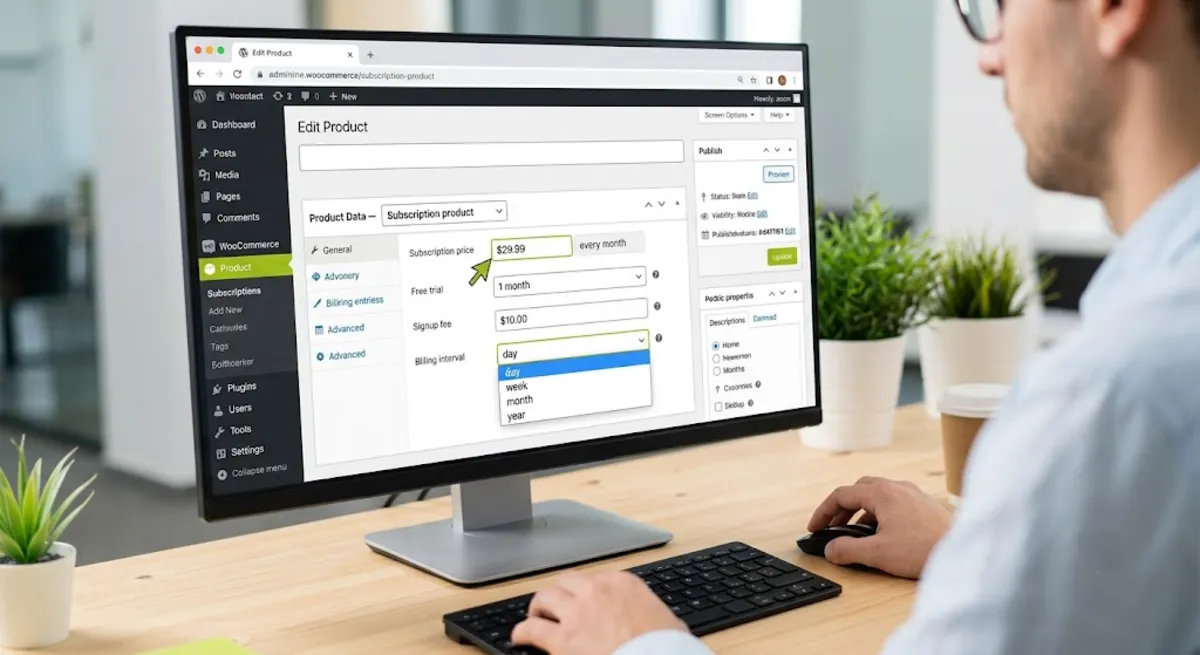
Per WooCommerce’s product documentation, the settings that matter:
- Product type. Choose Simple Subscription for a single plan, or Variable Subscription when you offer tiers like monthly and annual on one product.
- Billing interval and period. Set the number and the period, day, week, month, or year. For example, every one month, or every three months.
- Free trial. Optionally add a trial period before billing begins, so customers can try before the first charge.
- Signup fee. Optionally charge a one-time fee at the start to cover setup or onboarding costs.
- Expiry. Optionally set the subscription to end after a fixed number of payments, or leave it to renew until cancelled.
A pricing tip that pays off: offer an annual plan at a discount alongside the monthly one, using a Variable Subscription. Annual subscribers tend to churn far less than monthly ones, so the upfront discount usually pays for itself in retention and cash flow.
Once the product exists, the last piece is what happens after someone subscribes.
Renewals, Emails, and Management

A complete WooCommerce subscriptions setup is not finished until renewals, customer emails, and account management all work, because that is what turns a one-time sale into reliable recurring revenue. This is the part of WooCommerce subscriptions most tutorials skip, and it is where the real experience lives.
The pieces to configure and confirm:
- Automatic renewals. Confirm renewals are enabled so the gateway charges each cycle without anyone lifting a finger.
- Failed-payment handling. Set up retry logic so a declined card is retried and the customer is prompted to update it, rather than silently lapsing.
- Customer emails. Enable the subscription emails, renewal reminders, receipts, failed-payment notices, and cancellation confirmations.
- The My Account area. Customers manage their own subscriptions from their account, viewing, pausing where allowed, updating payment methods, and cancelling.
- Store-side management. You manage everything from the Edit Subscription screen in the admin, where you can change status, adjust, or process actions manually.
Pro tip: Before launch, run a full test cycle end to end. Subscribe as a test customer, force a renewal, and deliberately trigger a failed payment to confirm the retry and email flow works. Catching a broken renewal in testing is far cheaper than catching it from an angry customer.
Do all of that and you have working WooCommerce subscriptions. Now for the mistakes that catch people out.
Want your WooCommerce subscriptions set up and tested properly?
I configure recurring billing end to end, plugin, gateway, products, renewals, and emails, so it just works. See my WordPress development service.
What Most People Get Wrong
The most common mistake with WooCommerce subscriptions is picking a payment gateway that does not truly support automatic renewals. The store owner sets everything up, the first payment works, everyone is happy, and then the renewal never fires because the gateway only handled a one-time charge. By the time anyone notices, revenue has quietly leaked for weeks.

Here is the observation from client work. Almost every WooCommerce subscriptions problem I get called in to fix traces back to one skipped step: nobody tested a renewal. The first payment always works, so people assume the whole cycle works, and it often does not, because of a gateway limitation, a cron issue on cheap hosting, or a misconfigured retry. Forcing a test renewal and a test failed payment before launch catches nearly all of it.
The second WooCommerce subscriptions trap is overpaying, or underbuying, on the plugin. Small stores reach for the premium official extension when a native alternative would do everything they need for a fraction of the cost. Others pick the cheapest option and then hit a wall when they need installments or a subscription box with shipping. Match the plugin to what you actually plan to sell, not to the brand name or the lowest price tag.
When WooCommerce subscriptions are central to your revenue, or the billing gets complex, that is where getting the setup right the first time protects the recurring income you are building.
Launching subscriptions and want them done right the first time?
I set up and test WooCommerce subscriptions end to end, so renewals fire, emails send, and revenue does not leak. See my WordPress development service or book a free call.
Frequently Asked Questions
Does WooCommerce support subscriptions out of the box?
No. WooCommerce core handles one-time purchases only, so recurring billing requires a subscriptions plugin. The official WooCommerce Subscriptions extension is the established choice, and several capable third-party plugins offer recurring billing at lower prices. Without one of these, you cannot charge customers automatically on a schedule.
How much does WooCommerce Subscriptions cost?
The official WooCommerce Subscriptions extension is a premium annual purchase, which can feel steep for a small store. Native alternatives such as WPSubscription and YITH start much lower, often under a hundred dollars a year, and cover the needs of most stores. Choose based on your billing complexity, not just price.
Which payment gateways support WooCommerce subscriptions?
Any gateway that supports automatic recurring payments. Stripe, WooPayments, and PayPal Payments are the reliable choices, and the official extension integrates with 25 or more gateways in total. Avoid gateways that only take one-time payments, and be cautious with PayPal Standard, which has real recurring-billing limitations.
Can I offer a free trial or signup fee?
Yes. When you create a subscription product you can add a free trial period before billing begins, a one-time signup fee charged at the start, or both. Trials let customers try before paying, while signup fees help cover onboarding or setup costs. Both are standard options in the product settings.
Does WooPayments still include subscriptions on its own?
No longer. WooPayments removed its old built-in standalone subscriptions feature in version 10.2.0, so you now need the WooCommerce Subscriptions extension even when paying through WooPayments. WooPayments still supports automatic renewals and offers an optional Stripe Billing engine for eligible stores based in the United States.
How do customers manage their own subscriptions?
Through the My Account area on your store. Subscribers can view their active subscriptions, update their payment method, and cancel, and pause where you allow it. You, as the store owner, manage everything from the Edit Subscription screen in the WordPress admin, where you can change status and process actions manually.
Why did my subscription renewal not charge?
The usual causes are a gateway that does not support automatic renewals, WordPress cron not firing on time due to weak hosting, or automatic renewals not being enabled in settings. This is exactly why you test a full renewal cycle before launch, since the first payment working does not prove renewals will.
Should I hire someone to set up subscriptions?
Consider it when subscriptions are central to your revenue, your billing is complex, or you want the renewal and failed-payment flows tested properly before launch. Configuring the gateway, products, and renewal logic correctly is where costly mistakes hide. My WordPress development service covers the full setup.
Conclusion
Setting up WooCommerce subscriptions is genuinely straightforward once you know the three core parts: a subscriptions plugin, a gateway that supports automatic renewals, and a subscription product with the right billing cycle, trial, and signup fee. Pick the plugin that matches what you actually sell, choose Stripe, WooPayments, or PayPal Payments for reliable recurring charges, configure your renewal emails and failed-payment handling, and then, above everything else, test a full renewal cycle before you launch. That one test prevents the most common and most expensive subscription failure there is. Start by confirming your gateway supports automatic renewals, and the rest of the setup falls into place from there.
Ready to turn one-time sales into recurring revenue?
I build and test WooCommerce subscription stores that run reliably from day one. Book a free call or browse my recent project portfolio.
This article was last reviewed and updated in June 2026 to reflect current WooCommerce Subscriptions and payment gateway behavior.