
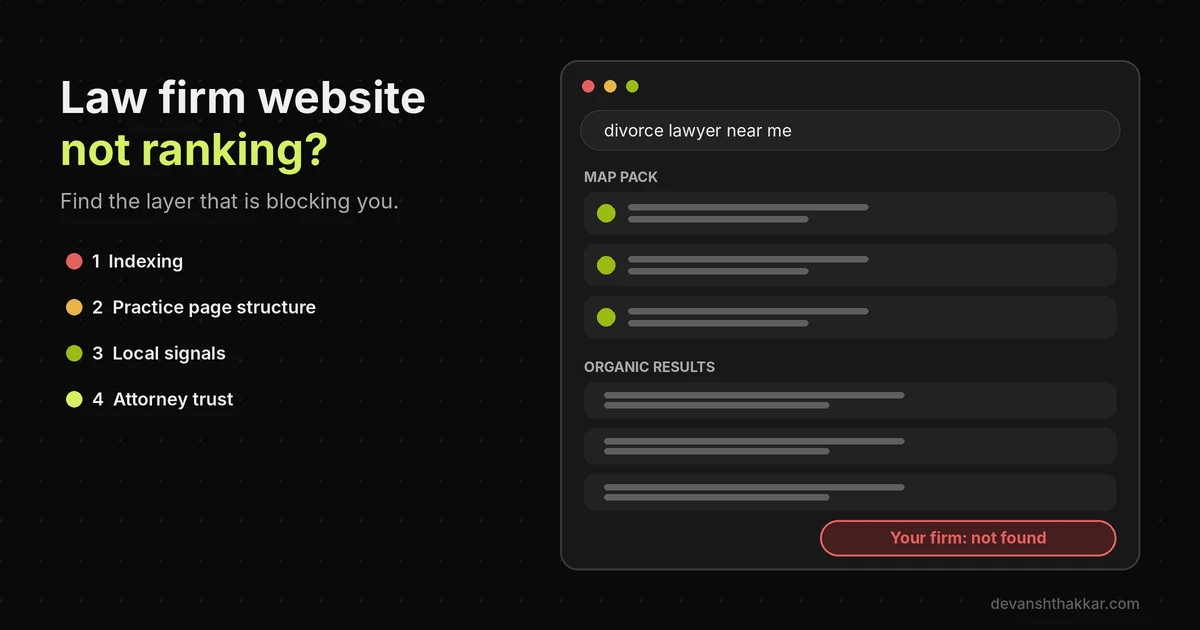
- A law firm website not ranking usually has one of four causes: indexing, missing practice pages, a weak Google Business Profile, or thin trust signals.
- Google’s November 2026 core update began on 10 November and may take two weeks, so judge any drop only after it finishes.
- The map pack and organic results are separate rankings. A firm can win one and be invisible in the other.
- New law firm sites often fail to rank because of a launch leftover, such as a noindex tag or blocked robots.txt.
- Google calls city pages that funnel visitors to one page doorway abuse, so thin location pages can hold a whole site back.
When a law firm website is not ranking on Google, the cause is usually one of four things: Google has not indexed the pages, the site lacks a page for each practice area, the Google Business Profile is weak, or the site shows too little attorney expertise. Check indexing first, then structure, then local signals, then trust.
Across 250+ WordPress projects over 7+ years, including law firm builds, the firms that call because their site is not ranking rarely have a “content” problem first. More often, a page Google cannot index, a practice area buried inside an accordion, or a Google Business Profile in the wrong category is quietly costing them calls. Meanwhile, competitors with weaker lawyers take those clients. The partners usually find out months later, when the phones go quiet. Most firms try to handle this themselves, and that’s where the real cost begins.
Why Is My Law Firm Website Not Ranking on Google?
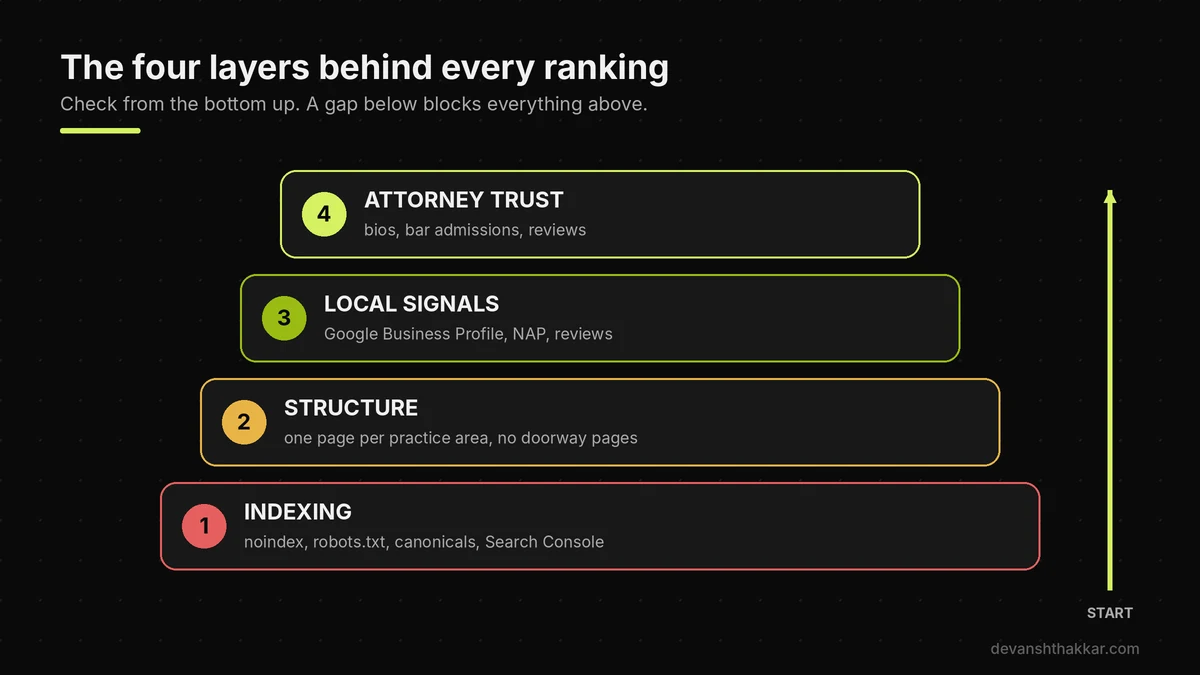
Your law firm website is not ranking on Google because something in one of four layers is missing: indexing, page structure, local signals or trust. Indexing comes first. If Google has not stored a page, it is not ranking anywhere, and nothing else matters. Structure comes next. Google ranks pages, not firms, so a site with one “Practice Areas” page cannot rank for “divorce lawyer” and “DUI lawyer” at the same time. Local signals decide the map pack, which is the box of three firms above the organic results. Trust matters more for lawyers than for most businesses, because Google treats legal topics as “Your Money or Your Life” content, where weak pages can cause real harm.
So a thin page with no named attorney, no bar admission and no reviews is usually not ranking for long. The good news is that each layer can be checked in an afternoon. The fix is usually specific, not a full rewrite. However, you have to diagnose the right layer first. Otherwise you spend months writing blog posts for a site that is not ranking because Google cannot even index it.
Map pack vs organic: two different rankings
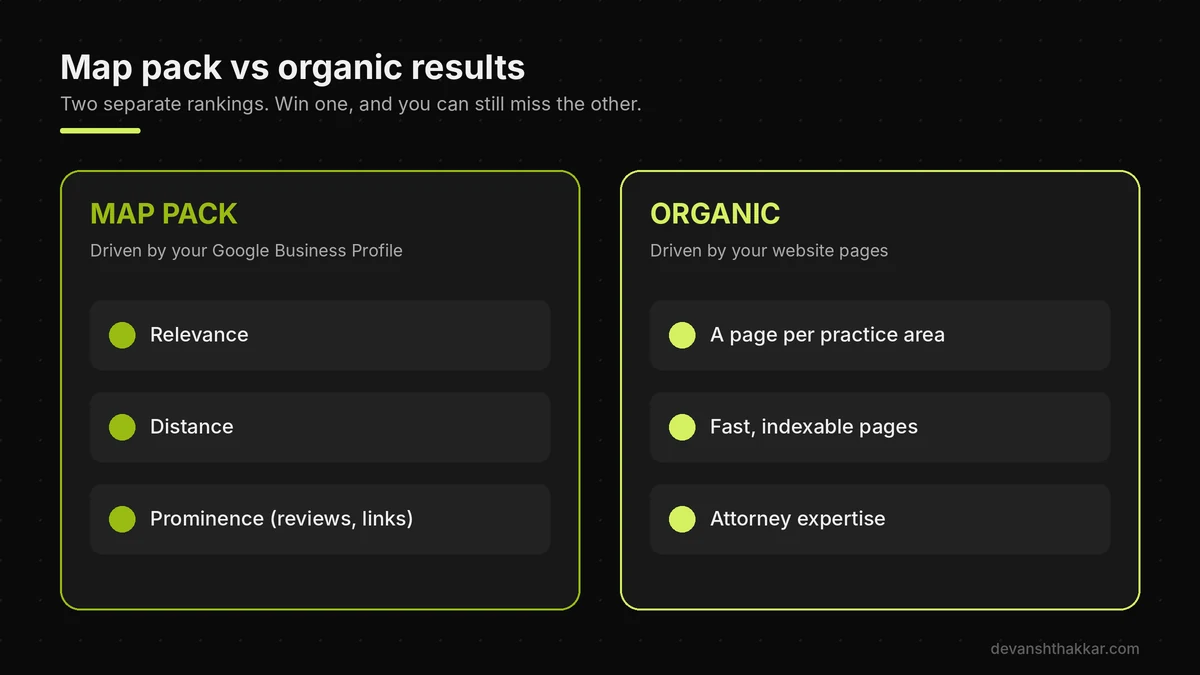
Many firms say they are not ranking when they mean one of two separate things. The map pack is driven by your Google Business Profile. According to Google’s local ranking guide, local results depend on relevance, distance and prominence, and “prominence means how well-known a business is.” Organic results, in contrast, are driven by your website pages. A firm can sit first in the map pack while its website is not ranking organically, or the reverse. Therefore, search your main practice area plus your city and note where you appear in each.
That single check tells you which part is not ranking, and whether to work on the profile, the site, or both.
Before you change anything, though, rule out the update that is rolling out right now.
Did the November 2026 Core Update Cause the Drop?
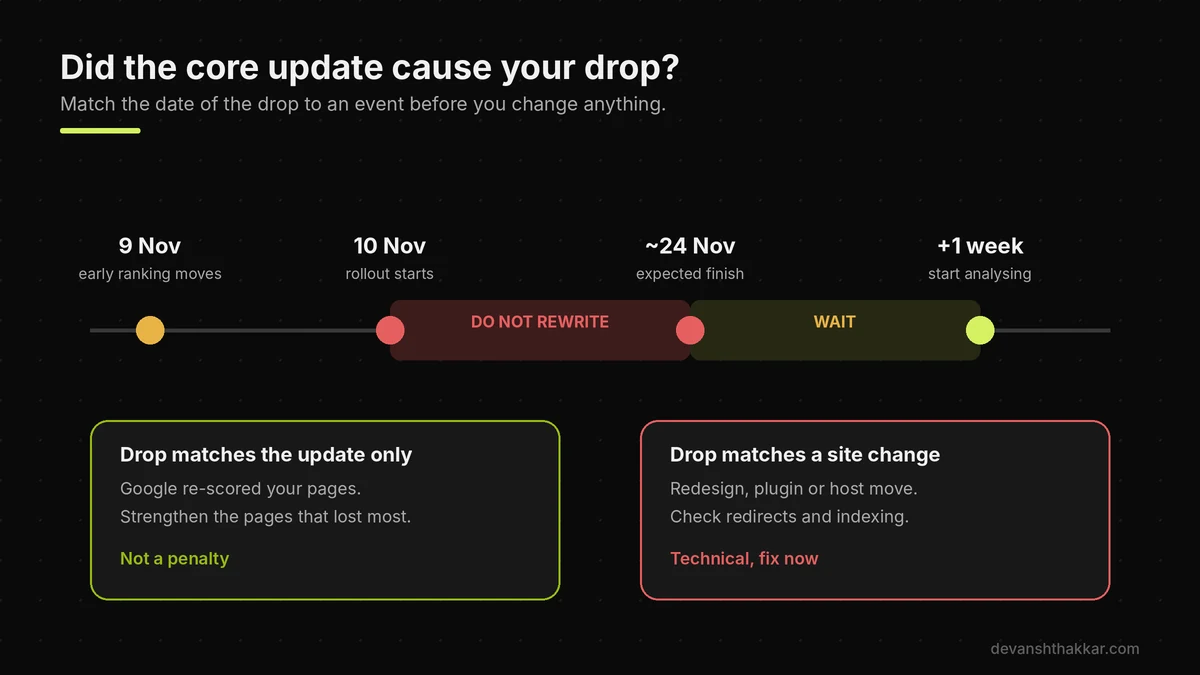
The November 2026 core update may have caused your drop if traffic fell sharply between 9 and 24 November with no change on your own site. Google started the rollout on 10 November and said it “may take up to 2 weeks to complete.” Core updates are not penalties. According to Google’s core updates documentation, they “don’t target specific sites or individual web pages.” Instead, Google re-scores how helpful and reliable every page is. Legal sites tend to feel these updates strongly, because legal topics are judged by a higher trust standard. So a site not ranking after an update is a signal that competing pages now look more useful to Google, not proof that you broke something.
To check, open Search Console, set the date range to cover the last three months, and look for the day the lines changed. If pages started not ranking exactly when the rollout began, and nothing else changed, it is probably the update. If it lines up with a redesign, a plugin change or a hosting move, the cause is technical and much faster to fix.
What to do while the update is still rolling out
Do very little, on purpose. Google recommends “waiting at least a full week after a core update completes before analyzing your site in Search Console.” Rankings bounce during a rollout, and changes made mid-update make the data impossible to read.
Meanwhile, use the time to audit, not to rewrite. List your practice area pages, check each one for a named attorney and real detail, and note which ones lost the most clicks. Then, once the update has settled, fix the pages that lost the most first. Google also says recovery does not need to wait for the next core update, because smaller updates run all the time. However, it adds that recovery “could take several months.”
Pro tip: In Search Console, compare the same 28 days before and after the drop, filtered to one practice area page at a time. A firm-wide drop points to trust or an update. A single page not ranking points to that page.
If you are not sure which pattern fits your firm, the diagnostic below narrows it down.
Diagnose It: What Is Causing Your Ranking Problem?
You can diagnose why a law firm website is not ranking with four questions about indexing, your firm name, the timing of any drop and where you appear. Each answer removes a group of reasons a site is not ranking. A site that does not appear for its own name almost always has an indexing or technical block, which is the easiest category to fix. A site that dropped suddenly on a clear date points to an update or a change you made. In contrast, a site that has never ranked at all is usually not ranking because it lacks structure, local signals or authority. The decision tree below follows that same logic.
It takes under a minute, and it ends with the most likely cause and a sensible next step. It will not replace a full audit, but it stops you working on the wrong layer. That matters, because the most common mistake I see is a firm paying for blog content while its practice pages are not ranking because Google cannot index them.
Whatever result you got, the nine fixes below cover every cause in the tree.
9 Fixes for a Law Firm Website Not Ranking
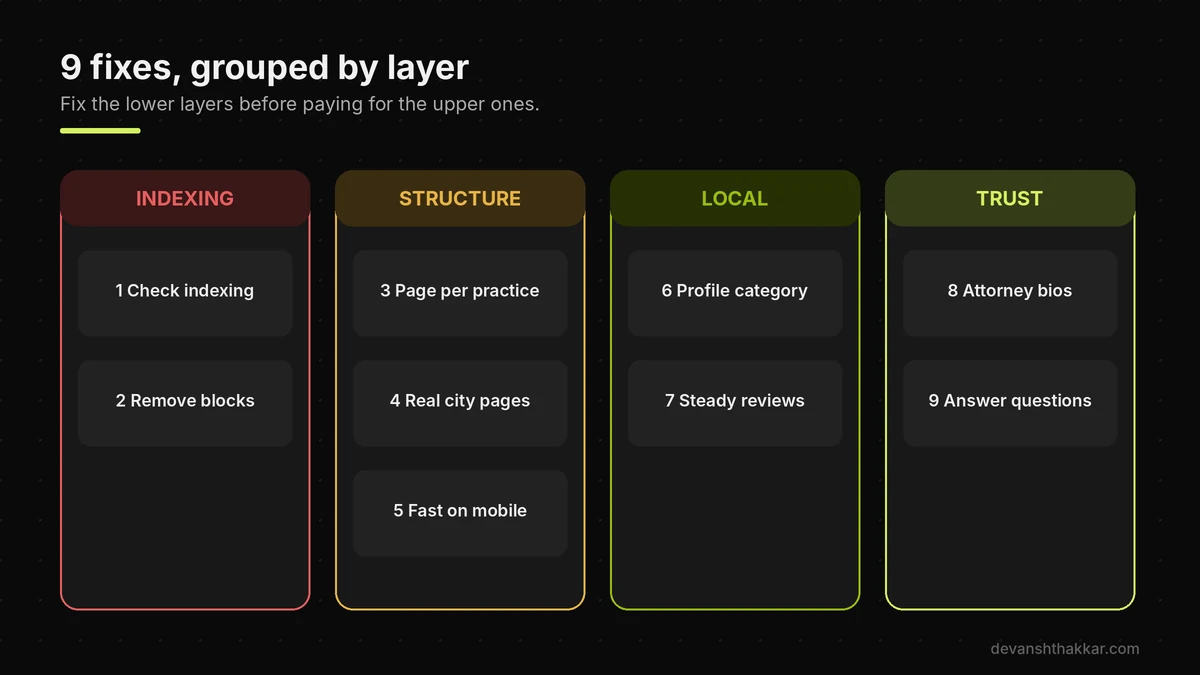
The nine fixes for a law firm website not ranking follow the four layers in order: two indexing fixes, three structure fixes, two local fixes and two trust fixes. Work through them from the top. Each fix removes one specific reason a legal page is not ranking, and most need only Search Console, your WordPress dashboard and your Google Business Profile. None of them involve tricks.
Google's systems reward legal pages that are easy to crawl, clearly organised by practice area and written by a real, credentialed attorney. After working on law firm builds, the pattern is always the same: the firms that rank are not the ones with the most blog posts, but the ones whose practice pages are clearly the best answer for one service in one place. Start with indexing, because an unindexed page cannot rank at all, however good it is.
1. Confirm Google has indexed your practice pages
Open Search Console and go to Indexing, then Pages. Look at "Why pages aren't indexed." The two statuses that matter most are "Excluded by noindex tag" and "Crawled, currently not indexed." The first is a setting you can change today. The second means Google saw the page and chose not to store it, usually because it looked thin or duplicated. Next, use URL Inspection on each practice area page. If a key page is not indexed, it is not ranking at all, so fix that before anything else.
2. Remove noindex, robots and canonical blocks
In WordPress, open Settings, Reading and make sure "Discourage search engines from indexing this site" is unticked. Then open yourfirm.com/robots.txt and check it does not say Disallow: /. Also view the source of a practice page and search for canonical. The canonical should point to the page itself on your live domain, not to a staging address. Each of these is a common leftover from launch, and each one leaves a site not ranking at all.
3. Give every practice area its own page
Google ranks pages, so each service needs its own URL. "Personal injury," "car accident" and "slip and fall" should be separate pages if you handle all three. Each page needs a clear heading, who you help, how the process works, likely costs or fee structure, and local detail. A single "Practice Areas" page with a paragraph per service is a common reason a firm is not ranking. It cannot compete with firms that publish a full page for each one. Our law firm website SEO checklist covers the full page structure.
4. Replace thin city pages with real location pages
Many legal sites copy one page across dozens of towns, changing only the city name. Google treats that as spam. Its spam policies list "pages targeted at specific regions or cities that funnel users to one page" as doorway abuse. Instead, build location pages only where you have an office or real local work, and give each one unique detail: the courthouse, local procedures and the attorneys who appear there.
5. Make the site fast and clean on mobile
Most people looking for a lawyer search on a phone, often in a stressful moment. Heavy themes, sliders, video backgrounds and three chat widgets slow legal sites down badly. Slow pages are a quiet reason a site is not ranking on mobile. Test your main practice pages in PageSpeed Insights on mobile. If the page takes several seconds to show content, fix images, caching and scripts first. A Core Web Vitals optimization pass usually removes most of that weight.
Found a noindex tag, a blocked robots.txt or one page doing the work of ten?
These are quick fixes for a developer and slow ones by trial and error. Get your law firm site's technical SEO fixed.
6. Fix your Google Business Profile category and details
A firm not ranking in the map pack usually has a weak profile. Choose the most specific primary category, such as "Personal injury attorney" rather than "Lawyer." Add secondary categories for other practice areas. Next, make sure your firm name, address and phone number match the website exactly, including suite numbers. Link the profile to the matching location page, not just the homepage. Finally, add real photos of the office and team, and keep your hours accurate, including holidays.
7. Build reviews steadily, not in bursts
Reviews feed both prominence and conversion. According to Scorpion's 2025 Law Firm Search Trends Report, 57% of respondents chose online reviews as their top deciding factor when choosing a firm. (Scorpion, 2025) The same survey found more than half of respondents won't choose a firm with fewer than four stars. Ask every satisfied client, through a short link, within a week of closing the matter. A steady flow looks natural. Fifty reviews in one week does not.
8. Turn attorney bios into proof of expertise
Because legal pages are held to a higher trust standard, the attorney behind the advice matters. Each bio should list bar admissions, years in practice, the courts they appear in, notable results where your bar rules allow, and links to publications or speaking. Then link each practice page to the attorneys who handle it. Adding law firm schema markup helps Google connect those attorneys, the firm and its locations.
9. Answer the questions clients actually ask
Clients search in questions: "How much does a divorce lawyer cost?" or "What happens after a DUI arrest?" Add a short, direct answer to the top questions on each practice page, then a fuller explanation below. This also helps with AI Overviews, which tend to quote clear, self-contained answers. Avoid publishing generic AI-written blog posts in bulk. After a core update, those are often the first pages not ranking, and they can drag down the pages around them.
Fixes like these help most sites, but a brand-new firm site not ranking often has a different, simpler problem.
The Launch Leftovers That Block New Law Firm Sites
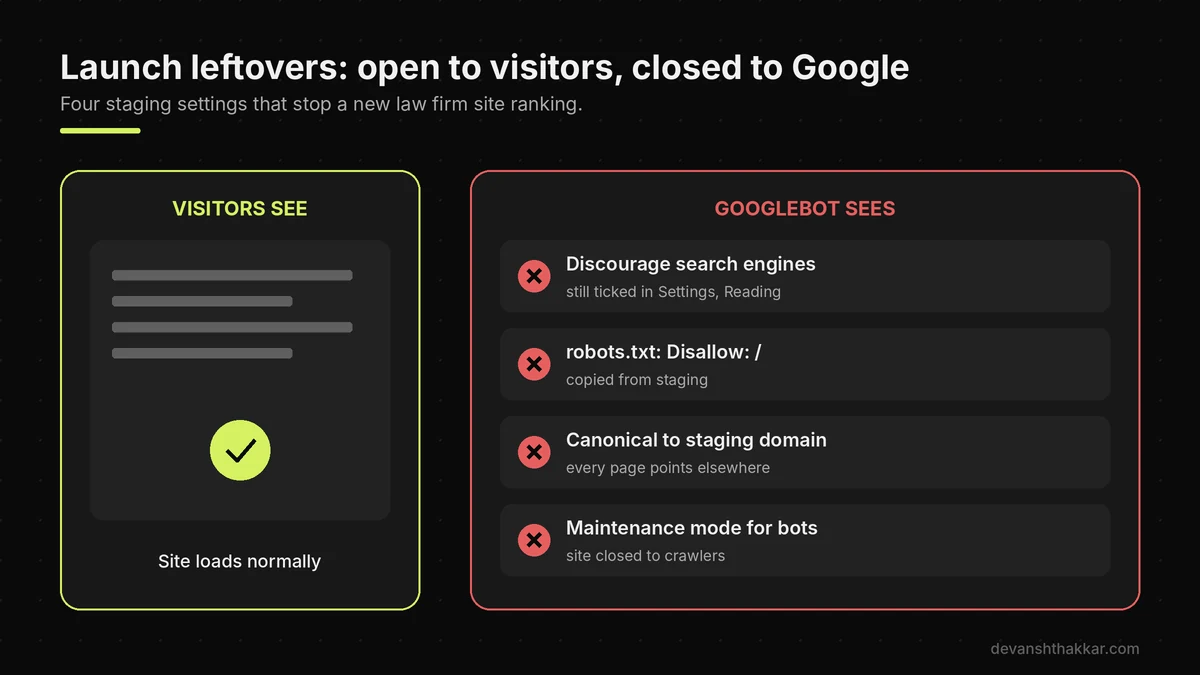
A new law firm website that is not ranking at all, even for the firm's own name, is usually blocked by a launch leftover rather than by weak content. Launch leftovers are settings that make sense on a staging site and are forgotten when the site goes live. The most common one I find is WordPress's "Discourage search engines" box still ticked, which adds a noindex instruction to every page. Close behind are a robots.txt file copied from staging with Disallow: /, canonical tags pointing to the staging domain, and a password-protected maintenance mode left running for search engines only.
Each of these looks invisible to the firm, because the site loads normally for visitors. However, Google sees a closed door. In my experience, these leftovers explain more "our new site is not ranking" calls than any content problem, and the fix often takes minutes once someone looks in the right place.
Reader trap: requesting indexing before removing the block
When a page is missing or not ranking, the natural reaction is to press "Request indexing" in Search Console again and again. That changes nothing while a noindex tag or robots block is still in place. Google will crawl the page, read the instruction to stay out, and obey it. So remove the block first, then use URL Inspection's live test to confirm Google now sees the page as indexable. Only then request indexing, once per page.
Pro tip: After any redesign or host move, run URL Inspection's live test on your homepage and your top three practice pages before you announce the launch. It takes five minutes and catches every leftover on this list.
Once the blocks are gone, the next question every firm asks is how long a site not ranking takes to recover.
How Long Does It Take a Law Firm Website to Rank?
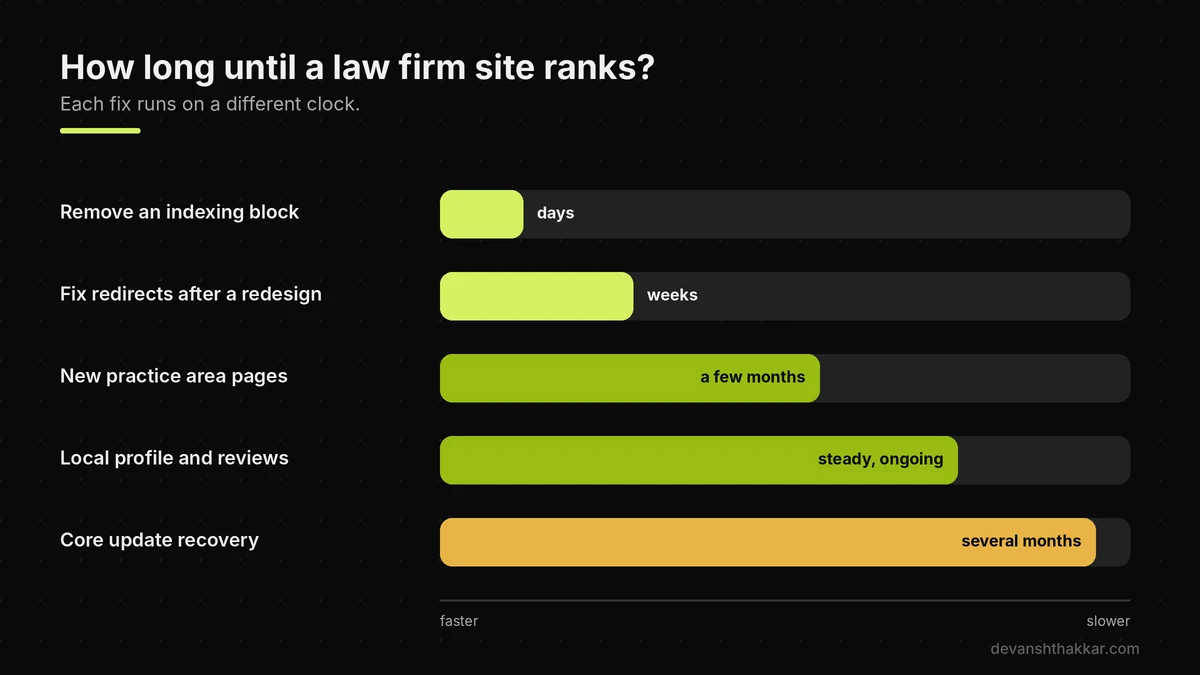
A law firm website usually takes months, not weeks, to rank for competitive practice area searches, and the timeline depends on why the site is not ranking. A removed noindex tag can show results within days, because Google only needs to recrawl the page. Fixing structure, such as splitting one page into ten practice pages, typically shows movement over a few months as Google discovers and evaluates the new pages. Recovery from a core update is slower. Google's own guidance warns it "could take several months" for its systems to confirm a site has improved. Local rankings move with your reviews and profile activity, so they build gradually.
Competition matters as much as time. A family lawyer in a small town can rank far faster than a personal injury firm in a major city, where national lead-generation sites spend heavily. So set expectations by market, not by a generic number. Track the trend in Search Console monthly, and judge progress by calls and form leads, not rankings alone.
Sometimes a site is not ranking because the site itself needs replacing.
Fix It or Rebuild It? How to Decide
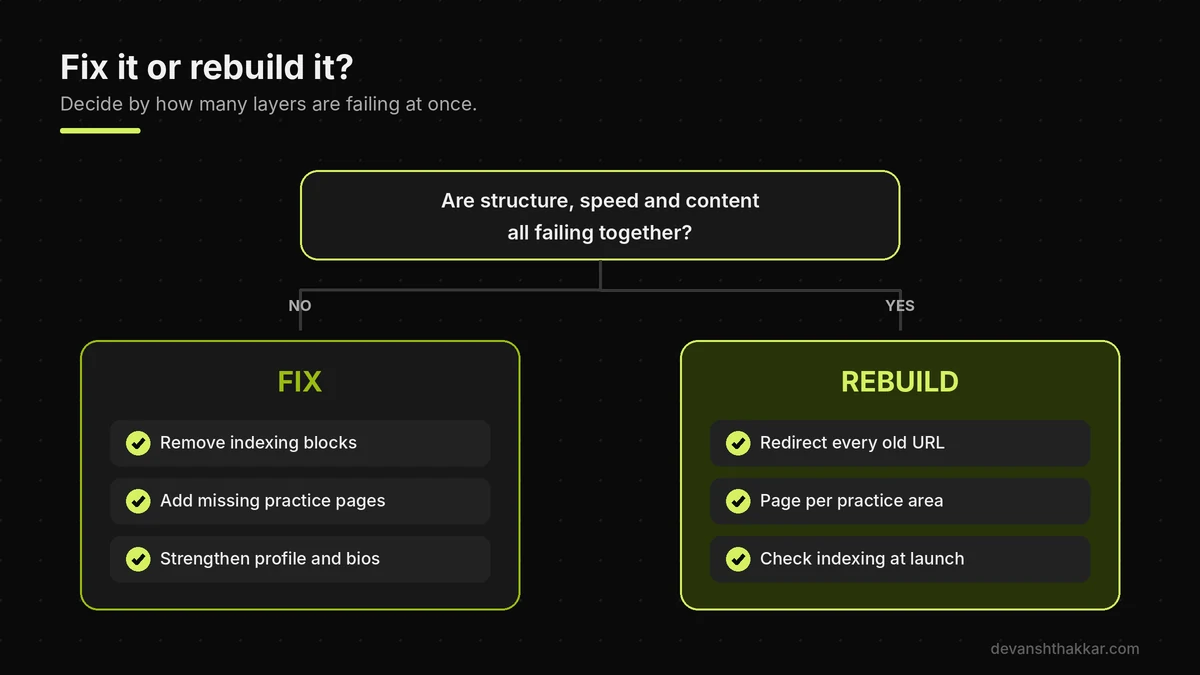
You should fix your law firm website if the problems are indexing, a few missing pages or local signals, and rebuild it if the structure, speed and content all need replacing at once. A site built on a heavy page builder theme, with one page for every practice area, slow mobile loading and dated copy, often costs more to patch than to rebuild properly. However, a rebuild carries its own risk. Done carelessly, it loses the rankings you already have through changed URLs and missing redirects.
The right developer for a law firm will show you live legal sites they have built, plan a redirect for every old URL before launch, and check indexing on launch day. They will also give each practice area its own page from the start and build in schema, fast hosting and a working intake form. Firms that rebuild this way typically see the technical problems disappear, so their content and reviews finally get a fair chance to rank.
Our guide to a law firm website redesign without losing rankings covers the full process, and the law firm website cost guide sets out realistic budgets.
Still not ranking after the obvious fixes?
When indexing is clean and the profile is in order, the issue is usually structure or trust, which takes a developer and an SEO view together. I build law firm sites with a page per practice area, schema, fast hosting and every old URL redirected, for $1,999 fixed. See the law firm website offer or book a free call.
Frequently Asked Questions
Why is my law firm website not showing up on Google?
It is frustrating to pay for a site that is not ranking and nobody can find. Usually, Google has not indexed the pages, a noindex or robots block is left over from launch, or the site has no page for each practice area. What makes the difference is checking the Page indexing report in Search Console first, before spending anything on content.
Why did my law firm's Google rankings drop suddenly?
A sudden drop feels alarming, especially when calls slow down. Match the date to an event. If it lines up with the November 2026 core update and nothing changed on your site, Google re-scored your pages. If it lines up with a redesign or host move, something technical broke. What makes the difference is knowing which, because the fixes are completely different.
Is a core update a penalty for my law firm?
It can feel like a penalty, but it is not. Google says core updates do not target specific sites. They re-assess how helpful and reliable pages are compared with competitors. What makes the difference is strengthening the practice pages that lost the most, with named attorneys, real detail and clear answers, once the rollout has finished.
Why does my firm show in Google Maps but not in search results?
This confuses many firms, because both look like Google. The map pack is driven by your Google Business Profile, while organic results are driven by your website pages. So a strong profile can rank on a weak site. What makes the difference is giving each practice area a full page, so the website can compete organically too.
How long does it take a law firm website to rank?
Most firms hope for weeks, and that is understandable. Removing an indexing block can work within days, while new practice pages usually take a few months and core update recovery can take several months. Competitive cities take longer. What makes the difference is fixing the blocking layer first, so the time you wait actually counts.
Do location pages help a law firm rank in other cities?
It is tempting to create a page for every nearby town. Copied city pages are treated as doorway abuse under Google's spam policies and can hold the whole site back. Real location pages work when you have an office or genuine local work there. What makes the difference is unique local detail, not a swapped city name.
Will more blog posts fix my law firm's rankings?
Blogging feels productive, so many firms start there. However, posts cannot help a site not ranking because practice pages are missing, blocked or thin, and bulk AI-written posts often lose ground after core updates. What makes the difference is fixing indexing and practice pages first, then publishing fewer, genuinely useful answers written or reviewed by an attorney.
Should I rebuild my law firm website to improve rankings?
A rebuild is a big decision, and it is right only sometimes. Rebuild if structure, speed and content all fail together. Otherwise, targeted fixes are faster and cheaper. What makes the difference is a rebuild that keeps every old URL redirected and checks indexing on launch day, so you gain ground without losing what already ranks.
What is causing my law firm website to not rank?
The question is stressful because so many things could be wrong. In practice, a site not ranking almost always has its cause in one of four layers: indexing, practice page structure, local signals or attorney trust. What makes the difference is checking them in that order. The decision tree in this guide finds the most likely layer in four questions.
When should a law firm hire a developer for SEO problems?
Most firms wait until calls have already dropped for months. Hire help when your site is not ranking and Search Console shows indexing errors you cannot explain, when rankings fell after a redesign, or when the site needs a page per practice area. What makes the difference is someone who handles code and SEO together. WordPress SEO services cover exactly that.
Conclusion
A law firm website that is not ranking almost always has a gap in indexing, practice page structure, local signals or attorney trust. Three points matter most. First, wait for the November 2026 core update to finish before judging any drop. Second, if a new site is not ranking at all, check for launch leftovers before paying for content. Third, give every practice area its own detailed page, backed by real attorney credentials and steady reviews.
If ranking your firm is now a real priority, the fastest path forward is working with someone who can show live legal sites they built and who plans indexing and redirects before launch, not rebuilding the process from scratch.
Want a law firm website built to rank from day one?
I build complete law firm sites with a page per practice area, attorney schema, fast hosting, legal pages and a month of support, for $1,999 fixed. Get your law firm website built.
This article was last reviewed and updated in November 2026 to reflect the latest Google updates and law firm search practices.