- An Elementor to custom theme migration rebuilds your design in hand-coded templates to gain speed, clean code, and ownership.
- Elementor content cannot be exported to blocks, so a real migration is a manual, page-by-page rebuild, not a plugin switch.
- Deactivating Elementor before rebuilding leaves your pages as raw shortcodes and unstyled content.
- Keep every URL identical and 301 redirect anything that changes, since URL changes, not the new theme, cause ranking drops.
- Migration is worth it for large, slow, or SEO-focused sites, and often not worth it for small sites you edit visually every week.
An Elementor to custom theme migration means rebuilding your site’s design in hand-coded WordPress templates and removing the Elementor plugin, usually to gain speed, cleaner code, and full ownership. Done right, it cuts page weight and improves Core Web Vitals. Done wrong, it breaks your content and tanks your rankings, so the process order matters. This guide covers when an Elementor to custom theme migration makes sense and exactly how to run it.
After handling website rebuilds for clients in 15+ countries, I can tell you the biggest mistake happens before anyone writes a line of code. People treat this like flipping a switch. It is not. An Elementor to custom theme migration rewards sequence: get it right and you keep your rankings and gain real speed. Get it wrong and you spend the next month cleaning up broken pages and lost traffic. So here is the honest picture, from whether you should migrate at all to the exact steps that keep your site safe.
What Is an Elementor to Custom Theme Migration?
An Elementor to custom theme migration is the process of recreating an Elementor-built website inside a hand-coded WordPress theme, then removing Elementor from the site. In plain terms, an Elementor to custom theme migration swaps the builder for real code. In an Elementor to custom theme migration, instead of the page builder generating your layouts at runtime, your design lives in lean template files you control. The result of an Elementor to custom theme migration is a site that loads the exact code it needs and nothing more.
The “custom theme” can take two modern forms. A classic theme uses PHP template files, and a block theme uses HTML templates plus a theme.json file for design tokens, which is the direction the WordPress Theme Developer Handbook now leads with. Either way, you replace Elementor’s heavy output with clean markup. That difference is the whole point of the move.
Pro tip: An Elementor to custom theme migration is a rebuild, not a conversion. There is no button that turns your Elementor pages into a custom theme. Anyone who promises a one-click migration does not understand how Elementor stores your content.
That raises the obvious question: if it is this much work, why do it at all?
Why Move From Elementor to a Custom Theme?
The main reason to run an Elementor to custom theme migration is performance, since a hand-coded theme ships far less CSS, JavaScript, and DOM weight than the page builder does. Elementor is flexible, but that flexibility costs you code on every page. A custom theme removes that overhead, which is why a well-built migration reliably improves Core Web Vitals and, often, keyword positions.
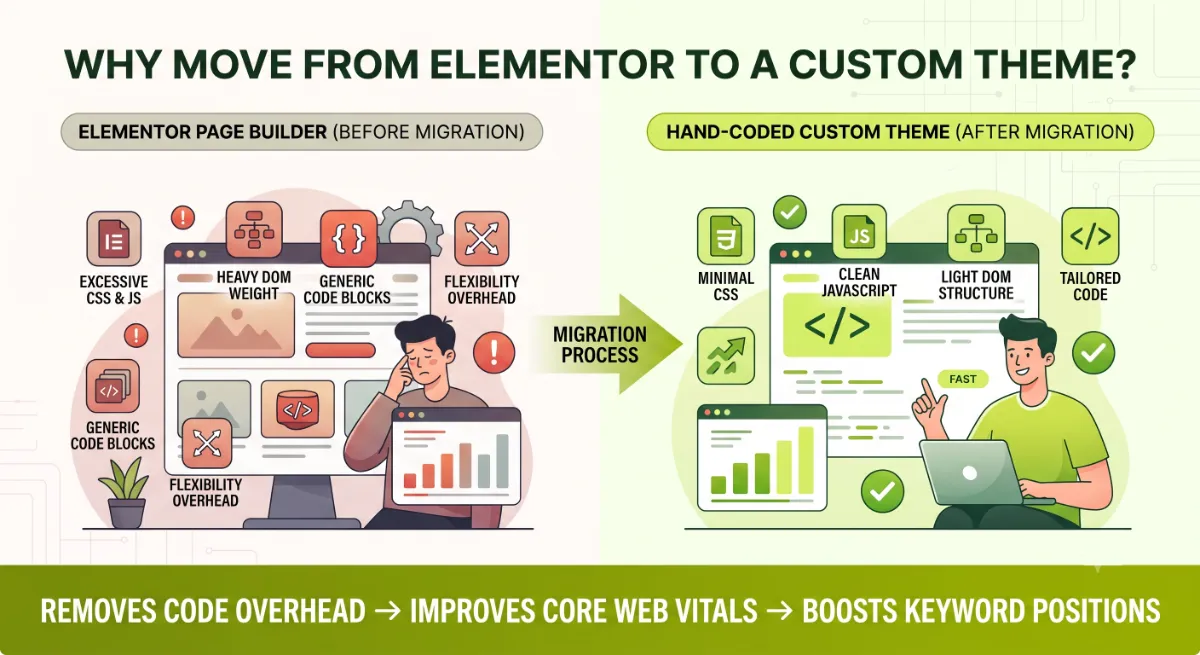
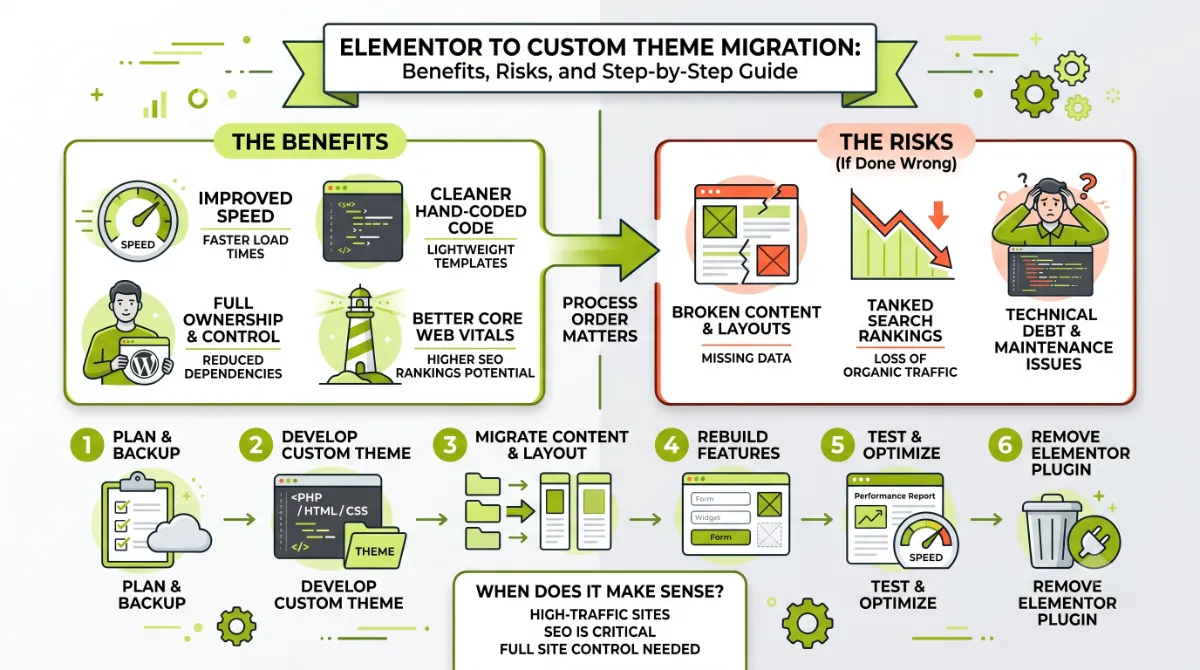
The benefits that make an Elementor to custom theme migration worth the effort:
- Speed and Core Web Vitals. Less code means faster loads and better mobile scores, which Google rewards.
- Clean, semantic code. No wrapper-div soup, which helps both crawlers and long-term maintainability.
- Ownership and independence. Your site runs on vanilla WordPress, free of reliance on a page-builder plugin.
- Easier scaling. Large sites are simpler to manage and extend in code than in a builder.
- SEO and AI search readiness. Clean, fast, well-structured pages are easier for search engines and AI answer engines to parse.
Those upsides are real. But migration is not the right answer for every site, and pretending it is would cost you money.
When It Is Not Worth Migrating
An Elementor to custom theme migration is not worth it when your site is small in scope, you edit it visually every week, or you have no developer to maintain the custom code. In those cases, the rebuild cost and the loss of easy visual editing outweigh the speed gains you would get. Sometimes the smarter move is to optimize the Elementor site you already have.
Think twice about migrating if:
- Your site is small, a handful of pages where Elementor’s overhead is not really hurting you.
- You rely on visual editing, and you or your team update layouts often without touching code.
- You have no ongoing developer, since a custom theme needs someone who can maintain it.
- Your real problem is speed, which you can often fix by optimizing Elementor first, with Containers, caching, and asset cleanup.
Pro tip: If speed is your only complaint, try optimizing Elementor before you commit to a full rebuild. Many “slow Elementor” sites recover most of their performance from settings and caching alone, at a fraction of the cost.
If migration does make sense for you, there is one technical reality you must understand before you start, because it catches almost everyone off guard.
The Hidden Risk: Elementor Content Lock-In
The biggest risk in any Elementor to custom theme migration is content lock-in: Elementor stores your page content as its own data, and there is no way to export that content into clean WordPress blocks or template code. When you deactivate Elementor without rebuilding first, your beautiful pages collapse into raw shortcodes and unstyled text. This is the single fact that turns “just switch the theme” into a real project.
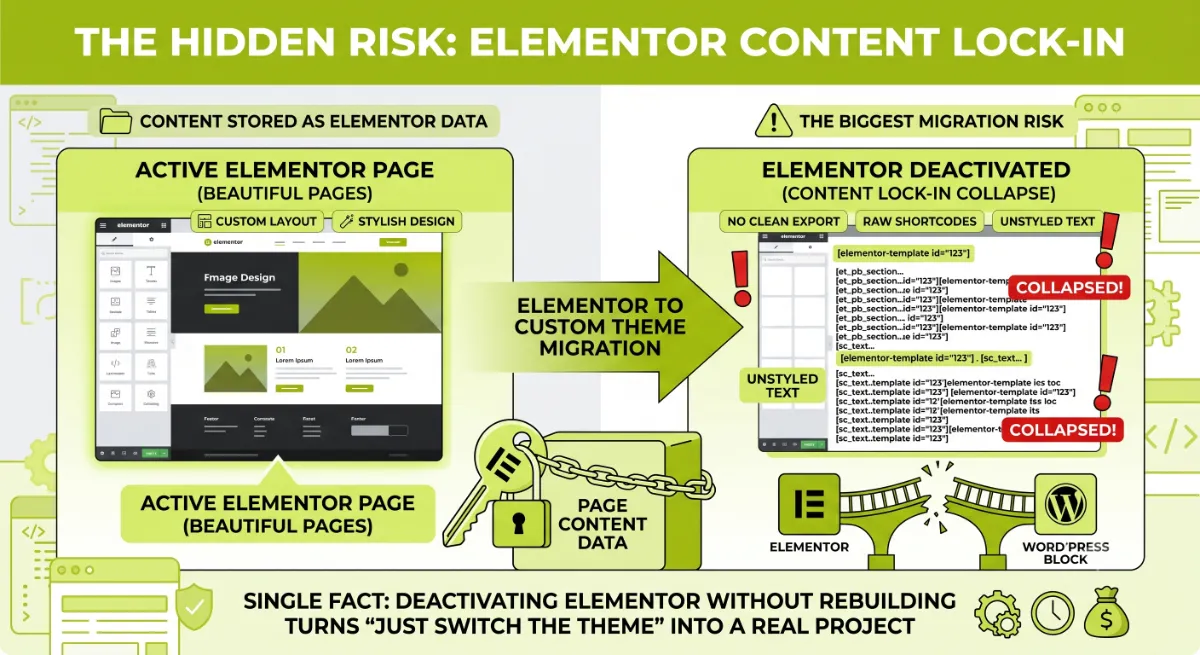
Because there is no export path, an Elementor to custom theme migration is a manual, page-by-page rebuild. Your layouts are recreated in the new theme’s templates, and your content is moved across by hand. Blog posts can often be automated, since their content is mostly standard. Complex custom page layouts almost always have to be rebuilt from scratch. The more elaborate your Elementor designs, the bigger the rebuild.
Knowing that, the safe way to run the whole project is a clear, ordered process.
The 7-Step Migration Process
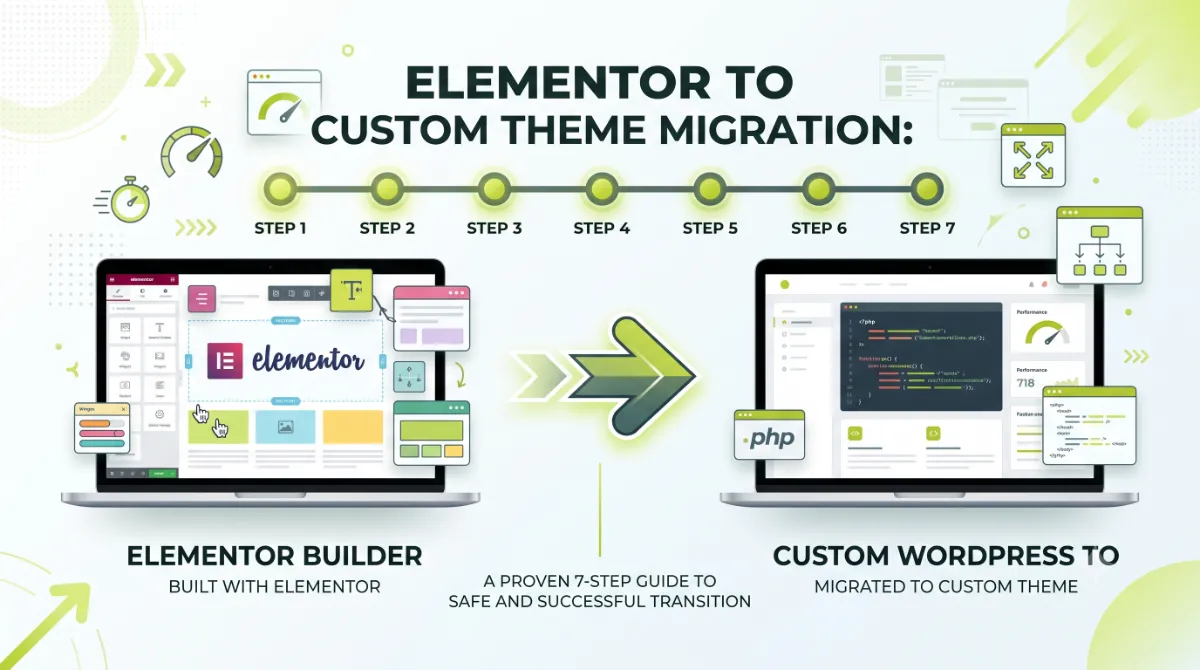
A safe Elementor to custom theme migration follows seven steps across three phases I call the Elementor Exit: Rebuild, Preserve, and Cutover. Run the Elementor to custom theme migration in this order and nothing breaks. The order of an Elementor to custom theme migration is what protects your rankings and your content, so do not skip ahead. Everything happens on a staging copy until the final step.
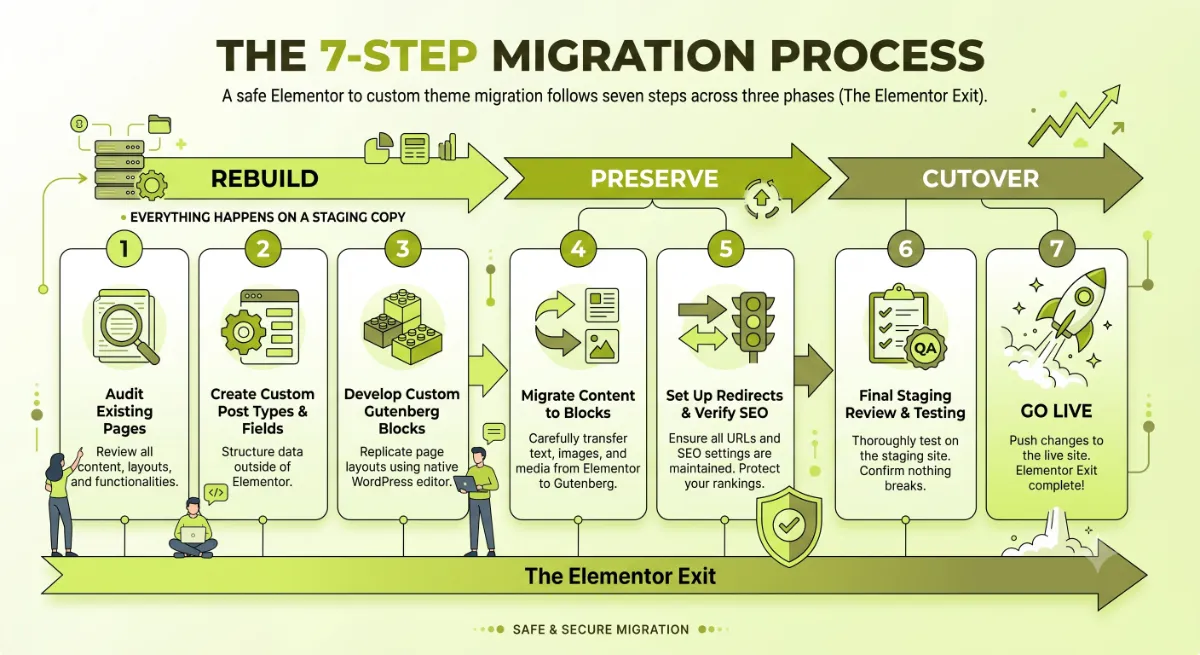
Phase 1: Rebuild (on staging)
- Audit and crawl the current site. Capture every URL, template, custom post type, and page layout so nothing is missed.
- Build the custom theme on a staging copy. Set up the target of your Elementor to custom theme migration, a classic or block theme, with your header, footer, and base templates.
- Recreate templates and custom post types. Rebuild page, post, archive, and CPT templates so your content structure matches.
- Rebuild the pages and content. Recreate each layout in the new theme and move content across, automating blog posts where possible.
Phase 2: Preserve (protect your SEO)
- Match every URL, and redirect the rest. Keep slugs identical wherever you can. For anything that must change, add a 301 redirect, and preserve titles, meta, and internal links.
# Example 301 redirect for any URL that had to change
Redirect 301 /old-elementor-slug/ https://yoursite.com/new-slug/
Phase 3: Cutover (go live safely)
- Test everything. Check mobile, cross-browser, forms, schema, Core Web Vitals, and page-by-page content parity against the old site.
- Launch and remove Elementor. Push staging live, deactivate Elementor, clear all caches, then verify in Google Search Console and watch your rankings.
Pro tip: For guidance on template structure, Elementor’s own developer docs on theme migration and the WordPress guide to classic and block themes are the two references worth bookmarking before you start Phase 1.
Follow those phases in order and the migration is safe. Skip the Preserve phase and you get the exact problem most people blame on the wrong thing.
Want your Elementor site rebuilt into a fast custom theme without losing rankings?
I handle the full migration, from audit to launch, with URLs and SEO preserved. See my WordPress development service.
What Most People Get Wrong
The biggest misconception about an Elementor to custom theme migration is that it tanks your SEO. It does not. What tanks your SEO is changing your URLs during the migration without redirects. The custom theme itself, if anything, helps your rankings by making the site faster and cleaner. The traffic drops people blame on the rebuild are almost always self-inflicted URL changes.
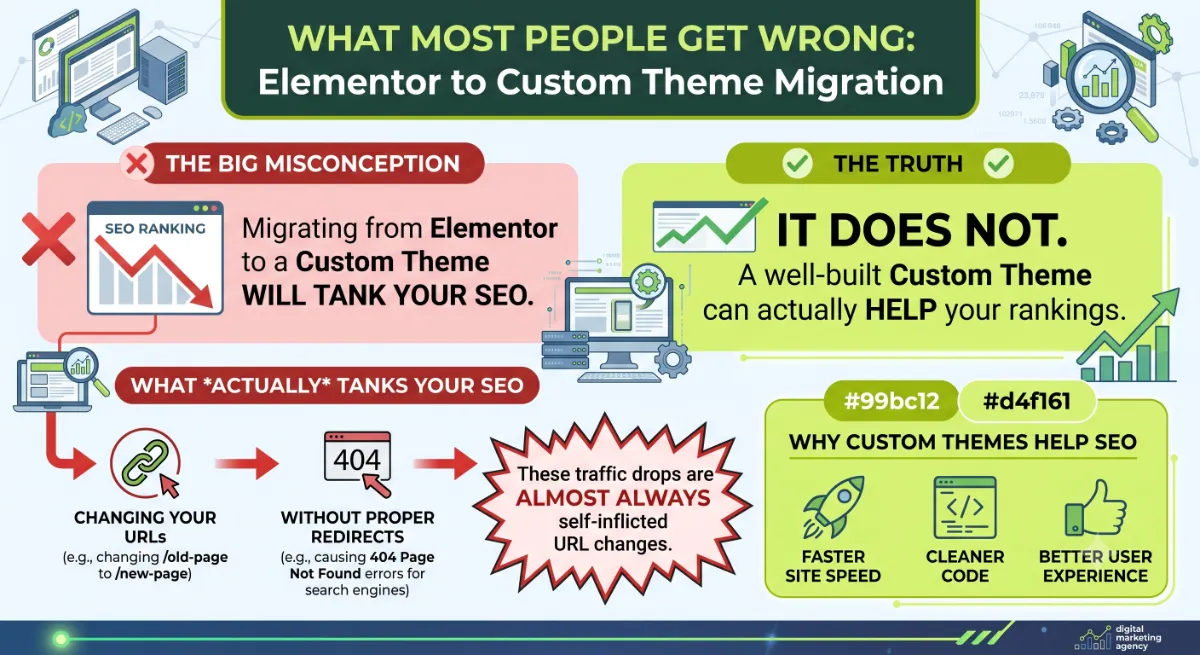
Here is the observation from years of client work: the migrations that kept their rankings were not the ones with the leanest possible code. They were the ones that kept every URL identical and 301 redirected anything that had to change. Performance is the bonus an Elementor to custom theme migration gives you. URL and content parity is what protects the traffic you already have. Get that order of priorities right and a migration is upside with very little downside.
When the site is large, the layouts are complex, or the rankings are too valuable to risk, that is where an experienced developer earns the fee, by rebuilding cleanly and preserving every signal that Google already trusts.
Ready to leave Elementor without the risk?
I migrate Elementor sites to fast custom themes with zero ranking loss, handled end to end. See my WordPress development service or book a free call.
Frequently Asked Questions
Can you migrate an Elementor site to a custom theme automatically?
No. Elementor stores content as its own data, and there is no tool that exports it into clean blocks or template code. A real Elementor to custom theme migration is a manual, page-by-page rebuild. Blog posts can often be automated during an Elementor to custom theme migration, but complex page layouts have to be recreated by hand.
Will migrating off Elementor hurt my SEO?
Not if you do it correctly. Rankings drop when URLs change without redirects, not because you switched to a custom theme. Keep every URL identical where possible, 301 redirect anything that changes, preserve your titles and internal links, and a custom theme usually improves SEO through better speed.
What happens if I just deactivate Elementor?
Your pages break. Elementor’s layouts collapse into raw shortcodes and unstyled content, because the design lived inside the plugin. That is why you must rebuild every page in the new theme on a staging copy first, and only deactivate Elementor at the very end of the migration.
Is a custom theme faster than Elementor?
Usually yes. A hand-coded theme ships far less CSS, JavaScript, and DOM markup than Elementor adds, so pages load lighter and score better on Core Web Vitals. That speed gain is the main reason to migrate, along with cleaner code and full ownership of your site.
Classic theme or block theme for the migration?
Both work. A classic theme uses PHP templates and suits fully custom, developer-managed sites. A block theme uses HTML templates and a theme.json file, and lets you edit in the Site Editor. For most 2026 migrations, a lightweight block or hybrid theme is a strong, future-friendly choice.
How long does an Elementor to custom theme migration take?
It depends on size and complexity. A small brochure site can take about a week, while larger or WooCommerce sites with many custom layouts take several weeks. The rebuild time comes from recreating each page by hand, since there is no automated path out of Elementor.
Should I migrate or just optimize my Elementor site?
If speed is your only issue and the site is small, optimize Elementor first with Containers, caching, and asset cleanup. If the site is large, business-critical, and you want clean code and ownership long term, migrating to a custom theme is the better investment. Match the fix to the goal.
When should I hire a developer for the migration?
Hire a developer when the site is large, the layouts are complex, or the rankings are too valuable to risk. Preserving URLs, rebuilding templates cleanly, and setting redirects correctly is where migrations succeed or fail. My WordPress development service handles the full process.
Conclusion
An Elementor to custom theme migration is a rebuild, not a switch, and treating your Elementor to custom theme migration that way keeps you safe. Remember the three things that matter most: Elementor content cannot be exported, so every page is recreated by hand; you must rebuild on staging before removing Elementor; and you protect your rankings by keeping URLs identical and 301 redirecting the rest. Do that, and an Elementor to custom theme migration trades Elementor’s overhead for a faster, cleaner, fully owned site with your traffic intact. If the site is large or business-critical, get help so the migration is upside with no surprises.
Want a fast, clean custom theme without losing what your site already earns?
I rebuild Elementor sites into lightweight custom themes and protect every ranking on the way. Book a free call or browse my recent project portfolio.
The exact Rebuild, Preserve, and Cutover checklist I use to migrate Elementor sites to custom themes without losing rankings.
Get it free →This article was last reviewed and updated in June 2026 to reflect current WordPress theme and migration best practices.