- The WooCommerce Interactivity API adds frontend interactivity to blocks with HTML directives and a store, replacing jQuery and frontend React.
- It is WordPress core since version 6.5, and WooCommerce is actively moving its blocks onto it.
- Its standout feature is cross-block communication, so an add-to-cart action can update a separate cart block instantly.
- It is built for server-side rendering, so your initial HTML is complete for SEO and progressive enhancement.
- The most common mistakes are confusing shared state with per-instance context, and skipping server-seeded state.
The WooCommerce Interactivity API is WordPress’s standard way to add fast, frontend interactivity to blocks using simple HTML directives and a small store, instead of jQuery or a heavy React app. WooCommerce is now building its blocks on it, so features like live product filtering and instant cart updates work without page reloads. This guide shows how it works and how to build with it.
After building custom WooCommerce blocks and extensions for clients in 15+ countries, I can tell you this is the shift developers most need to learn right now. WooCommerce has publicly committed its blocks to the Interactivity API, so the old jQuery and custom-AJAX way of adding checkout or cart interactivity is becoming a dead end. The good news: the new way is genuinely simpler once it clicks. Here is the whole model, plainly, and how to build with it.
What Is the WooCommerce Interactivity API?
The Interactivity API is a WordPress standard, in core since version 6.5, for adding frontend interactivity to blocks using HTML attributes called directives that connect your markup to a JavaScript store. It lets you build reactive interfaces, toggles, live filters, and carts, without shipping a full React app to the browser or hand-wiring jQuery.
Under the hood it uses Preact signals, but you rarely touch that. You write declarative data-wp-* attributes in your markup, define a store with your logic, and the runtime keeps the DOM in sync with your data. Per the official WordPress documentation, it also powers core blocks like Search, Query, and Navigation, so it is a proven standard, not an experiment.
Pro tip: The Interactivity API is designed for server-side rendering. Your PHP renders complete HTML first, then the API hydrates it on the client. That means full content for SEO and a usable page even before JavaScript runs, which a frontend React app cannot easily match.
That design is exactly why WooCommerce chose it, and why it matters to your store.
Why It Matters for WooCommerce
The WooCommerce Interactivity API matters because WooCommerce is rebuilding its blocks on it, making it the supported way to add or extend frontend interactivity in a modern WooCommerce store. Per WooCommerce’s own roadmap, the API replaces jQuery and vanilla JavaScript with a maintainable, framework-aligned approach, while preserving the familiar hooks and filters extensibility model.
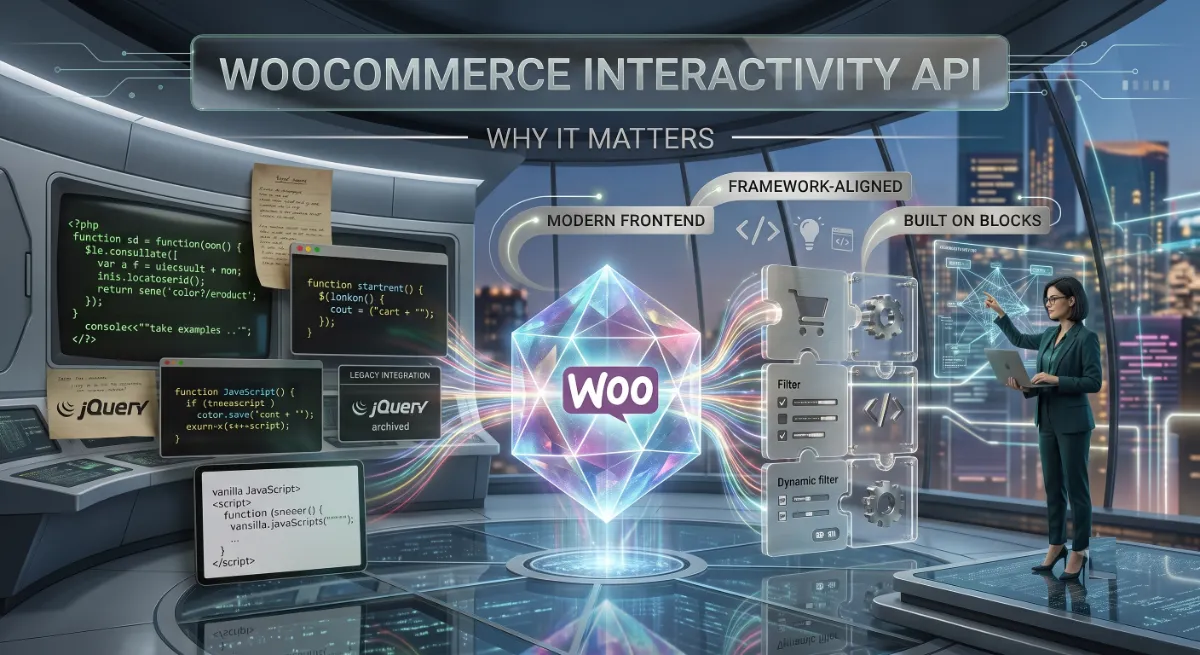
The standout capability is cross-block communication. Blocks can share data, actions, and callbacks, so clicking an add-to-cart block can seamlessly update a separate cart block. That is what makes app-like WooCommerce experiences clean instead of fragile. For shoppers, it means real benefits:
- Cart quantity updates without a page reload.
- An interactive mini cart that reflects changes instantly.
- Real-time product filtering and live search that updates only the product grid.
- Product configurators where selecting options updates the price on the spot.
Timing matters here. WooCommerce is defining these extensibility patterns right now, in 2026, which means learning the Interactivity API today puts you ahead of the extension ecosystem rather than catching up to it later.
To build with it, you need to understand its three moving parts.
The Three Parts: Store, Context, Directives
The API is a three-part system: a store that holds your logic, context that holds per-instance data, and directives that connect your HTML to both. Get this mental model right and everything else falls into place, because most confusion comes from mixing up the three.
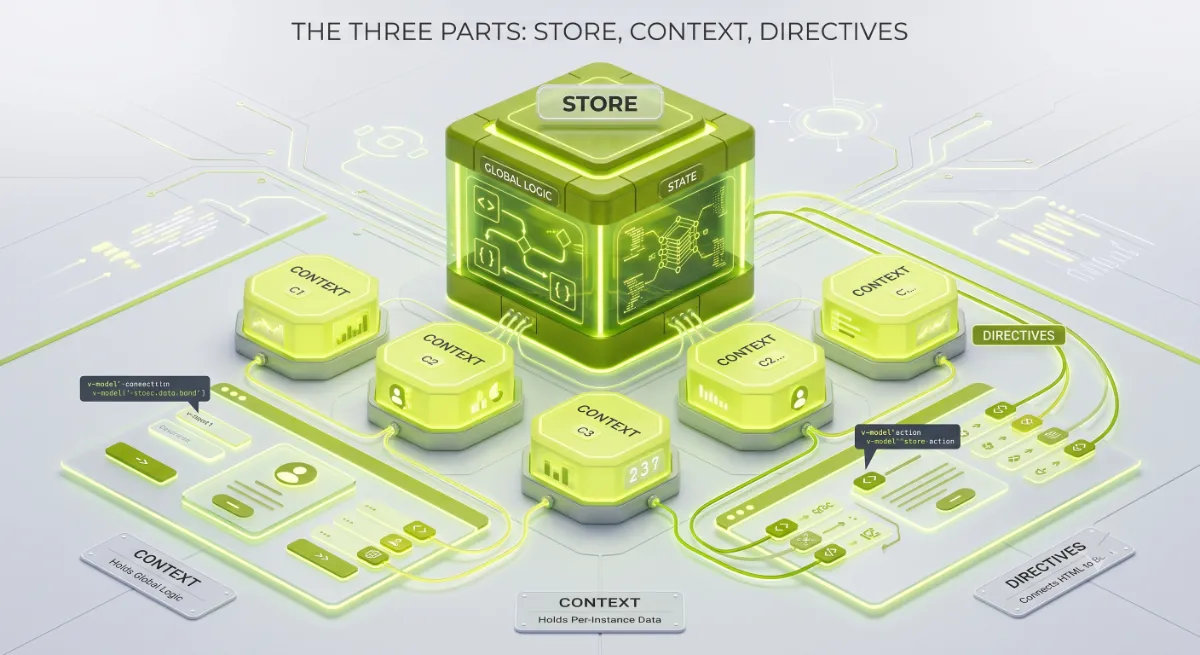
Here is what each does:
- Store: a JavaScript object, defined in your view file, holding state, actions, and callbacks. State here is shared across every instance of the block on the page.
- Context: block-local state set with
data-wp-contextas JSON. It is per-instance and scoped to that element and its children, ideal when the same block appears many times. - Directives: the
data-wp-*attributes on your markup that bind DOM elements to state or context and react when either changes.
The directives you will use most:
| Directive | What it does |
|---|---|
data-wp-interactive | Activates interactivity and sets the store namespace. Required. |
data-wp-context | Defines local, per-instance state as JSON. |
data-wp-bind--[attr] | Binds an attribute like hidden or disabled to state or context. |
data-wp-on--[event] | Runs a store action on an event, such as click. |
data-wp-class--[name] | Toggles a CSS class based on a value. |
data-wp-text | Sets an element’s text content from state. |
data-wp-watch | Runs a callback whenever the data it reads changes. |
data-wp-each | Renders a list, using a stable key for efficient updates. |
With the parts clear, here is the order to build them in.
How to Build an Interactive Block
To build an interactive WooCommerce block, follow five steps I call the Interactive Build Order: Activate, Seed, Store, Wire, and Share. Doing them in this order means your block renders correctly on the server first, then becomes interactive, which is the whole point of the API.
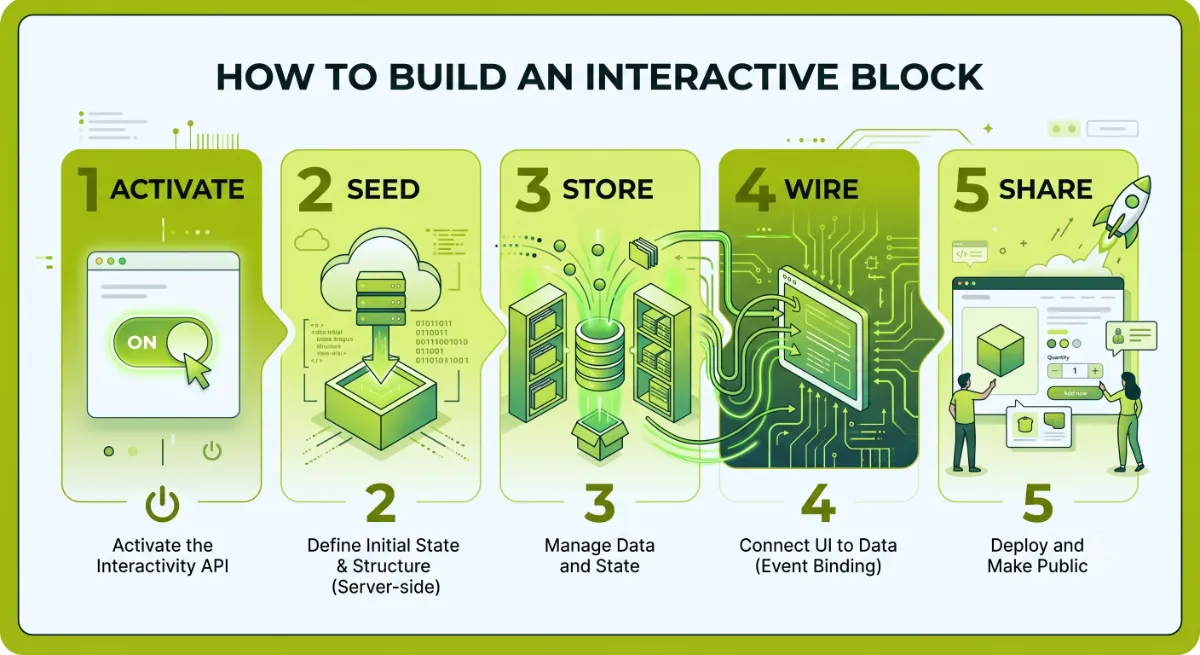
The five steps:
- Activate. Add
"interactivity": trueto your block’s supports inblock.json, register your frontend logic withviewScriptModule, and mark the root element withdata-wp-interactiveplus your namespace. - Seed. Set your initial state on the server with
wp_interactivity_state()in PHP, so the first HTML response is complete for SEO and there is no flash of empty content. - Store. In your view file, import
storefrom@wordpress/interactivityand define your state, actions, and callbacks. Use getters for derived values like a formatted price. - Wire. Add directives to your markup:
data-wp-on--clickto trigger actions,data-wp-bindto reflect state in attributes,data-wp-textto show values. - Share. For cross-block features, use a shared store namespace so one block, like add-to-cart, can update another, like the cart, through the same state.
Pro tip: Use context for anything that must be unique per block instance, like whether one product card is expanded, and keep the shared store for genuinely global data, like the cart. This keeps state small and updates fast.
That is the whole build. Now the mistakes that trip up almost everyone.
Need a custom interactive WooCommerce block or extension built?
I build modern, Interactivity API-driven WooCommerce components that are fast and future-proof. See my WordPress development service.
What Most People Get Wrong
The single most common mistake here is putting per-instance data in the shared store instead of context. When you do that, every copy of a block on the page reads and writes the same value, so expanding one product card expands them all. Shared state is for global data like the cart. Per-instance data belongs in context.
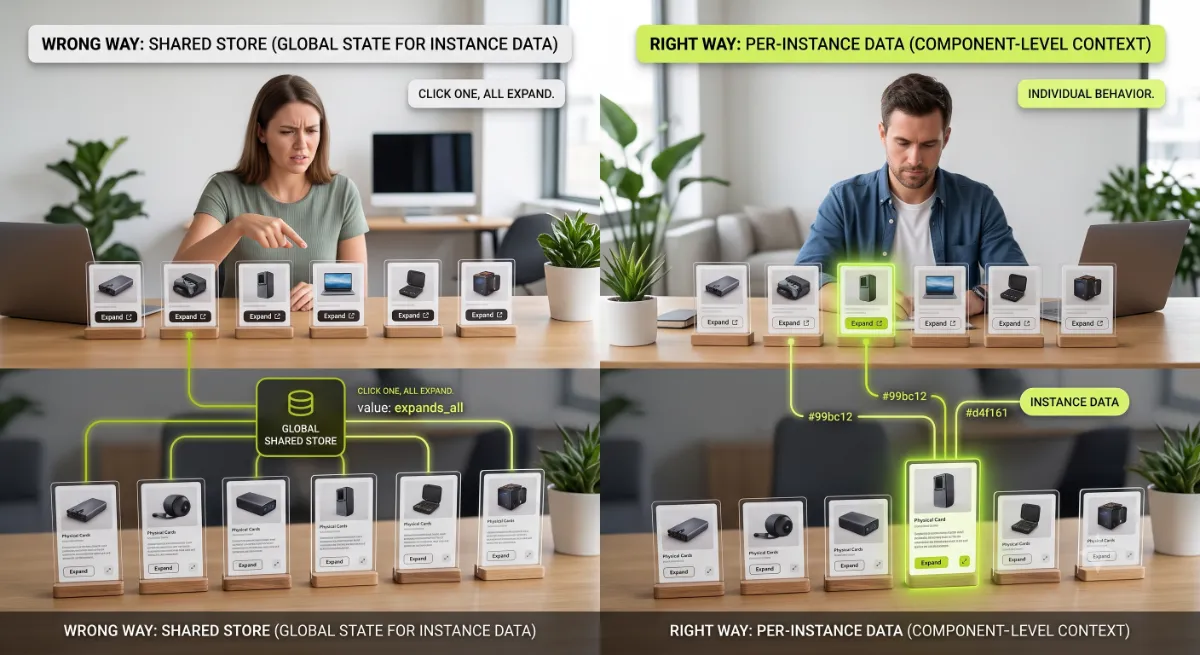
Here is the observation from real builds. Two other mistakes cost the most time. First, skipping server-seeded state: if you only set state in JavaScript, the initial HTML arrives empty, which hurts SEO and causes a visible flash before the block hydrates. Always seed with wp_interactivity_state() in PHP. Second, using an array index as the key in data-wp-each: it causes wrong updates and full re-renders. Use a stable identifier like a product ID instead.
And the biggest strategic mistake: reaching for React or jQuery out of habit. For enhancing server-rendered WooCommerce blocks, this approach is lighter, is the WordPress standard, and is the direction WooCommerce itself is committed to. Building the old way now means building something you will have to redo.
When the interactive component is business-critical, or the cross-block logic gets complex, that is where getting the architecture right the first time saves a painful rebuild.
Want a fast, modern interactive component built the right way?
I develop custom WooCommerce blocks on the Interactivity API, clean, server-rendered, and future-proof. See my WordPress development service or book a free call.
Frequently Asked Questions
What is the WooCommerce Interactivity API?
It is the WordPress Interactivity API used in a WooCommerce context: a standard, in core since WordPress 6.5, for adding frontend interactivity to blocks with HTML directives and a JavaScript store. WooCommerce is rebuilding its blocks on it to power interactive carts, filters, and product experiences without page reloads.
Do I need React to build interactive WooCommerce blocks?
No. That is the point of the Interactivity API. It gives you reactive, app-like interactivity through declarative HTML directives and a small store, without shipping a React app to the frontend. For enhancing server-rendered WooCommerce blocks, it is lighter and is the officially supported approach.
What WordPress version do I need for the Interactivity API?
WordPress 6.5 or later, where the Interactivity API shipped in core. On earlier versions you would need the Gutenberg plugin at version 17.5 or higher. For WooCommerce work, run a current WordPress and WooCommerce version so the blocks you are extending use the API too.
What is the difference between state and context?
State lives in the store and is shared across every instance of a block on the page, ideal for global data like the cart. Context is set with data-wp-context and is local to a single block instance and its children, ideal when the same block appears many times and each needs its own values.
Does the Interactivity API work with server-side rendering?
Yes, that is a core design goal. You seed initial state in PHP with wp_interactivity_state, so the server returns complete HTML for SEO and progressive enhancement, then the API hydrates it on the client. This avoids the empty initial markup and flashes common with frontend-only frameworks.
Can two WooCommerce blocks talk to each other?
Yes, and it is a headline feature. Blocks can share data, actions, and callbacks through a shared store namespace. That is how an add-to-cart block can update a separate cart block instantly, which makes building app-like WooCommerce experiences far cleaner than the old jQuery approach.
Is the Interactivity API ready for production WooCommerce stores?
The API itself is stable core WordPress and powers several core blocks. WooCommerce’s own blocks are actively adopting it, and the extensibility patterns for custom work are being defined through 2026. It is production-ready for building interactivity, with the caveat that WooCommerce-specific patterns are still maturing.
Should I hire a developer for interactive WooCommerce blocks?
Consider it when the component is business-critical, involves cross-block logic, or must be fast and SEO-friendly. Getting the store, context, and server-seeded state right takes experience, and mistakes are costly to unwind. My WordPress development service covers custom interactive block development.
Conclusion
The WooCommerce Interactivity API is the modern, supported way to make your blocks interactive, and it is worth learning now because WooCommerce is building its future on it. Keep the model simple: a store for shared logic, context for per-instance data, and directives to wire your markup to both. Build in order, activate, seed on the server, define the store, wire the directives, then share across blocks, and lean on server-side rendering so your content stays fast and SEO-friendly. Avoid the classic traps of mixing state with context and skipping server-seeded state, and skip React out of habit. Start with one small interactive block this week, and the whole model will click.
Want app-like WooCommerce interactivity without the guesswork?
I build custom, Interactivity API-driven WooCommerce blocks that are fast, clean, and future-proof. Book a free call or browse my recent project portfolio.
The exact Activate, Seed, Store, Wire, Share checklist I use to build interactive WooCommerce blocks with the Interactivity API.
Get it free →This article was last reviewed and updated in June 2026 to reflect the current WordPress Interactivity API and WooCommerce block adoption.